
Wacom Cintiq 21UX interactive pen display
Designer on-screen drawing tablet
Review Wacom may be best known for its standalone, pressure-sensitive tablets, but its current flagship product is a 21-inch LCD monitor, but with a difference. The whole screen of the Cintiq 21UX is one enormous graphics tablet that you can draw on directly.
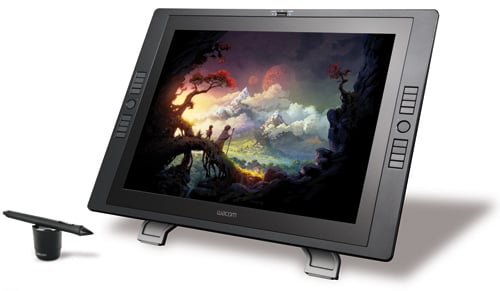
Drawing board: Wacom's Cintiq 21UX
In essence, the Cintiq 21UX eliminates the need to master a tablet as a separate piece of kit – where you would look in one place while drawing in another ¬¬– enabling you to work on an image without anything getting in your way. Curiously, the screen has a 4:3 aspect ratio, rather than widescreen, which initially feels like a backward step. After years of widescreen displays, I have to admit I found this display areas uncomfortably narrow.
The tablet comes with a sturdy multi-position mount. You can place it at any angle from virtually vertical to almost flat and rotate the screen to any position. The Cintiq’s versatile positioning helps to address the main problem with drawing directly on-screen, namely, the artist's hand obscures the image. By contrast, with a conventional tablet to the side of the monitor, it's possible always to see the entire image without impediment.
Raising the Cintiq 21UX up on a stand also means a keyboard can be placed beneath and in front of it, giving access to all the shortcuts and modifier keys essential for designers. This was a major problem with earlier Cintiq devices, and again it has been neatly overcome. It's also just about possible to remove the tablet from the stand and hold it in a lap, although it’s such a heavy device that few would find this comfortable for long.
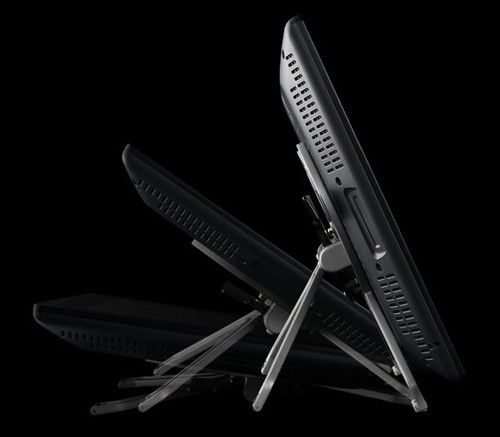
Can be positioned to suit most drawing preferences
Eight Express keys on either side of the tablet’s edge can be customised to perform any function you choose, from triggering Photoshop Actions to holding modifier keys. Modifiers are essential to in applications such as Photoshop; to constrain selections, pop up contextual menus and to modify tool behaviour. Having these located on the tablet border is a good idea in principle, but there are a couple of problems.
COMMENTS
Uhh...
So, you don't like that your hand gets in front of the work and that it's not widescreen? I'd hate to see your review of paper.
Also, complaining that this wouldn't make a good primary monitor is like complaining that a Ferrari makes a lousy daily driver. And your comment that it 'might' make sense for 'old school artists looking to transition' is absurd. It's a vastly superior way to interact with drawings; if you're not working directly on paper/canvas/dog's hide then it's the next best thing whether you're an old school, new school, or middle school artist.
This is a tool for people who will use it constantly; your UI gripes are reasonable, but again, difficulty of setup isn't a dealkiller for people who will think, live, and breathe it.
So, just like paper then...
"there’s also the perennial problem that my hand, inevitably, gets in the way of the design."
Have you ever used a pencil and paper?! I thought the whole point was to create a more natural interface for artists?
Shame it's so insanely expensive.
WS vs 4:3
I find WS too big if it's 1600 lines.
Many WS laptops and screens lack height resolution. 1200 vs 768, 1024 or 1080 makes a big difference.
I welcome it being a 4:3. Especially if you want a 2nd screen.
This is an interactive drawing board. When did you ever see a Wide Screen Drawing board?
The advantage of a light pen is of course anti-aliasing. Inherently a light pen works at lower than screen resolution and a touch panel with orientation and pressure stylus can work at higher resolution.
I think this is excellent for serious Artists, slightly less useful for regular CAD and not a good idea at all for people doing only occasional photo editing and no drawing/CAD.
It's a nice tool for professionals in addition to a regular screen, even maybe an addon to serious laptop.
Aspect Ratio.
I'd image that the choice of a 4:3 aspect ratio is that it's closer to the traditional photographic sizes than 16:9 widescreen. If fact, I can't think of any professional stills cameras that shoot in 16:9, although I do have a Fuji point & shoot in a drawer somewhere that had it as an option.
in defense of the hand
The idea of this tablet is not that it "replaces paper", but that it "replaces a tablet". And when one uses a tablet (I use a 12"x9" intuos), your hand does not get in the way of the work you're doing, because the input and the result are on different surfaces.
Going "back" to having your hands getting in the way of your art is a legitimate problem. One of the downsides of paper, as well as short brush media like aquarel, is that your tools (hand and arm included) obstruct part of your work while you're working on it. This is not a problem, but it's a minor inconvenience that tablets did away with. Cintiqs reintroduce that minor inconvenience, and as such is something to consider if you've been using a tablet for a while, and are considering the move to a "draw on your monitor" device.
