Conficker Autoplay ruse gets teeth into Windows 7
VXers still ahead of the game
Regcast training : Hyper-V 3.0, VM high availability and disaster recovery
Social engineering autoplay tricks work on early versions of Windows 7 as well as Vista, according to tests by security researchers.
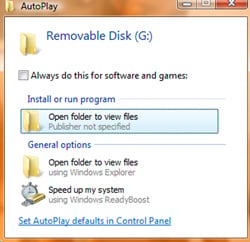
As well as spreading by exploiting a weeks-old Microsoft vulnerability, the Conficker (Downadup) worm attempts to spread across network shares and to infect removable drives, using a special malformed autorun.inf file.
The use of a clever social engineering ruse means that users plugging an infected drive (such as a USB drive) into a Windows Vista machine might well be lulled into the idea they are clicking on a link that simply opens a folder, rather than actually running the worm's viral payload.
The same trick, first noticed by researchers at the Internet Storm Centre on Vista, also works on beta versions of Windows 7, researchers at F-secure have discovered.
Windows 7 is still in development, so there might still be time to modify how AutoPlay works in order to limit the scope for social engineering attacks. Conficker will surely not be unique in exploiting the ruse to trick users, so a change would surely be welcome. ®
COMMENTS
Simple security measure
I understand the "logic" behind Microsoft not wanting to disable autorun, but there's still a very simple security feature that could be added - don't show the program icon and name. Instead of tiny words that say "Install or run program" and a big, clickable icon of the program, the box should make big, clickable text that reads "Install or run program," and maybe a tiny icon with text underneath it.
If you take control away from the programs that want to run, it takes away their ability to influence the user and other programs. Why should a program be allowed to put its icon in an OS-owned dialog box?
Ralph Nader: Computers Unsafe at Any Speed?
AC wrote, "I have to agree with some of the other people who have commented about this article that it is really up to the end-user to get off his/her lazy ass and learn something,or just don't own a computer or lose all your personal info to crims. Computers have been around long enough that people need to understand that they are not just another appliance. It's best to actually know something about the operation of the devices."
Ideally, yes. However, computers aren't marketed that way - they're marketed towards people who are barely smart enough to not pee on the floor indoors.
Such clueless users will learn how to use computers safely at the same rate that idiots will learn how to stop crashing their cars. "Seatbelts save lives", as the saying goes, but cars didn't used to have seatbelts until whiners like Ralph Nader started making a big public stink about auto safety, eventually resulting in the automotive industry doing things to save idiots from themselves (saving bad drivers, and non-defensive drivers, from some Darwinian justice).
Maybe we need a Ralph Nader type to address computer-OS security concerns, to keep idiot lusers from being a menace to others on the internet.
Since that's not likely to happen anytime soon, the idiocy will continue.
Nevertheless, it's often hopeless trying to explain to the average home PC user why they shouldn't run as Admin, etc etc... - their attitude is, "Well, the PC was set up like that when I first bought it, so it *must* be right, why would I change it?" :(
So I would like to see *some* changes in the MS default stuff. Not to protect idiots from themselves, but to protect the rest of us from the idiots... or something like that.
@ usual unix shite
"That is the unix paradox: thou will never replace Windows until thy command line be gone... but how can thou prance superiorly about without thine command line?"
I used to think that too, but as I have become more interested in alternative to Microsoft OS, I have found that many of the more established BSDs/GNU-Linuxes communities don't want to replace Microsoft on the desktop, at least.
I have to agree with some of the other people who have commented about this article that it is really up to the end-user to get off his/her lazy ass and learn something,or just don't own a computer or lose all your personal info to crims. Computers have been around long enough that people need to understand that they are not just another appliance. It's best to actually know something about the operation of the devices.

IT infrastructure monitoring strategies
Agentless Backup is Not a Myth
Top 10 SIEM implementer’s checklist
Steps to Take Before Choosing a Business Continuity Partner
Requirements Checklist for Choosing a Cloud Backup and Recovery Service Provider