The Register® — Biting the hand that feeds IT

Feeds

Dot Hill: Performance isn't everything... check out our, er, cheap capacity

Storage array pusher gets creative with SPC benchmark rankings

Magic Quadrant for Enterprise Backup/Recovery

Mid-range storage array vendor Dot Hill has presented its SPC-1 performance benchmark results in a left-field way to make it stand-out from the crowd, saying it leads as the best performer on a $/GB (capacity) measure.

It's announced "exceptional value for mid-range customers," with its AssuredSAN Pro 5000 Series storage array producing 39,041.81 SPC-1 IOPS at a cost of $2.96 per SPC-1 IOP.

This array has with real-time tiering between SSDs and disk drives with hot data being served up from fast flash and not slow spinning rust, so, okay, it should be good, but we couldn't see any "exceptional value" ourselves, not at first sight.

Dot Hill says mid-range systems are those priced (list priced) between $30,000 and $200,000. We graphed midrange SPC-1 benchmark results to see where Dot Hill ranked in IOPS terms:-
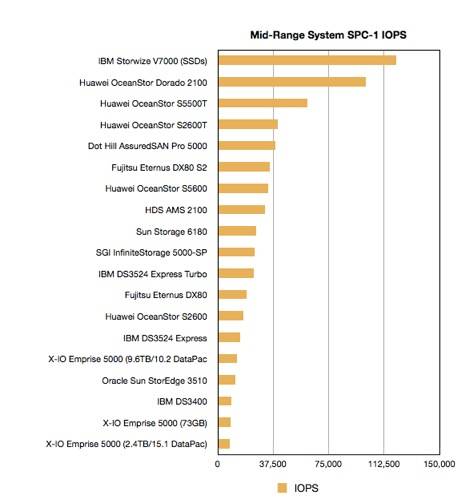
Mid-range SPC-1 IOPS

Mid-range storage array SPC-1 IOPS

Nothing exceptional here: the AssuredSAN box was fifth, good but no way exceptional. So we looked at the cost per IOPS ($/IOPS) and graphed that, looking to see if Dot Hill stood out.
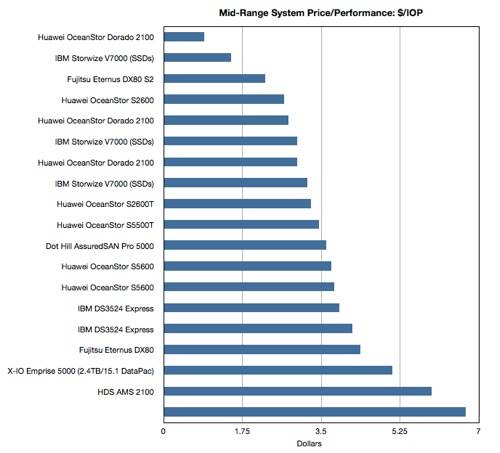
Mid-range SPC-1 dollars per IOPS

Bottom system on the chart is a X-IO Emprise 5000 (9.6TB/10.2 DataPac)

It didn't, it was placed 11th from the top. What's going on? Dot Hill's array isn't a performance (IOPS) leader or a cost/performance leader either. Where does this exceptional value come from? We tried looking at both IOPS and $/IOPS in a scatter graph to see if the AssuredSAN stood out from the crowd in that way.
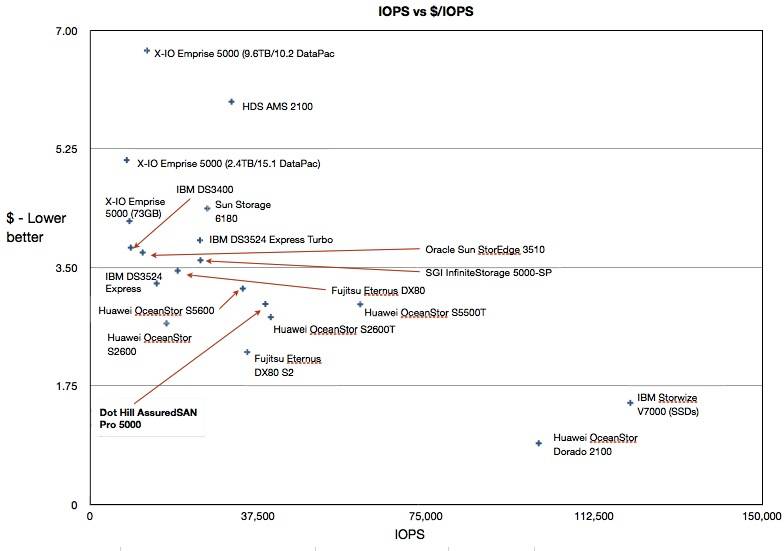
Mid-range IOPS and $/IOPS

Click on this chart to get a larger version. Dot Hill entry in bold text.

No way, Jose. It doesn't stand out in this presentation either. We gave up and asked Dot Hill to explain. It sent us its own graph and, sure enough, it stood out from the masses:
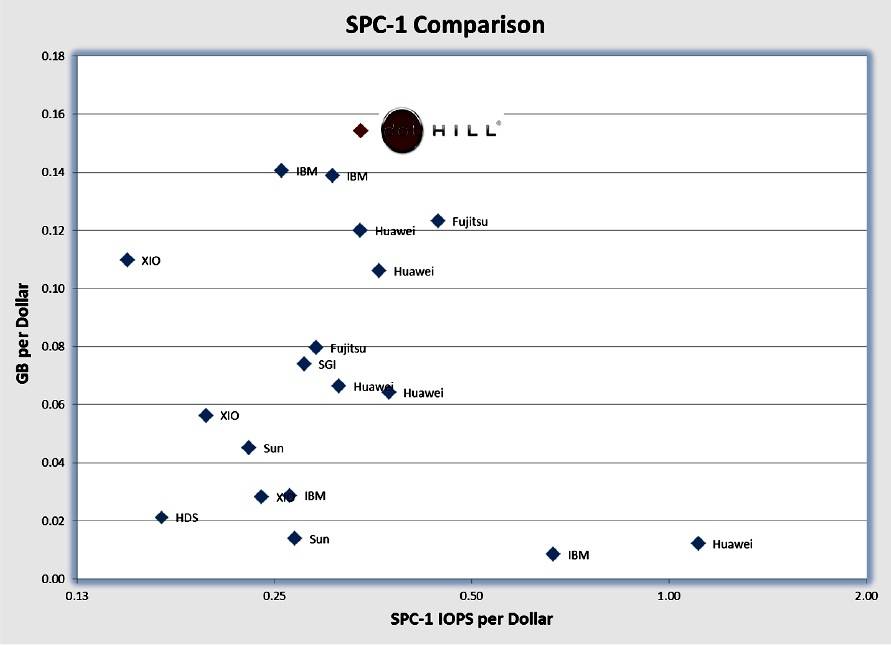
Dot Hill SPC-1 presentation

Click on chart again to make it bigger

It's top of the heap with the best balance of cost and performance and can justifiably claim exceptional value. How has it managed that? The vertical axis is GB per dollar of storage and not $/IOPS which we used in our chart above this one. The horizontal axis is also different, being IOPS per dollar and not IOPS which we used in our chart.

Dot Hill hasn't taken advantage of the newest 4TB drives to get the cheapest disk capacity either: the disks in its SPC-1 config are 600GB, 10,000rpm jobs.

Is this a valid way of presenting SPC-1 results? We think so, although it is a bit left field. You certainly have to hand it to the firm's number strokers for being creative. ®

Agentless Backup is Not a Myth

Anonymous Coward

Re: dollar per gig is better

LOL, I don't know your methodology behind it, but placing a NetApp 3170 (high-end/midrange) cheaper pr. Tbyte than AMS' (low-end/midrange) is actually entertaining. This comparison is obviously flawed.

No other traditional arrays from other vendors comes with the same amount of software as NetApp. And no other traditional arrays needs to reserve the same amount of capacity to be used for filesystems as NetApp.

You cannot assume that just because all capacity on all disks in a SPC-1 test is not used, that this is "fraud" while testing.

I mean: SPC-1 runs for a certain length of time, and during this time it is simply impossible to fill the entire capacity in big arrays doing any kind of random small-block access. It is *impossible*, therefor only a fraction of the capacity will ever be used in SPC1.

1
0

Re: dollar per gig is better

"LOL, I don't know your methodology behind it...." EXACTLY! It's just a methodology to give Dot Hill the answer they want so they can justify their argument. ALL vendors do these selective comparisons (including NetApp), some more dodgy than others, but the REAL test is to consider what is the requirement for YOUR environment, then look at the systems on offer and make your own valid comparison. For some users the management of the device may be more important the $-per-GB, or compatibility with a particular system or application may be the deciding factor. All credit to Dot Hill for generating a bit of media interest with their pitch, but I'd take anything they stated as making their system "the best" with a pinch of salt until it was being tested in my own environment.

0
0

Re: Touchy Luke 11 Re: Reliability - HP

"......Has nothing to do with buggy firmware, corrupted flash memory on controllers and bad replication technology....." True, I don't get to touch the recent MSAs much nowadays, we use proper enterprise arrays, but I think we have a few G3 models in our T&D labs and I don't recall hearing the issues you mentioned. A quick yahoogle also doesn't bring up lots of hits for P2000 problems, so I suppose that leaves three options:

1. The vast majority of other P2000 users were simply lucky and didn't run into the problems you did.

2. You were really, really, REALLY unlucky and got thirty "bad" units.

3. Your install and/or maintenance skills suck.

".....you post an e-mail address and I'll forward you all the anonymised support e-mails....." Now, if you had an hp support contract like we do, you'd know all you have to do is post the hp support call IDs and then I could search the hp ITRC knowledge base for them. Hmmmmm, looks like you need some training on your hp support tools as well as your install skills. Just saying!

0
0

More from The Register

SCO vs. IBM battle resumes over ownership of Unix
Zombie lawsuit back and wants to suck the brains out of Linux
 breaking news
You don't need phone lines or cable for ANYTHING, says Dish
The satellite-dish man can sort you out with phone and broadband over the air too
 breaking news
What's HP got under wraps? Looks awfully flash and tape shaped
What happens in Vegas won't stay there - we've got the details
AMD lifts the veil on Opteron, ARM chip plans for 2014
Hey Samsung, let's see your chippery handle 64GB of RAM
Microsoft borks botnet takedown in Citadel snafu
Stupid Redmond kicked over our honeypots, wail white hats
IBM's $1bn layoffs latest: Now axe swings in US, Canada - reports
Union claims 121 storage bods canned after dismal sales
NetApp musters muscular cluster bluster for ONTAP busters
Storage array OS overhauled to juggle more nodes, go down on you, er, less
HP adds 'Haswell' Xeon E3s to entry ProLiant servers
Gussies up MicroServer for SMBs, adds baby switches