The Register® — Biting the hand that feeds IT

Feeds
90%
Heatmiser PRS-TS WiFi RF Thermostat

Heatmiser PRT-TS Wi-Fi RF thermostat

Hot property

  • print
  • alert

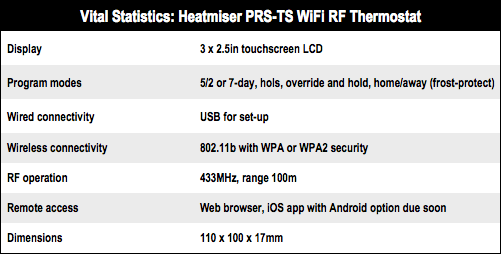
Review With fuel bills ever rising, keeping an eye on your heating makes good sense, and Heatmiser’s Wi-Fi thermostat is intended to help you do just that. It’s based around a large, 3 x 2.5in touchscreen, which controls a timer/thermostat with its wireless features enabling configuration from an iOS device.
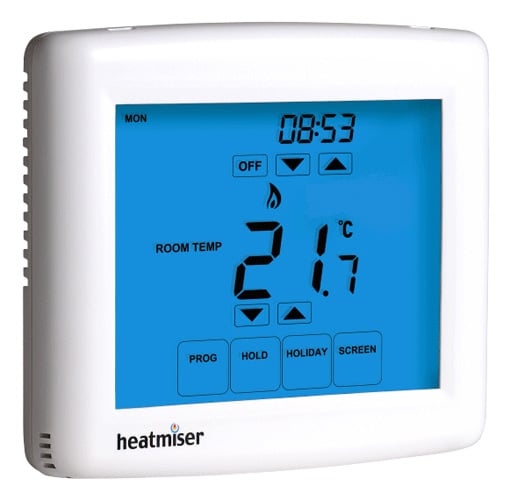
Heatmiser PRS-TS WiFi RF Thermostat

Heatmiser's PRT-TS: touchscreen tweaks or remote access from a browser

The device can work in either five plus two or seven day modes, with four periods for each day, labelled ‘wake’,’leave’,’return’ and ‘sleep’. So far, not so different from most other programmable thermostats.

Yet having a built-in web server also allows you to change the settings remotely from any browser, and a second port which listens for a command protocol, which is supported by an iPhone app, with an Android one coming soon.
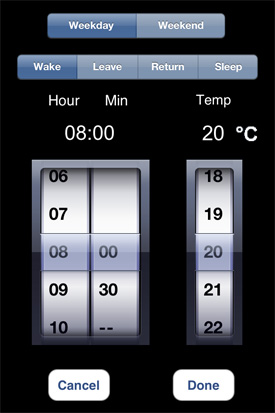
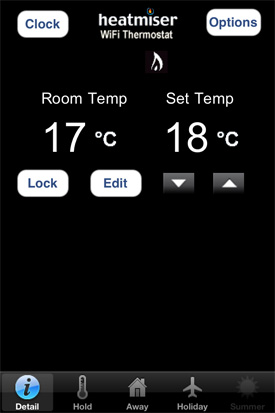
Heatmiser PRS-TS WiFi RF Thermostat Heatmiser PRS-TS WiFi RF Thermostat

The iPhone app makes it easy to turn heating on when you leave the office and alter settings

The model I tested is the RF version, which requires just a mains power supply, so can replace a thermostat that’s connected by only two wires, without needing to pull new cable. The actual switching is handled by a remote RF switch, which can be sited next to the boiler.

If do you have a three wire connection to your existing thermostat, then the standard model is £50 cheaper. Either way, installation is a simple DIY job, though the size of the thermostat means it needs to be mounted on a standard inset wall box, rather than a surface one, which it would overhang.
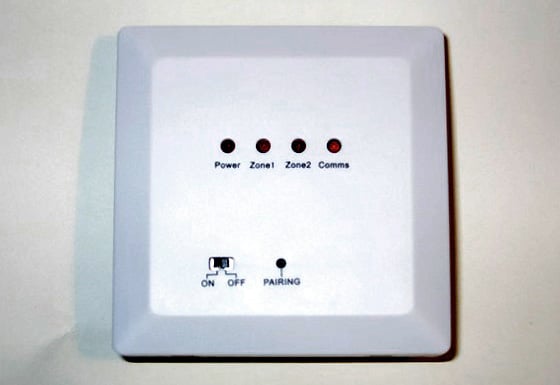
Heatmiser PRT-TS WiFi RF Thermostat

The RF version uses a remote switch, so a standard two-wire thermostat connection can power the thermostat

Before that, though, you have to configure the thermostat from your PC. It needs a fixed IP address so you can access it remotely, and an app for both Windows and Mac makes it easy to configure. Linux users should have no trouble either, as when it’s plugged in using USB, the thermostat appears as a drive, with a ‘config.txt’ file that is what the setup tool modifies, so you can do it yourself in vi.
Heatmiser PRS-TS WiFi RF Thermostat

Next page: Warming up exercises

Anonymous Coward

It's not any old thermostat.

It's an Apple-compatible thermostat. £200? No problem.

9
1

Seems dangerous

Hackers could break in while your asleep and override the safteys, literally BOILING... YOU... ALIVE...

I'm going to write to fox news, suggest they do a piece on this threat.

5
0

Re: Convergence?

> requirements to set my central heating when I'm out of the house

This is exactly what I need. When I decide to work late, or go out for the evening, there's no point firing up my boiler that evening, so being able to override it will put save beer tokens. Similarly, when I'm sent home early because it's snowing, I can make sure I get home to a warm house. What's not to like?

3
0

Re: £200 ?

I know right? Who the hell spends £1,000 on gas either? Oh wait, I do every year.

This will pay for itself in no time, perhaps not for you but I'm not on the 9-5 so being able to switch on the heating as I leave for home rather than rely on a dumb timer is a real money saver.

3
0

Optimum Start

You can set the warm up period from 1 to 3 hours in the config settings. The unit does work out how long it takes to raise the room temp by 1 degree so if you set it to 3 hours it will switch on anytime within this period

3
0

More from The Register

Is the next-gen console war already One?
Microsoft’s new Xbox - and more
 breaking news
Apple cored: Samsung sells 10 million Galaxy S4 in a month
Beware of South Koreans bearing Android
US boffin builds 32-way Raspberry Pi cluster
Beowulf cluster built for the price of a single PC
STROKE this mouse to make apps POP, says Microsoft
Windows 8 Start button comes to Redmond's rodents
Nintendo throws flaming legal barrel at YouTubing fans
All your walk-through vid revenue are belong to us
Fairphone goes on sale to all
The Android handset that's PC can be yours

Hands on with Hyper-V 3.0 and virtual machine movement

Our award-winning Regcasts have teamed up with training provider QA for the deepest of deep dives into Hyper-V, including a live demo.

Understand VM movement - just click to play, or go here for a bigger version.