The Register® — Biting the hand that feeds IT

Feeds
80%
Steelseries SRW-S1 gaming steering wheel

Steelseries SRW-S1 PC gaming steering wheel

Taken for a spin

  • print
  • alert

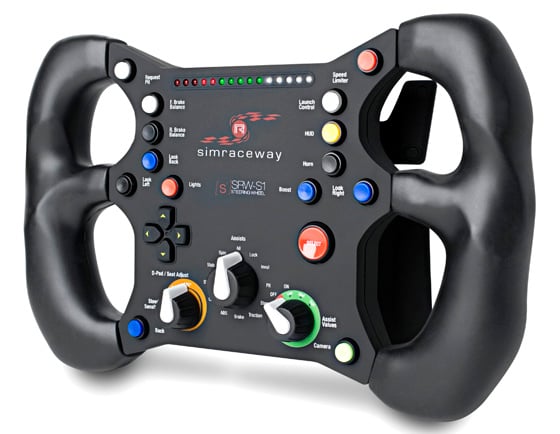
Review Admittedly, until recently my idea of a racing game was Super Mario Kart as I don't play too many driving games. However, the Steelseries SRW-S1 steering wheel certainly had me intrigued enough to want to take it for a spin.
Steelseries SRW-S1 gaming steering wheel

Custom job: Steelseries' SRW-S1 gaming steering wheel

Optimised for Simraceway and littered with buttons and switches, it appears more suited to flight simulation. Yet this Windows PC-only USB peripheral looks certain to give me an edge that a regular controller isn't going to provide. I might even get beyond crashing at the first turn.

All the fifteen buttons, four paddles and even the navpad (how you sit) are easy to configure – typically, one setting will work across several games, in my experience. Yet the essential parts on the SRW-S1 are the paddles on the back, acceleration (lower right), brakes (lower left) and gear change (upper paddles). Using the change camera button is initially fun, as are the horn and boost buttons but these aren't going to make any great difference in-game.
Steelseries SRW-S1 gaming steering wheel

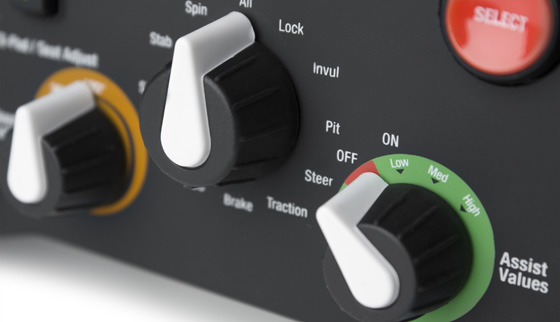
Dashboard modifications

The HUD button isn't essential either – unless you’re particularly bothered about your tyre pressure – still, it's a quick way to access all your on-board information. The brake balancing buttons to the front or back are something that could be used quite frequently in iRacing, which closely simulates everything you'd find on a F1 track, same goes for the speed limiting button, so I don't get a drive through penalty during my pit stop.

The LED lights at the top of the SRW-S1 look über bling and lit up to give me a pretty convincing gear change indicator. Yet for actually making some helpful fine tuning, the steering sensitivity knob is probably your best bet.
Steelseries SRW-S1 gaming steering wheel

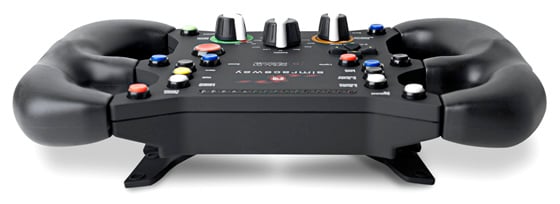
USB connectivity and dead easy to configure

Luckily, set up is a breeze – a great example of plug and play – then it's a simple matter of tweaking my settings depending on the game. If you’re new to joysticks and wheels at this level of sophistication a glance at the Steelseries advanced set up videos would be a good place to start.

Next page: Going for a paddle

I stopped reading...

...as soon as I realised that it doesn't physically connect to anything that could provide force-feedback and "free-floats" in your hands.

The designers really have missed a trick here. If they had of made it a detachable wheel, like in F1 and a few other formulas, with a force-feedback base unit then the wheel could have been used to store your settings... attach it to a base unit and the game automatically changes its settings to your preferences. Would be great if you have a few mates (that also have the wheels) round for a few beers and a "Who's the best/fastest driver" session[1].

My cousin has the right idea... Official GT steering wheel and pedals attached to a specially made wooden cockpit (that you have to slide into, like a real open-wheel racer), with a real bucket seat, in front of a mahoosive TV that basically fills your field of vision!

[1] Using a game, I'm not condoning or encouraging drink driving IRL before anybody says it!

3
0

Using this thing to play iRacing is like going to Navy SEAL training in a pair of Hawaiian-print swiimming trunks .

1
0

If you're going to review a wheel...

either get someone who has used other wheels to do it, or review in a group test.

As it is, you're looking at one of the more unique wheels on the market and there's no indication of how it stacks up.

1
0

I love the comment...

when it was realised that "ultimately, the SRW-S1 is really all about the steering".

No shit.

1
0

FAIL

I purchased this, used it for a day and a half and by the following morning it was dead. It was unplayable with Shift2 because of lag (shift2 bad design), Simraceway was responsive, no lag. The surprise was F1 2011. That proved to be very responsive and easy to drive with the SRW-S1.

None of that matters now though because on the 3rd morning I switched on PC and all of the lights came on the SRW-S1 and stayed on. The wheel was no longer detected in windows. I checked to see if any of the switches or buttons were jammed (they were not), unplugged, plugged back in, tried on a second PC, same result. All the lights were on but the wheel no longer detected. The wheel was screwed after approximately 4 hours of use. I registered on Steelseries website and then went to open a support ticket. FAILED!! The page failed each time I tried to post a support so the support is as dead as the wheel.

I posted my story on tweaktown and one of the tweaktown guys who had recently reviewed the SRW-S1 said he would contact Steelseries to see if they could help? Stil no word so I guess this is my first and last Steelseries.

The broken wheel is due for return to the shop today for refund.

0
0

More from The Register

Is the next-gen console war already One?
Microsoft’s new Xbox - and more
 breaking news
Apple cored: Samsung sells 10 million Galaxy S4 in a month
Beware of South Koreans bearing Android
US boffin builds 32-way Raspberry Pi cluster
Beowulf cluster built for the price of a single PC
STROKE this mouse to make apps POP, says Microsoft
Windows 8 Start button comes to Redmond's rodents
Nintendo throws flaming legal barrel at YouTubing fans
All your walk-through vid revenue are belong to us
Fairphone goes on sale to all
The Android handset that's PC can be yours
Microsoft reveals Xbox One, the console that can read your heartbeat
Upgrades Live service – and no always-on requirement

Hands on with Hyper-V 3.0 and virtual machine movement

Our award-winning Regcasts have teamed up with training provider QA for the deepest of deep dives into Hyper-V, including a live demo.

Understand VM movement - just click to play, or go here for a bigger version.