


This article is more than 1 year old
Pentax Q compact system camera
The cutest camera in the world?

Review When it come to compact system cameras, Pentax has form, if your memory goes back far enough. Like the Auto110 SLR film camera of old, the Pentax Q is laughably small, but in a good way. It’s a happy laugh – like a friendly chuckle at the burblings of a new-born. Its design is achingly cute – especially the white version I received for review – while build quality is impressively and surprisingly high.
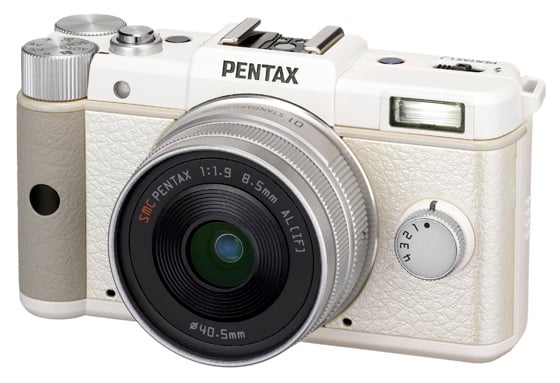
The Pentax Q – a fully-working scale model of an enthusiast camera
Its retro looks are unashamedly borrowed from the classic and prohibitively expensive rangefinders of yore, but this is no cheap plastic scale replica: When handling the Q, its leather-clad magnesium- alloy body feels entirely authentic and reassuringly solid.
It is a little bit small though, did I mention that? Sure, there are normal compacts smaller than the Q, but this is a camera that’s designed to be tweaked and poked about a bit. There are many tiny buttons to be pushed and dials to be dialled – and if you’re the kind of person who’s considering the Q based on its ability to compete on the same turf as an SLR, you will be pushing and dialling a helluva lot.
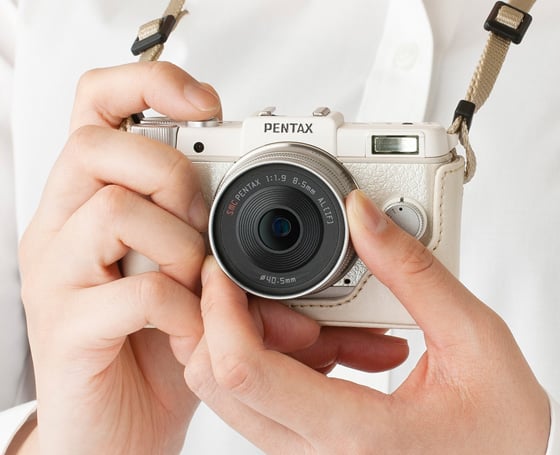
This is not a toy
Using the Q is unlike handling and other camera: If you have big hands, then prepare to look a little silly as it’s not so much your hands that will be holding the Pentax Q, or even your fingers. No, the Pentax Q is to be held very much by the fingertips – and I do mean specifically the tips. You know how grown men look riding those mini motorbikes with their knees poking out sideways to great comic effect? Well, expect something a bit like that.
The controls themselves are as well placed and evenly spaced as they can be, given that most of the rear of the camera is taken up by a 3in LCD display – that’s bigger than you’d get on the considerably larger Fujifilm X10, for example. Next to it, the usual up, down, left, right and OK cursor controls are supplemented by discrete Menu, Info and Av buttons along with a green ‘panic’ button which will instantly override the mess you’re making with the manual exposure controls and fix them for you.
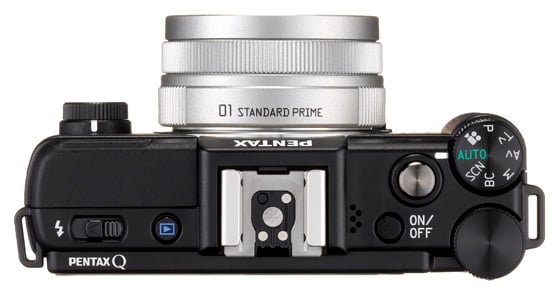
Fingertip control
Thumb and forefinger of the right hand get a control dial each: The finger gets the classic mode dial incorporating the usual PASM and full-auto options along with a scene mode selector, dedicated ‘Blur Control’ mode and, of course, the option for 1080p video.
 Biting the hand that feeds IT

