The Register® — Biting the hand that feeds IT

Feeds
90%
AirDroid Android app icon

AirDroid

Remote control for your smartphone

  • print
  • alert

Android App of the Week If you've ever wanted to manage your Android phone from your computer's desktop then AirDroid is the answer to your prayers.

Installation and use are blindingly simple. Point a web browser to the handset's IP address of your local network - it's provided by the app - then type in the supplied password and you're in. You can change the password to one of your own for the sake of an easier life.
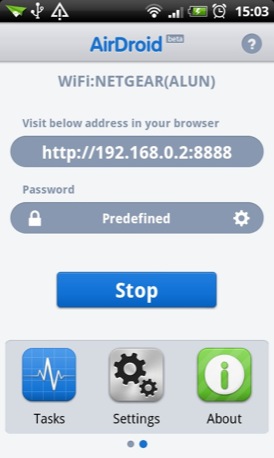
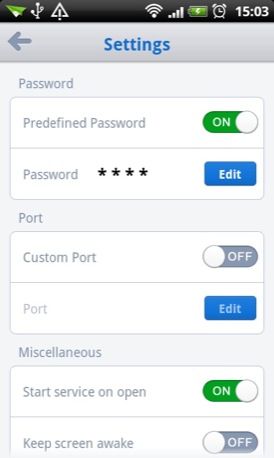
AirDroid Android app screenshot AirDroid Android app screenshot

Run the app and then access your phone...

Once you are connected, you can access and modify all the files, pictures, applications and music on your device, and view your call logs and contacts.

Open up the Music folder in the browser and not only can you add, remove and reorganise files but you can also use the built-in player to listen to the tunes on your handset through your PC speakers.
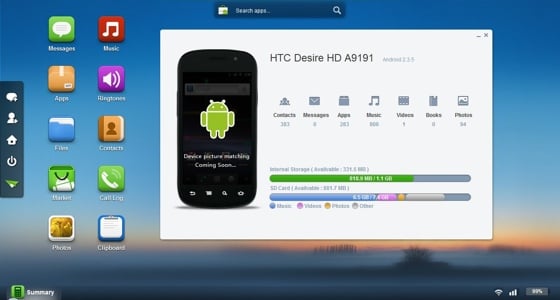
AirDroid Android app screenshot

...from a browser-hosted UI

AirDroid also lets you read and send text messages from your browser and gives you access to device stats like how much storage space you have left. Not enough room? AirDroid lets you uninstall apps.

You can even use AirDroid to export .APK files of any apps you have installed. That's handy for making a backup, or for anyone with a second Android device that doesn’t have Market access. The web interface also supports batch operations so you can export all your apps in one go.
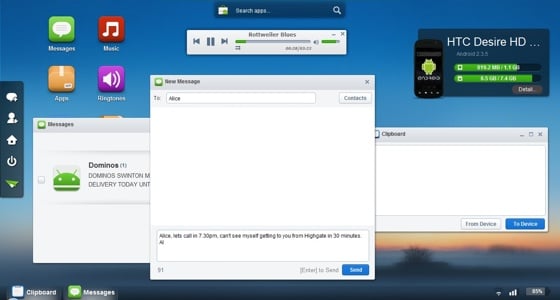
AirDroid Android app screenshot

Open multiple windows to view different sections of your phone's storage

AirDroid shares the content of your handset’s clipboard so you can type something into the clipboard on your browser and paste it in into an app on your phone or vice versa.

The web interface is very easy on the eye, and each part of the app opens in its own window to keep things tidy. There are also Wi-Fi signal strength and battery charge indicators tucked away at the bottom right of the web portal.
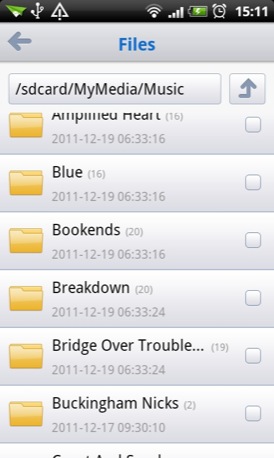
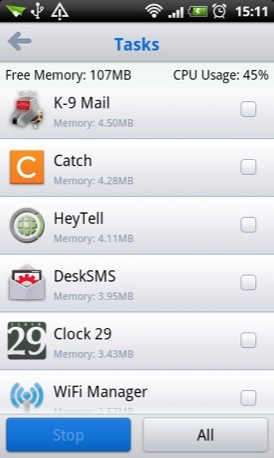
AirDroid Android app screenshotAirDroid Android app screenshot

AirDroid has a basic file manager (left) and a simple task manager (right)

RH Recommended Medal

The only caveat is that your phone and PC must be connected to the same network but that at least provides a degree of security as long as the network in question is protected.

Technically, AirDroid is still in beta so I wouldn’t be remotely surprised if more functions, such as remote task killing, call dialing and a video player crop up in due course. ®

Size 3.2MB
Apps2SD No
AirDroid Android app QR code

We make our choice of the best Android smartphone and tablet downloads every Tuesday. If you think there's an app we should be considering, please let us know.

More Android App of the Week Winners

FilmOn WikiHow Go Contacts EX Cocktail Flow CamScanner
Anonymous Coward

The killer feature

is the option to export apk files - if you have more than one Android device you'll wonder how you ever managed without it. Sending and reading texts in the browser is a pretty handy feature too.

2
0

Perhaps they do it for the enjoyment of doing it?

Why does it have to be about the money?

1
0
Anonymous Coward

I already have some of this provided on my Motorola through their Moto phone portal, but this seems to be worth a look.

1
0

How do they make money?

Maybe I haven't dug around enough, but how do these guys make money? They have a professional looking site and it's all very smart in appearance, but it makes me quite uncomfortable not knowing how they plan on making money from me when they're not asking for any.

Have people stopped asking this question or something?

1
0

I dunno anyone would choose to type on a phone given the option of a real keyboard so this seems like it should be a good idea.

It is not that good though. (Prefer a native application to a webui).

I would like full remote control (with 3d perhaps with a modified VirtualGL) none of the vnc based ones are good enough quality though for me. (The latest versions of rdp manage it so it is totally possible to offload stuff).

Don't get why people choose to use the least convenient device (the phone) (Except in the times it is most convenient (i.e out and about).)

PC>Laptop>Ultra portable>Tablet>Phone (Indoors) -

(outdoors or out and about) I use what ever is comfortable to do the job I need to. (Ideally nothing certainly not facebook).

Dunno why people want web anything either. (Anything web seems to be total junk other than a few exceptions (e.g the Bastion chrome web app).

0
0

More from The Register

Is the next-gen console war already One?
Microsoft’s new Xbox - and more
 breaking news
Apple cored: Samsung sells 10 million Galaxy S4 in a month
Beware of South Koreans bearing Android
US boffin builds 32-way Raspberry Pi cluster
Beowulf cluster built for the price of a single PC
STROKE this mouse to make apps POP, says Microsoft
Windows 8 Start button comes to Redmond's rodents
Nintendo throws flaming legal barrel at YouTubing fans
All your walk-through vid revenue are belong to us
Fairphone goes on sale to all
The Android handset that's PC can be yours
Microsoft reveals Xbox One, the console that can read your heartbeat
Upgrades Live service – and no always-on requirement

Hands on with Hyper-V 3.0 and virtual machine movement

Our award-winning Regcasts have teamed up with training provider QA for the deepest of deep dives into Hyper-V, including a live demo.

Understand VM movement - just click to play, or go here for a bigger version.