


This article is more than 1 year old
Samsung NX200 20.3Mp APS-C compact system camera
A serious take

Review Samsung's NX200 compact system camera (CSC) is not a mere upgrade of its predecessor but a game-changer for the company’s place in the mirrorless cameras market. Not only does the NX200 look completely different to the NX100 but Samsung has also upped its game and provided this newcomer with head-turning specs designed to attract enthusiasts and semi-pro users.
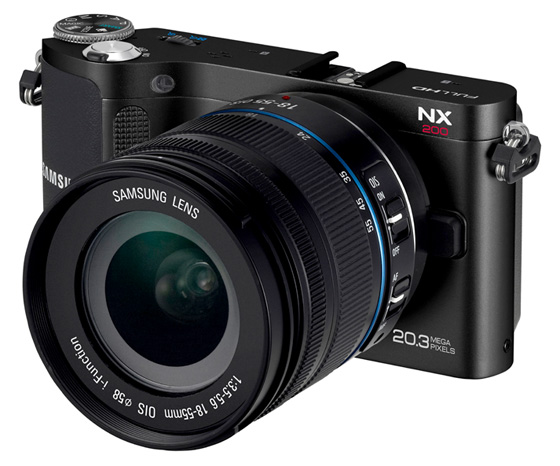
Mirrorless magnificence: Samsung's NX200
The NX200 features an aluminium frame with a 20.3Mp APS-C CMOS sensor, a boosted ISO range of 100-12800 and high-speed performance including 7fps continuous shooting. Add to that ultra-fast auto focusing, 1080p HD movie recording and a growing family of i-Function lenses and there’s a lot to like. All this comes at with a £600 price tag though but you should be able to find the 18-55mm lens kit for £100 less if you shop around. Still, it’s quite a jump from its NX-series predecessors – do the improvements justify the increased cost though?
The new NX is as much better and more professional looking camera than any previously released model. Samsung has abandoned the toyish, futuristic, plasticky looks of the NX100 for a new scaled-down, sleek and functional design with the unquestioned appeal of an all-metal body and a metal lens mount.
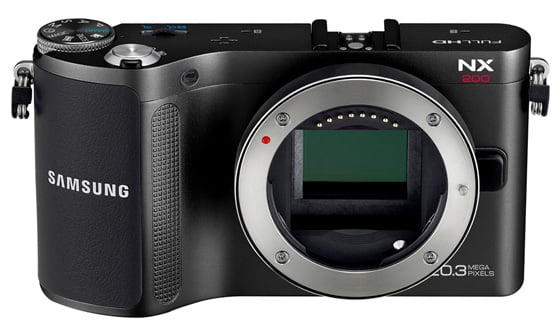
APS-C with a 20.3Mp resolution takes some beating in a body this size
Handling has also been improved with a protruding and texturised front grip that makes the camera feels secure and stable in the hand. The NX200 has a good selection of useful controls at the back, including direct movie recording, exposure compensation and the Fn button, which gives quick access to most of the camera’s functions and settings in virtually one or two steps.
The Fn button brings up a newly designed smart panel on the screen that can be easily navigated through the control wheel at the top. For the most frequent settings Samsung provides and even quicker shortcut in the shape of its unique and ingenious i-Function mode provided on the lens that gives immediate access to Aperture, Shutter Speed, EV, ISO, WB and i-Zoom.
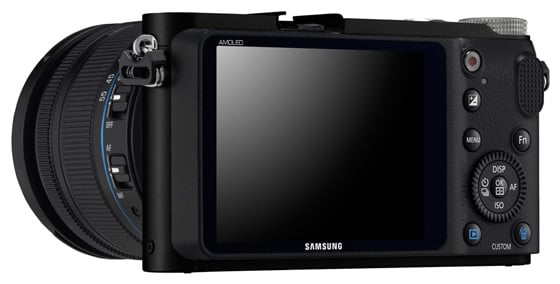
A fixed LCD panel leaves room for an articulating upgrade in the next model
Compared to previous versions, iFunction 2 featured on the NX200 certainly increases the customisation and speed of operation, as the iFn button placed on the lens can now be user-defined to control one or all the five settings available. The settings themselves can be changed by either turning the lens focusing ring or using the rear scrolling wheel.
 Biting the hand that feeds IT

