The Register® — Biting the hand that feeds IT

Feeds
80%
Samsung Remote iOS app icon

Samsung Remote

AV kit control over Wi-Fi

  • print
  • alert

iOS App of the Week

CES 2012 Week

We’ve reviewed a number of gadgets, such as the Gear4 Unity Remote, that allow you to use an iOS device as a universal remote for your TV and other AV kit. iDevices don’t have IR transmitters built into them so the Unity and its rivals all have to encompass both an app and a separate piece of hardware that acts as an IR beamer – and which also bumps the price up too.

However, more and more TVs, Blu-ray players and set-top boxes now have network connectivity, which means that it’s possible to transmit commands to these devices over your Wi-Fi network, bypassing IR altogether. This has allowed TV manufacturers such as Samsung to release free remote control apps of their own.
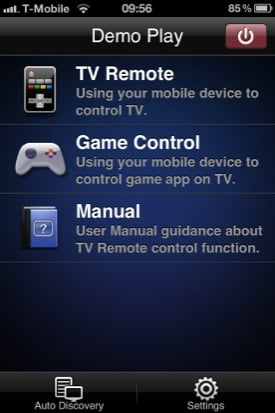
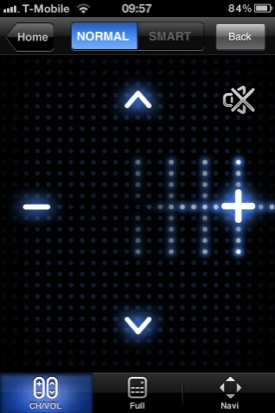
Samsung Remote iOS app screenshot Samsung Remote iOS app screenshot

Samsung Remote's UI is intuitive, and the swipe-to-contol Simple Mode (right) a doddle to use

Most of the big-name manufacturers have released apps of this type in recent months, but Samsung Remote – which runs on Android as well – seems to be particularly well thought out.

You don’t have to do anything to set up the app as it can automatically detect any compatible Samsung devices on your network. There’s a list of supported devices in the iTunes App Store.
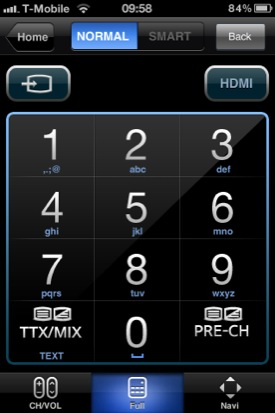
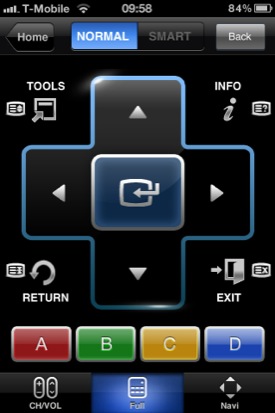
Samsung Remote iOS app screenshot Samsung Remote iOS app screenshot

Full Mode can issue the same commands as a standard Samsung remote

The remote control features work in two modes. The Simple setting allows you to adjust the volume just by flicking your finger up or down on the screen, or to step through the list of channels by flicking left or right. It's ideal for slobbing out on the sofa.

Tapping the button for Full mode provides a complete set of controls of the kind that you'd find on your normal Samsung remote control.
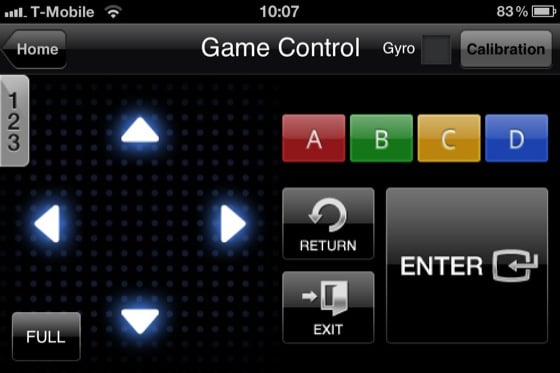
Samsung Remote iOS app screenshot

There's even a gaming mode for entertainment apps on Samsung's smart TVs

There’s also a Game Control mode that allows you to use the iPhone as a motion-sensitive gamepad, for use with the various apps and games that Samsung includes with its smart TVs.

RH Recommended Medal

Of course, the one drawback of these remote control apps is that they’re manufacturer-specific. So you’re scuppered if you use a Samsung TV with, say, a Panasonic Blu-ray player. You could download both the Samsung Remote and Panasonic Blu-ray Remote and see how you get on switching between them – or just wait and see if some enterprising developer comes up with an app that can download control codes for devices from multiple manufacturers. ®

We make our selection of the best iPhone, iPod and iPad downloads every Thursday. It you think there's an app we should be considering, please let us know.

More iOS App of the Week Winners

Sleep Cycle Dermandar
Panorama
KitchenPad 08 Wizard Hailo

Full Size keyboard

Why on earth doesn't this app let you use the android keyboard when using apps? Considering they expect people to use twitter and Facebook on the Smart TV. Having to use the numbers 2-9 to represent the alphabet is just tedious. Especially considering that the app could have integrated the Android keyboard rather than slavishly replicating the standard remote.

1
0
Anonymous Coward

@Joseph Lord

There are plenty of DLNA apps on the Apple store that allow you to stream content from a PC to your phone. They also work quite well to 'forward' the content *to* your DLNA TV.

I use it to screw with the missus when she's watching Eastenders. Well... not very often cos she gets quite cross :)

1
0

Unonoficial WP7 one as well

I found a WP7 "unofficial" remote as well - compared it tothe official one I downloaded on the missuses HTC desire and both work well.......Just wish Samsung had a better text input method for their apps and browser....why they can't support wireless keyboards I'll never know.

0
0

The Android version works really well on my Galaxy Tab (original). Using the Smart Hub feature on the Bluray player is made much easier when you can use the tablet without reference to what's being displayed on the TV.

Being able to search YouTube for music and start playing it while in the other room is great, and text entry is so much easier than using the IR remote.

I just wish it was possible to remotely turn on the TV and Bluray player, but I guess you can't have everything.

0
0

No PVR Support!

Sadly, this falls way short, as the most obvious use - being able to properly control your Samsung PVR - is not catered for. As they insist on using slightly odd IR codes, an app seems a wonderful solution to being able to set up recordings, browse your library, play back and view the programme guide.

But... no, that's not suppported. You're restricted to 'dumb tv' controls, channel up, channel down and so on.

it promises so much and utterly fails to deliver.

0
0

More from The Register

MYSTERY Nokia Lumia with gazillion-pixel camera 'spotted'
With 20Mp sensor - NOW will you try Windows Phone 8?
 breaking news
Microsoft reveals Xbox One, the console that can read your heartbeat
Upgrades Live service – and no always-on requirement
The iWatch is coming! The iWatch is coming!
Reports: Apple's wrister to have 1.5-inch OLED, test units being built
US boffin builds 32-way Raspberry Pi cluster
Beowulf cluster built for the price of a single PC
Dell's PC-on-a-stick landing in July: report
Wyse up, suckers, could this be a new set-side-stick?
Review: HP Pavilion 14 Chromebook
All roads lead to Chrome?
Borked your iDevice? Pay EVEN MORE to have it fixed by Applecare
Or scream at their hapless techies on their forums
Review: Sony Xperia SP
The new mid-range marvel? Oh yes.
Euro PC shipments plummet into bottomless pit of DOOOOM
11th quarter of decline, 20pc drop on last year - Gartner