


This article is more than 1 year old
Windows 8 to get self-healing 'Storage Spaces'
Microsoft's next OS to sport ZFS features

Microsoft will introduce in Windows 8 what it calls Storage Spaces – a method of putting drives into a virtual pool from which self-healing virtual disks can be created, with some resemblance to ZFS features.
Details of these virtual disks – the aforementioned Storage Spaces – were described in a 4,400-word deep-dive blog post on Thursday, introduced by Microsoft Windows Division head, Steven Sinofsky, and written by a member of Redmond's Storage and File System team, Rajeev Nagar.
Storage Spaces are being added to the coming Windows 8 Beta and can be tried out in the Windows 8 Developer Preview. The basic idea is to provide automated data protection and resiliency against physical drive failures, and a storage volume that is actually larger than individual physical drives.
A group of physical disk drives have their capacity aggregated into a single named storage pool. Once allocated to a pool, the individual physical drives are owned by Windows, and are not available or addressable by Windows 8 users as file/folder locations on individual drives.
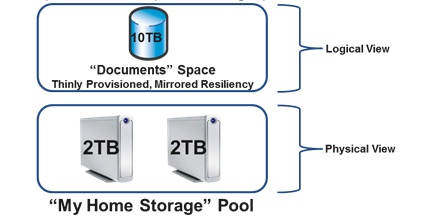
The Storage Spaces concept in a nutshell
The participating drives, using NTFS, can be connected to the Windows server host via USB, SATA, or SAS links, and can be of varying capacities, speeds, and types, including 2.5-inch and 3.5-inch drives. The blog post is less than clear as to whether SSDs can join the party.
The pool cannot be used as data storage by Windows 8 users or applications – that's the job of a Storage Space, of which one or more can be created within a pool. Virtual drives are created from all or part of a pool and called Storage Spaces, each with its own name and drive letter. You still talk to, for example, a C: drive, only now it is a virtual disk drive or volume, formed from part of a storage pool which itself is an amalgamation of physical disk drives.
You can only use Storage Spaces as long as there is a quorum of disks in the pool; basically enough disks to support the capacity and data recovery operations – which we will come to in a moment.
Thin provisioning
Data - files and folders - are written to the virtual drives.
Storage Spaces can be thinly provisioned with, say, a nominally 50TB storage space actually using only 20TB because that's all the data that has been written. If the space starts getting close to being full – in the sense of filling up the underlying physical drives forming it – then Windows 8 delivers an alert saying that more disk capacity needs to be purchased. When more capacity is added, the new disks can be included in the pool and then get used as needed.
Any capacity used by deleted files is returned to its parent pool and made available for use by spaces.
Slabs and mirror spaces
There are, effectively, three kinds of Storage Spaces: basic spaces, mirror spaces, and parity spaces.
In a mirror space at least two copies are made of the data and stored on two separate physical disks. Optionally, three copies can be made, which means that a two-drive physical disk failure can be tolerated, roughly equivalent to software RAID 6 - but with no parity - with two-copy mirror spaces tolerating a single drive failure, equivalent to software RAID 1.
If a physical drive fails, Storage Spaces automatically regenerates data copies for all the affected spaces as long as sufficient physical disks are available in the pool. Pools, by the way, can be given hot, spare drives for such an eventuality.
In mirror spaces, data is actually stored in constructs called Slabs, which are 256MB in size. Slabs are stored across the range of participating physical drives to provide resiliency against data loss through drive failure - a form of striping.
 Biting the hand that feeds IT

