The Register® — Biting the hand that feeds IT

Feeds

Ten... colour laser printers

Rainbow warriors

Review There are two main technologies that can put colour text and graphics on paper; inkjet and laser. Though inkjet makers like Epson and HP have tried to push inkjets into the lower end of the office market, it’s still dominated by colour lasers, due to their speed and the high permanence of solid toner over liquid ink.

Colour laser printers have dropped dramatically in price in the last few years and a canny shopper can find budget models for under £100 on-line. Beware, though, that these loss-leader prices often come with high running costs. Here are ten, capable colour lasers you should consider for a short list.

Brother HL-3040CN

RH Numbers

This is an entry-level colour printer, but uses high intensity LEDs instead of a laser beam, which keeps the mechanism simple and the machine quite small. Brother supports secure print on this machine, so you can give a job a PIN and only print it when you’re at the printer. There’s a 250-sheet main tray and a single-sheet feed for special media and USB and network connections are standard. Speeds are good for entry-level, with a genuine 14ppm maximum and print quality is good, with crisp black and vivid colours. Lots of consumables means a bit of maintenance is needed and costs are only fair, at 3.1p for black and 13.3p per colour page.
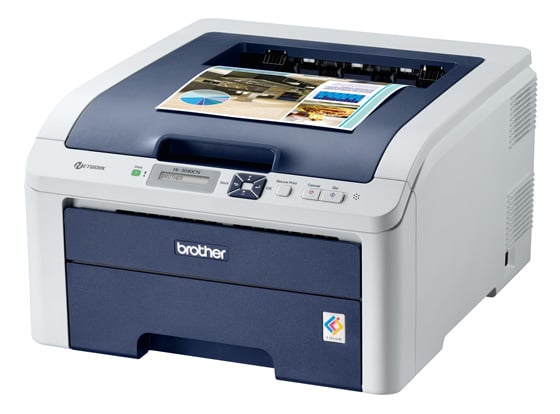
Brother HL-3040CN colour laser printer

Reg Rating 75%
Price £204
More info Brother

Brother HL-4570CDW

RH Numbers

A much heavier weight machine with a price tag to match, this printer still comes with a single 250-sheet paper tray as standard – a second is available as an option – but it does have a 50-sheet, special-purpose tray. It can also do secure print and the two-line LCD is enough to display menu contents. The printer’s in-line laser engine is rated at 28ppm, fast for a colour machine, and I saw 23ppm under test. Text print is sharp and clean and while colour graphics are vivid, some colours are dark by default. Running costs are low, with black pages costing 2.0p and colour ones 9.4p.
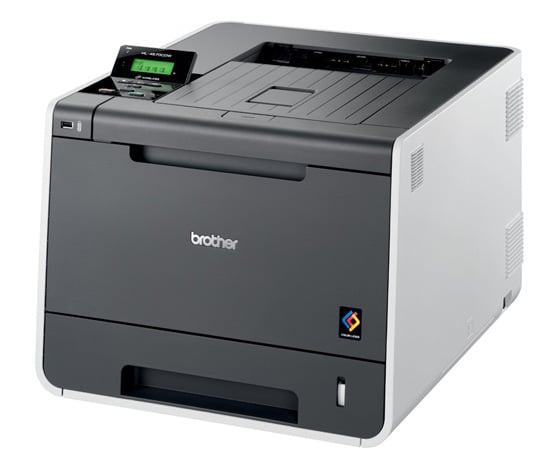
Brother HL-4570CDW colour laser printer

Reg Rating 75%
Price £634
More info Brother

Next page: Dell 1250c

Solid ink, right...

While the Xerox solid ink printers produce nice looking printouts, they also produce a bad smell and need to placed in a well ventilated area. Also, if you only occasionally print with them, they waste a lot of ink on start-up and it's a slow printer anyway, especially if the printer was off.

The whole roundup is stupid anyway. The prices range from 139 to 634, and the blurb on the first page states "Here are ten, capable colour lasers you should consider for a short list" but the reviewer has given 60% verdict to two printers. Why would I put the Xerox 6010 on my short list if the reviewer states that "it may be OK". That HP is noisy, slow and the previous cheap HP carousel models were also prone to break.

Clearly the reviewer works in a retailer or distributor and reviews whatever he has handy there. And that's just fine. But these reviews should be more consistent. Comparing a £200 laptop to a £2000 model makes no sense, why do it with printers?

6
0

No mention of OS compatibility.

Even the ones running on Ethernet are not necessarily postscript compatible, and some Linux drivers are crap (or non-existant)

6
0

Noise

It's all well & good listing the running costs for the printers, but of equal importance for a small office is noise.

I've found that many colour laser printers can be incredibly noisy, especially the carousel models that rotate the toner cartridges between passes.

Any chance of adding a noise level next time you review printers?

6
0

Add to review..

Theres several important factors that are missing from the printer reviews on thereg lately, and i feel they would make the reviews far more useful.

1, Standards support - does the printer require proprietary drivers (and if so for what platforms are drivers made available), or can it work with postscript or pcl? I would always prefer a postscript printer simply because it works with everything and will continue working even long after the manufacturer has given up making drivers... Some devices (eg hp touchpad) only support pcl, some things only support postscript.

2, Airprint - lots of people want to print from iOS devices, would be good to know which printers support it.. Worth noting tho that with a small linux box you can make an airprint server for any printer that linux supports (i do this with my old laserjet)..

3, Noise - for home or small office use noise is important... some printers are even noisy when idle!

4, Startup time - from cold, and from going into powersave mode (assuming it has one)

5, Available prints in the default toners - for some people not wanting to print a lot, the default toners may last a long time... Especially true with lasers which don't dry out like inkjets, it may be more economical for some people to buy cheaper printers with generally higher running costs for very occasional use.

6, power consumption and heat output

Also a table at the end summing things up...

5
0
Anonymous Coward

10,100,500,1000 pages per month

that's way beyond the duty cycle of all these printers put together...

3
0

More from The Register

Android is a mess and needs sprucing up, admits chief
Can Google really fix it? It isn't in control any more
New Lumia 925: This, loyalists, is the BIG ONE you've waited for
Nokia veep drills high-end master plan for El Reg
Android device? Ooohhhh, you mean a Samsung phone
Koreans nabbed nearly all the Q1 profits – more even than Google
Review: HP Pavilion 14 Chromebook
All roads lead to Chrome?
Borked your iDevice? Pay EVEN MORE to have it fixed by Applecare
Or scream at their hapless techies on their forums
Euro PC shipments plummet into bottomless pit of DOOOOM
11th quarter of decline, 20pc drop on last year - Gartner
MIT takes battery-powered robot cheetah for a gallop
Biomimetic big cat needs no power cord, just a walker