The Register® — Biting the hand that feeds IT

Feeds

David Caminer, creator of the first business computer

We salute the architect of LEO

  • print
  • alert

Unsung Heroes of Tech Business without computers would be unthinkable today. Spare a thought then for those who first made the connection; who not only realised that a computer could be used to run a company, but who also knuckled down to build a system from the ground up and put it to use driving a huge commercial enterprise.

This pioneering work happened here in the UK, in a Britain that was pulling itself together after the ravages of World War II.

The computer's name was LEO, and the man in charge of bringing LEO to life was David Caminer.

Caminer died in 2008 aged 92. His long career in IT had lead him from Lyons & Co., which he joined as a management trainee in 1936, to his eventual role as a senior executive at ICL from which he retired in 1980, receiving an OBE for services to British industry.

Distinguished though that career was, none of Caminer's subsequent achievements exceeded the extraordinary feat he achieved on returning to Lyons in 1943, invalided out of the Green Howard regiment after losing a leg in the battle of Mareth, Tunisia.
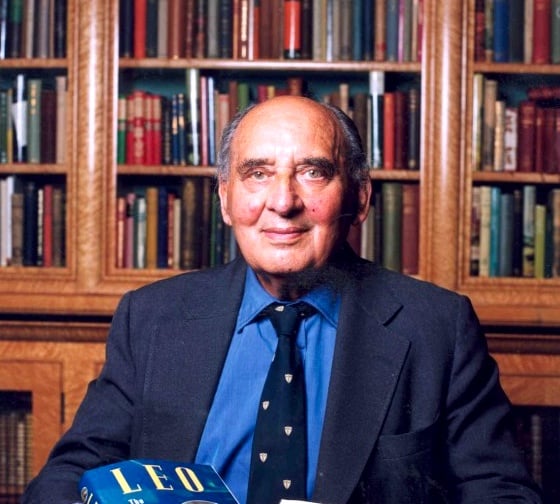
David Caminer

Long before Caminer joined Lyons, the enterprise had been run on traditional bean-counter lines. He describes the Lyons accounts department of the early 1920s as "a Dickensian atmosphere of clerks standing at tall mahogany desks". But in 1923, his predecessor, John Simmons, arrived to shake up the whole "bean counter" process.

Rethinking the process

A revolutionary idea at the time, Simmons set up internal markets inside the Lyons empire. Departments became "profit centres", buying in services and material from other departments and selling on through the organisation as if to external customers. He also introduced what came to be known as "Organisation and Methods" (O&M), turning Lyons into a leader in the field of office mechanisation.

By the time Caminer stepped into Simmons' shoes, the job - now officially "Manager of System Research" - had become the keystone of the enterprise. Caminer oversaw operations management, which organised and controlled a logistical system that ran like clockwork, the timely buying of the right amount of wheat, for example, to grind enough flour to make exactly the right number of biscuits.
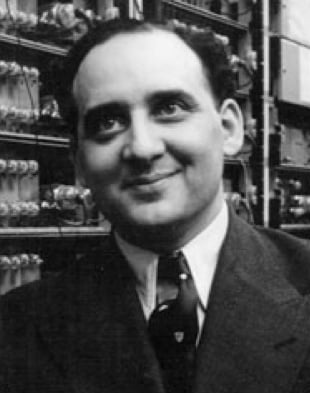
David Caminer

But the War had left Lyons - and Caminer - with a huge problem. The enterprise was labour-intensive, and, thanks to the war, labour costs were rocketing. Someone suggested that these new-fangled "computers" the Americans were building might provide the solution, and in 1947 two senior managers were sent to the US to investigate the possibilities.

The Americans were amused by the idea. Their prize device, the 30-ton ENIAC (Electronic Numerical Integrator And Computer) had been publicly launched the previous year as a "general purpose computer". But in the absence of any means of storing programs ENIAC was hard-wired only to calculate shell trajectories for the Artillery - a contribution to the war effort that missed its deadline, being delivered only after the War was over.

Now the University of Pennsylvania was investigating the academic possibilities. But ENIAC to run a business? I don't think so, buddy.

Next page: Made in Britain

Ah nostalgia...

When I left school in 1968, my first job was as a computer operator on the Leo III at Hartree House. 22 microseconds to read a memory location (this was 3/1 - the first Leo III built, later models had a 13 microsecond read time). Four banks of core memory, 8 tape decks, 2 paper tape readers, 2 card readers, 3 printers, too early for disk storage. Programs were written in Intercode (basically assembler code) or CLEO (Clear Language for Expressing Orders). The system ran 24x7 doing bureau work, payroll runs, etc, for customers. Able to timeshare up to 4 apps at once, memory permitting.

I still remember some of the commands we used to toggle on the console keys, but can't remember what I open the fridge for. Go figure...

8
0

Leo III Reminiscences Part 2

Program Suites

The programs for a particular customer were arranged in a 'suite'. This usually consisted of an input program, a sort, the main processing program, another sort, and then a print.

Input

For a payroll suite, this would contain data like hours worked that week per employee, etc. The input data was punched onto paper tape by a Data-Prep group. This was a team of about 40 (all female, never saw a male DP). Each set of data was actually punched twice. The first time it was punched onto yellow tape, then the yellow tape was fed into a verifying machine while it was punched a second time onto white tape. The verifier would compare what was being punched with what was on the yellow tape, and stop if there was a discrepancy so the DP could fix the discrepancy. These DP girls were amazing - they could carry on full conversations while punching and not miss a beat. As a fresh faced 18 year old, it was quite intimidating walking into the room to collect the paper tapes, and have all the conversations stop so they could check you out.

Sorting

The tapes from the DP group were read and the data written to a mag tape, using the first program in the suite. This mag tape was then used as the input tape to a sort program, that sorted the data into the right order for processing (duh). The standard sort program (07004 if I remember rightly) had an input tape, an output tape, and two work tapes. The data was read from the input tapes onto the work tapes, and then the work tapes were successively read/written and rewound while the data on them was progressively sorted into order. Usually it would take several read/write/rewind passes before the sorted data could be written to the output tape. More intensive sort jobs could be done using program 07006, which used 3 work tapes. Sort programs were what were running when you see the old computers in movies. They were quite impressive to watch, as all the tape decks would be in action, sorting the data between them.

Main Processing

This program read the tape produced by the sort program, and did all the calculations and number crunching on the data. On a typical payroll suite, this would do all the pay and tax calculations for each employee. The calculated data was written to an output tape that was then sorted again by another trip through the 07004 sort program.

Printing

The output tape from the sort was then read by the print program (06060) and printed onto either continuous plain paper, or continuous special stationary (like paychecks). The printers were 120 0r 160 column drum printers. To start with there used to be carbon inserts for 2 or 3 part printing, but later they introduced new-fangled carbonless paper. As operators, we would have to take the boxes of printed paper and 'decollate and burst' them. This involved a complicated an temperamental machine that would feed the continuous paper through, and simultaneously remove the carbon and split the paper where it was perforated into individual pages. I never managed to get away without getting covered in carbon ink from sorting out paper wrecks.

That's probably enough information for anyone to take in one sitting. For anyone still reading - thanks for indulging me :-)

7
0

Jacki will be pleased

David had a bright and incisive mind right up to his passing, and made little of constant discomfort he felt from his artificial limb. He remembered everybody even with a twenty year absents, and was always very welcoming. His wife Jacki still lives in their family home, and will probably be pleased to see we still remember him.

In the annals of Computer Science he probably should be remembered as the inventor of Systems-Analysis.. a worthy ambition for our “profession” would be for all practitioners to be as methodical, thorough and visionary as he was 50 years ago.. within 50 years!

as foot-note, he turned down an undergraduate place at Oxford because he did not see the relevance of a classical education in a rapidly changing world.

7
0

Leo III Reminiscences Part 1

Operators Console

The console had a typewriter that the system used to communicate to the operators. It was used for output only, the operators used a bank of switches to issue commands to the system. There were 3 groups of 4 toggle switches, each group representing a hexadecimal (or more precisely an EBCDIC) number, and a spring-loaded 'Stack' switch that you pressed to execute the command entered on the 12 toggle switches. So a command would be something like entering 4-0-2 on the 12 keys, and then press the Stack key to execute it.

Commands

The 4-0-2 command was used to run a program (they were called programs rather than 'apps'). You would load a tape containing the program code on a mag tape deck, load a paper tape with the program name, serial number, and run number into a tape reader, and then execute the command. This would load the program from mag tape and run it.

Strictly speaking, the middle zero in the 4-0-2 command was a 'route' number. Each set of peripherals were on a separate channel, with each device having a rotary switch that you could set to an address 'route' within that channel. The nearest tape reader to the console was usually set to zero, hence the default 4-0-2.

A 1-0-3 command (I think) was used to load a 'Release Tape Index' (RTI). The RTI was a list of mag tape numbers that were OK to write on. Each tape had a serial number, and a corresponding card in a card index. The card was manually updated with details of what data was written on the tape. When the data was no longer needed, the tape was 'released', the tape number punched onto a paper tape in batches of 12 at a time, and then read into the system using the 1-0-3 command. When you loaded a mag tape, the system would read the serial number on the first few blocks, and would check it against the list of tape numbers from the RTI you had loaded. It would not write on a tape without its number being on the RTI.

A 3-0-1 command would do a core-dump to a mag tape. This was later printed (remember there were no monitors back then) and used by programmers to debug errors.

There was also a command for changing the priority of a program compared to other programs that were running, so you could get the best timesharing performance. I can't remember the command number for that though.

6
0

Remembering LEO

The point is that November 1951 was the month in which the first time critical business application was rolled out. The computer had been delivered and readied for operational use well before that date.

In this exellent article due credit is given to the role played by David Caminer. But if we are to pay tribute to the innovators who made LEO possible we must note T.R. Thompson, and Oliver Standingford and John Pinkerton. Thompson was Simmon's deputy and he and Oliver Standingford visited the USA in 1947 not to check out computers but to see if there had been any interesting developments in business process engineering (as it is now sometimes called). They came across computers and quickly recognised their potential for solving business proceess problems. Indeed they sketched how a computer could tackle a business application. On their return they produced a prescient report suggesting that Lyons should explore the possibilty of acquiring a computer. The Lyons Board to their credit and prompted by Simmons accepted the report.

Thompson subsequently played a major part in setting up the LEO organisation and became CEO of LEO Computers when this became a subsidary company. He aslo recruited David Caminer to LEO. Standingford left Lyons to run an independent engineering company in Liverpool.

If Thompson and Caminer played the major role in applying the computer to business processes, John Pinkerton the chief engineer was the genius who turned ideas into practical computers designed to handle business applications.

An unsung achievement of the three great pioneers -Thompson, Pinkerton and Caminer is that they built a team which whose achievements at LEO and beyond still resonates.

3
0

More from The Register

New Lumia 925: This, loyalists, is the BIG ONE you've waited for
Nokia veep drills high-end master plan for El Reg
Review: HP Pavilion 14 Chromebook
All roads lead to Chrome?
Borked your iDevice? Pay EVEN MORE to have it fixed by Applecare
Or scream at their hapless techies on their forums
Euro PC shipments plummet into bottomless pit of DOOOOM
11th quarter of decline, 20pc drop on last year - Gartner
US boffin builds 32-way Raspberry Pi cluster
Beowulf cluster built for the price of a single PC
Report: AT&T dropping Facebook phone after dismal sales
Turns out folks won't buy that for a dollar
Nintendo throws flaming legal barrel at YouTubing fans
All your walk-through vid revenue are belong to us
Which petite model likes a fondle and GETTING WET? Sony's Xperia ZR
Take this new mobe swimming. Just not deep, or for long, OK?