The Register® — Biting the hand that feeds IT

Feeds
80%
Dell Alienware M18x

Dell Alienware M18x 18.4in gaming notebook

Playing away from home

  • print
  • alert

Review Last year, Dell added to its Alienware laptop family and simultaneously expanded the definition of ultra-portables with the tiny-beefcake M11x. This year's new addition, the flagship M18x, now expands the other end of the spectrum.
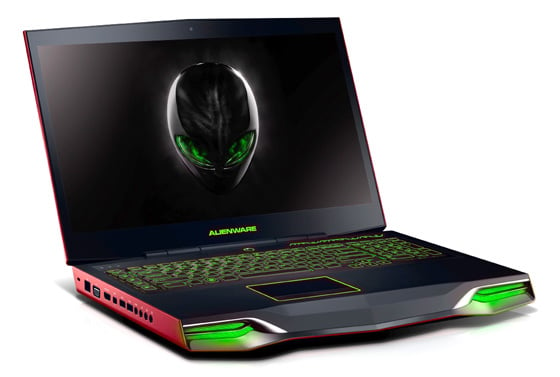
Dell Alienware M18x

Big player: Dell's Alienware M18x

Labelling this colossus a desktop replacement tells only half the story. At 436 x 322 x 53mm and with a starting weight of 5.41kg, the M18x is only four legs short of replacing your actual desk. Factor in a 1.54kg power adaptor and your back will spasm just contemplating lugging this titan around LAN parties.

Happily, this isn't Miss World as having a huge body isn’t such a disadvantage here. Indeed, the M18x is a head-turner, with its pedigree rhomboid chassis and imposing Pontiac Firebird-style front slope and grilles striking a deft balance between geek and chic.

This Alienware machine’s mishmash of materials initially appears discordant, but their functionality highlights fastidious attention to detail. The anodised aluminium of the lid and sides (available in Nebula Red or Space Black) are extremely tough. Short of standing on the case, there's no flex whatsoever. The M18x is scratch and smudge resistant too. As is the large soft touch rubber wrist area, which provides excellent grip. Talking of grip, the half-octagon texturised-rubber panel at the cover's rear is dead handy when carrying this monster underarm.

The design excellence extends to the keyboard. The large 99 x 56mm trackpad is the smoothest, most responsive and precise I’ve ever used. White-bordered 18 x 18mm keys make for comfortable typing, with good stroke distance and low noise. There's even a column of programmable macro keys on the left, ideally placed for MMO-players in proximity to WASD. Providing the finishing flourish, Alienware's signature AlienFX illumination offers customisable back-lighting from a palette of 20 colours to four keyboard zones, the macro keys, trackpad and grilles.
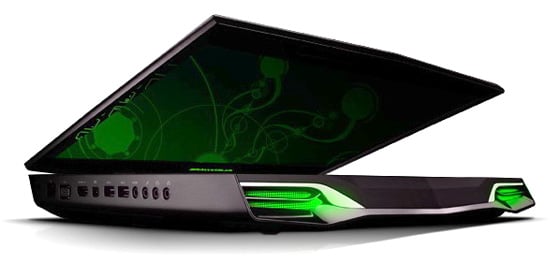
Dell Alienware M18x

With dual drives and GPUs, it's a bit of a fatty

Port placement further exemplifies the meticulous attention to detail, with all the heavy cabling kept to the rear. Running along the left, from front to back, are two headphone, one mic and an S/PDIF sockets, plus two USB 3.0 ports, MiniDisplay, VGA, Gigabit Ethernet and a Kensington Lock.

Next page: Port authority

Anonymous Coward

That's one ugly looking PC

I wonder why manufacturers of gaming rigs go all out to put silly sharp angles, neon underlighting and other gaudy crap into their designs.

8
0

More money than sense

I worked with a guy who had one of these monsters years ago.

It was drool-worthy, cost 4 grand, looked amazing.

Yet it whined like a hoover (you never mentioned the noise level) and within 3 years its GPU was so out of date, and RAM maxed out, and nothing upgradable, that the thing was more useful as a doorstop than a laptop.

You can get a top-level desktop that crushes this thing, and a fine laptop, and an ipad, combined, for half the cost of the top model of this thing. I just can't see the point.

5
0

100% F-ugly

Congratulations Dell on building the ugliest most expensive laptop ever!

You'd have to tripping your t*ts off to even consider buying this POS.

4
0

ACK

I'm sorry, but as a former XPS user, I have to say that thing is FUGLY.

What is the deal with the down rez in screens these days? My ancient M1710 had 1920x1200 and this thing only has 1920x1080!? What's the deal with that?

I'm glad that Dell kicked the audio up a notice with the Klipsch speakers, but judging from the underside pics, they also dropped the really nice subwoofer on the bottom that the XPS had. That's a real shame.

4
0

Dedicated gamers?

Surely the hardcore guys use desktops?

The hardware is:

- cheaper, unit by unit

- more configurable (you can choose *all* the components you want)

- more cost effective (overclocking ranges tend to be wider; you might be able to do with a lower spec, but overclocked unit)

- more reliable (cooling is far more efficient)

- more modular; if one unit does fail, it can be replaced and doesn't involve a total replacement of the entire unit

- more updateable; adding a new CPU or GPUs doesn't involve a total replacement of the entire unit

One of these just seems...a bit poser-ish

2
0

More from The Register

 breaking news
Microsoft reveals Xbox One, the console that can read your heartbeat
Upgrades Live service – and no always-on requirement
US boffin builds 32-way Raspberry Pi cluster
Beowulf cluster built for the price of a single PC
Review: HP Pavilion 14 Chromebook
All roads lead to Chrome?
Euro PC shipments plummet into bottomless pit of DOOOOM
11th quarter of decline, 20pc drop on last year - Gartner
Fairphone goes on sale to all
The Android handset that's PC can be yours
Nintendo throws flaming legal barrel at YouTubing fans
All your walk-through vid revenue are belong to us
Startup hires 'cyborg' Mann for Google Glass–killer project
3D augmented reality specs coming your way this year