
Lenovo Thinkpad X220T 12.5in tablet PC
A fondleslab too far?
Review A recent business profile of Lenovo in a national newspaper made an interesting assertion. "Anyone you spot on the Tube using a ThinkPad has almost certainly obtained it from their employer," claimed the reporter.
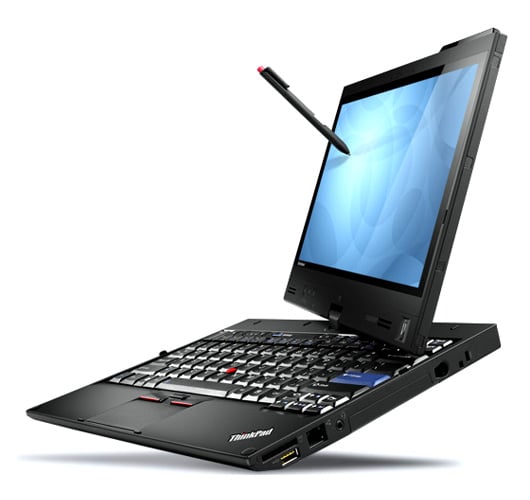
Tablet with a twist: Lenovo's ThinkPad X220T
Well, discerning readers know this isn’t true. The build quality, devotion to no-frills heavy lifting, the aftermarket support, and ease of maintenance have long made ThinkPads a favourite. This is a machine for people who know their work, and want to buy the best tool possible to get it done.
The X220 is the most significant overhaul to the premium lightweight X-series in three years; the new model replaces both the X201 and the pricey flagship, the X301. The standard laptop isn’t in the channel yet and wasn’t available for review, but the Tablet version is here; I’ll start by summarising the changes common to both laptop and tablet models.
The single biggest change is a slight increase in width over the X200/X201, to accommodate a 12.5in (diagonal), 1366 x 768 screen. This offers a little more real estate than the 1280 x 800 of the X200s, but at the expense of vital vertical viewing area – a consequence of shifting from 4:3 to 16:9 ratio displays in line with the rest of the market. This isn’t a popular move with long-time users – and remember that some 13.3in X300s models offered a 1440 x 900 resolution display option. If you need one, Fujitsu still offers laptops with 4:3 ratio displays.
Lenovo has also brought modern display I/O to the X-series with Displayport. The X301 had a Displayport, but no card slot, while the X200s shunned DVI and HDMI digital video ports. Don’t worry, the VGA port is still there. And it’s a relief to see the Expresscard 54 slot, an endangered species these days, going strong – giving access to a range of essential upgrades such as fast I/O (Firewire, eSATA), SSD cards and professional audio options.
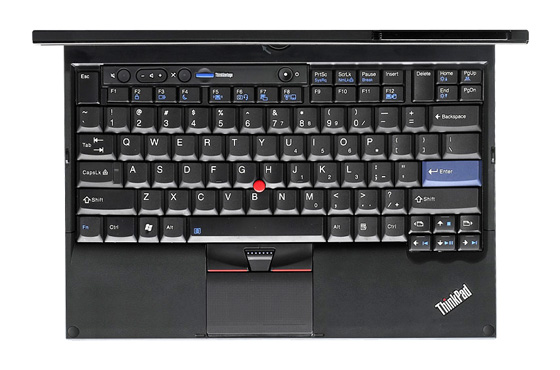
The new widescreen aspect consequently broadens the keyboard real estate
The build quality is as you’d expect, outstanding, with a magnesium alloy chassis, showing no hint of flexing, and the familiar matte finish. The keyboard makes the most of the room in the expanded chassis, and ranks as the best I have used on an X-series, and perhaps any ThinkPad, being firm, light, consistent and perfectly sprung. Finger fatigue is noticeably less after using a well made keyboard. It is a sheer pleasure to use. The extra vertical space has allowed Lenovo to use doublesized Delete and Escape keys.
Next page: Screen test
COMMENTS
Wide screen on a business laptop = fail
Have to agree with all the comments around this annoying obsession with wide screen 16:9 ratios.
It is pretty much useless on a business machine, and probably about 95% useless on a laptop for home use.
I've got a T400 at work, and that's the older 1280 x 800 size. At 800, this screen is only just high enough for most uses, but forces you to scroll up and down all the time when using normal apps, such as writing or reviewing documents in Word etc. Most of the width is wasted, as almost all apps don't utilise this extra screen estate. So this new 1366x768 size is actually making things worse! Taking away the hight, when you really need more, and adding to the width, when you really need less of this!
The only use I can see for having a 19:9 ratio, is for watching movies, and I'll never do that at work, and have only ever done that once away from work.
So that basically means, at least for me, all current laptops with a 16:9 ratio screen, are unsuitable for purpose for about 99.99% of the time.
Bring back 4:3 for business use, or at least give people the option. Even 16:10 is better, as at least there you don't loose all the hight!
Wide screen on a business laptop = fail * 2
Lenovo, stop copying everyone else. I want a 4:3 screen. This is a machine to work on, not play movies!
I'm still using the Thinkpad R52 which I've had more years than I care to remember because it has a 4:3 screen which is 1400x1050 pixels, and still only 15". Incidentally I bought it myself, with my own money to replace the Thinkpad A30 which I had also bought with my own money, but unfortunately stood on after many years of reliable service :'(
The only way I can get that kind of vertical resolution on a laptop these days is to buy something which is 1920x1080, and the size of a f*cking aircraft carrier's flight deck.
Please please please be a little different, stop being a sheep, and give me a good upgrade path, because at the moment I'm seriously looking at bi-passing the sata/pata bridge chip you put in this machine so I can install a sata SSD to get some more speed out of it and run it for another 5 years!
Screen Ratio
When was 1280 x 800 4:3?
Surely the shift is 16:10 to 16:9 for the resolutions quoted.
Exactly
I'm on my 4th Thinkpad X series laptop at the moment: all bought second-hand with my own money, run for a few years with Debian and then sold on still with more life left in them. I won't buy anything else.
Aside: nice to see Orlowski not trolling!
1366x768
The preponderance of 1366x768 laptops is disappointing....to think that the vertical resolution of most small-ish laptops today is *exactly* the same as it was in the 1990s when 1024x768 was the norm! And what's the point of a 16:9 laptop anyway? Is watching DVDs the only thing people use laptops for?
