The Register® — Biting the hand that feeds IT

Feeds

Benchmark Tests

CrystalDiskMark 3 Results
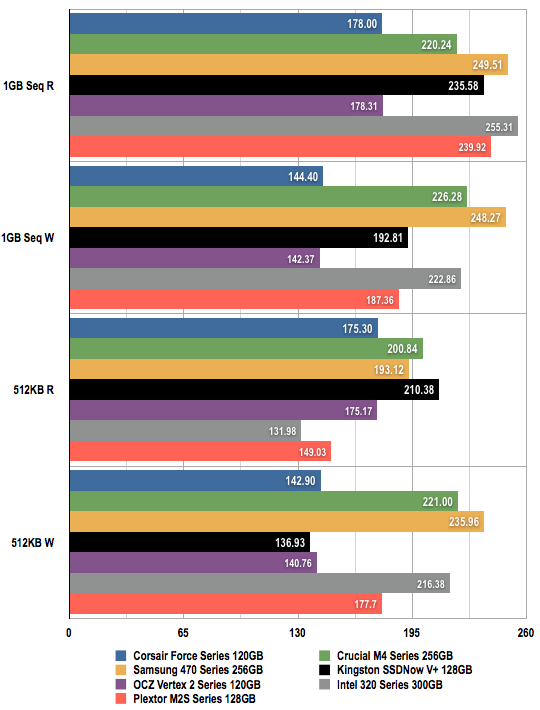
SSD Comparison

Data Transfer Speeds in Megabytes per Second (MB/s)
Longer bars are better
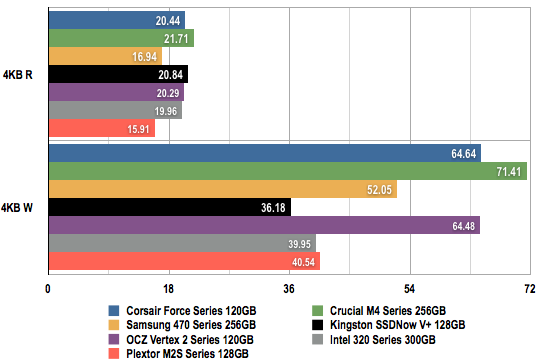
SSD Comparison

Data Transfer Speeds in Megabytes per Second (MB/s)
Longer bars are better

Next page: Verdict

Drive size is important

Drive size is important whilst benchmarking as the lower capacity drives have less chips rather than smaller ones. This means you can have fewer active data paths and so the smaller drives are slower. 3 of the 7 drives in this test used larger drives and so they will show greater performance than you would have seen with all 128GB drives. So its not exactly a fair comparison.

4
0

Flippin yanks

UK site, prices qoted in GBP so why are the links to amazon.com not .co.uk?

2
0

Couple of tips...

I bought a 40GB SSDNow about 18 months ago, best/biggest I could afford without various TRIM and stuttering issues. Promptly installed Windows 7 on it and it really will transform your computer!

Bear in mind, by default, Windows will create a swap file and a hibernate file the same size as the RAM in your PC, in my case, it created 2x 8GB files, that is instantly 16GB of the 37GB available plus Windows itself. Add in Apple and Chrome creating all their data files on the C partition without asking and you will run out of space very, very fast!

I've made my swap file 512MB, switched off hibernate and system restore and used 'mklink' to create junction points to move things like Apples backups to the spinning disks. Happy enough at the moment but currently looking at drives around the 120GB mark. It's also worth noting that many controllers perform much worse with smaller drives so if you are comparing performance figures, it must be on the size of the drive you are considering.

1
0

As above

Using these drives for backup is ridiculous. Use 2TB drives in RAID-1 instead.

These drives are performance enhancers, not volume storage.

At normal usage levels (ie not hammering them with 100GB of backup data per night) this current generation of SSDs should last about 10 years according to most recent studies on the subject.

Remember, mechanical drives fail too. Often well before 10 years if they are in regular use. The difference with an SSD is that the moment of failure is (usually) predictable and measurable.

In terms of power, SSDs generally use a little less than mechanical drives.

2
1

AFAIK

All current generation should have TRIM support, with some of the newer/newest ones not really even needing it as the controllers have started running their own garbage collection.

I think Tom's or Anand has much more info on the topic - and apologies in advance if I'm not exactly accurate with my comments above.

1
0

More from The Register

MYSTERY Nokia Lumia with gazillion-pixel camera 'spotted'
With 20Mp sensor - NOW will you try Windows Phone 8?
 breaking news
Microsoft reveals Xbox One, the console that can read your heartbeat
Upgrades Live service – and no always-on requirement
The iWatch is coming! The iWatch is coming!
Reports: Apple's wrister to have 1.5-inch OLED, test units being built
US boffin builds 32-way Raspberry Pi cluster
Beowulf cluster built for the price of a single PC
Dell's PC-on-a-stick landing in July: report
Wyse up, suckers, could this be a new set-side-stick?
Review: HP Pavilion 14 Chromebook
All roads lead to Chrome?
Borked your iDevice? Pay EVEN MORE to have it fixed by Applecare
Or scream at their hapless techies on their forums
Review: Sony Xperia SP
The new mid-range marvel? Oh yes.
Euro PC shipments plummet into bottomless pit of DOOOOM
11th quarter of decline, 20pc drop on last year - Gartner