


This article is more than 1 year old
Dell Inspiron Duo
Flip your lid

Review Devices that try to reconcile the essentially irreconcilable often come a cropper. As the Good Book says, “Because thou art lukewarm, and neither cold nor hot, I will spue thee out of my mouth.” Trying to combine the best of the netbook with the best of the tablet is what Dell’s new Inspiron Duo is all about, but does it work as either, let alone both?
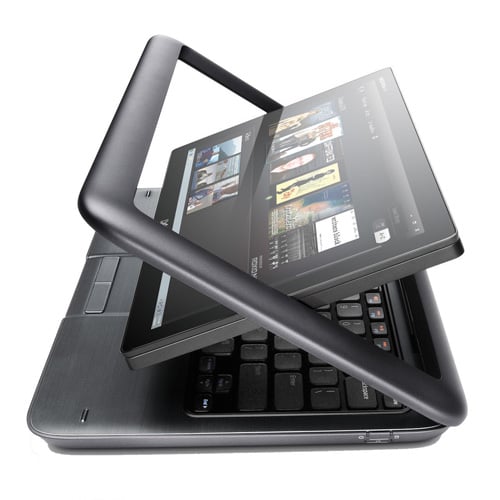
Back in the fold: Dell's Inspiron Duo
First off a word about the lid assembly and screen mount which is the Duo’s party piece. The lid itself opens and shuts just like any other netbook but the screen can pivot through 180 degrees within the lid frame, so it can face inwards to work as a regular laptop or outwards to work as a tablet. Small magnets keep it in place in either position. The design looks fragile but it’s not actually, so durability shouldn’t be an issue.
And a nice screen it is too. It’s only the netbook norm 10.1in corner-to-corner but the resolution is a healthy 1366 x 768. It’s also glossy and capacitive to the benefit of how it looks and how it works when touched. However, it has a less than robust tolerance to viewing angles, especially about the horizontal plane.
Take a shufti around the exterior of the Dell Duo and you will find two USB ports and 3.5mm audio in/out jacks all hidden behind panels on the left... and, well, actually, that’s it. No SD card reader, no more USB ports, no HDMI socket. Dell seems to have decided we don’t actually need the usual netbook array of ports. I beg to differ, however.
If you do want two extra USB ports, an Ethernet socket and a card reader, then you will have to cough up £100 for the JBL-endorsed speaker dock, the Inspiron Duo Audio Station. I’m sure the dock is a great bit of kit and a worthwhile investment if you plan on watching a lot of video on our Duo. Even so, removing expected connections from a small laptop to help flog a desktop accessories is still daft.
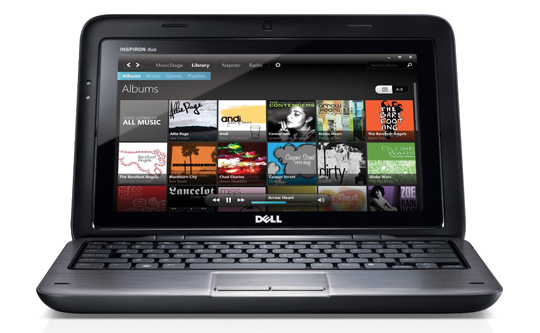
A turn up for the netbooks
The Duo’s chiclet keyboard is solid affair with well spaced flat topped keys that have a clean and positive action. The layout looks a tad odd due to the rounded corners of each key but I’ve no complaints about how it works, and the same goes for the multi-touch trackpad and two-piece click bar.
 Biting the hand that feeds IT

