


This article is more than 1 year old
Diagramming for web development
Use the tool, relieve the drudgery
Workshop Web site development is mostly a complex process, often made more so by people from IT, marketing, publishing and design all having to sit in the same room together for long periods of time.
Phrases like “content is king” and “monetising the clicks” run thick and fast. While some proceed according to “principles of information architecture” others just go by the rule “build it and they will come”.
But whatever approach prevails there is a need to plod through all the stages from planning to testing, rejigging, coding, more testing, more coding and then hopefully, implementation.
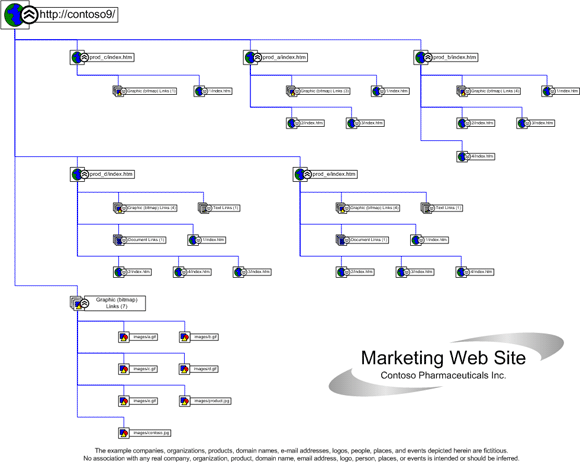
Visual documentation includes wireframes, prototypes and project management diagrams. They are all grist to the mill for diagramming tools. At the most basic level, these tools provide the means to create web site maps and wireframes that allow visualisation of the intended site’s pages, and to share the design for collective changes to be made.
Higher up the food chain there are tools that go some way towards simulating the site in operation, and even a few that can automatically generate some of the code, although we are still a long way from being able to press a button that automatically builds it.
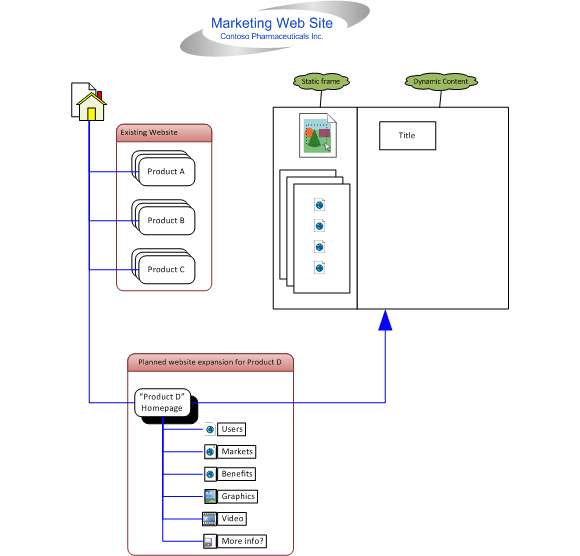
Microsoft Visio is known as a Steady Eddie in web design circles. It does what it says on the tin, namely it is allows you to create simple web site maps and wireframes.
In earlier versions, Microsoft included a set of Windows XP stencils for such work. For Visio 2010, it has provided a new set of wireframe shapes that are generic and not specific to the operating system. As before there are shapes for building dialogs, controls and toolbars, and in addition there are common icons for Windows, web and multimedia applications.
The look of the new wireframe shapes can be customised through “themes” or formatting. Introduced in 2007, the Themes drop-down menu allows you to introduce colours and effects in shapes.
Most shapes are customisable, resizeable and have state options. The new Containers concept also allows a range of shapes to be built within a container so that when the container is moved all controls inside it move too.
Visio is also capable of helping maintain a site through the Web Site Map template. It diagrams the pages, the graphics, where the graphics are stored, the hyperlinks and where there are broken hyperlinks.
Andrew Binns, a Microsoft Visio Most Valuable Professional (MVP), comments: “While web site designers may not be so keen, it’s ideal for SharePoint site managers. SharePoint 2010 is designed for all users to create web pages but they won’t necessarily have the skills of a designer, leading to excess pages and broken links. When I’ve shown this feature to web site managers they have been very impressed.”
"There really is no excuse these days for not doing proper and visible wireframing and prototyping"
David Parker, managing director of BVisual and a Visio MVP, adds: “There are many different methods of creating a website and Visio cannot satisfy them all. It's good for sketching out concepts, though, and I would like to see the wireframes enhanced. But the reverse engineering of web sites can be a bit hit-and-miss.”
Tools like Visio also have to compete with more niche applications. Chris Roth, who blogs as Visio Guy, says: “Something like Axure seems more interesting to me. Its graphical software is aimed specifically at wireframes and prototyping of web sites and user interfaces. You can take the core engine behind it and wrap it up in several special-purpose applications that people really need for their business.” Axure and Balsamiq Mockups have their fair share of fans, but there are also those who say their automatic coding feature is not worth bothering with, a topic of much debate among web designers. A web site prototype can be built using paper, colour pens on whiteboard, Powerpoint, Photoshop, Keynote, Illustrator, OmniGraffle, Visio, Adobe Fireworks, Balsamiq Mockups, Axure, Wordpress or pure code.
The problem with static prototypes is that they cannot be tested and you need imagination to see how the site will work. But bearing in mind that many web sites begin life as paper or Post-it notes on a whiteboard, this is not necessarily a great drawback in the early stages. Experts favour “the right tool at the right time” approach, judging by the heated discussions in web design forums.
Deri Jones, chief executive at web testing firm SciVisum, says: “There really is no excuse these days for not doing proper and visible wireframing and prototyping. The tools are there, cloud-based if you want. If you share the planning and the results for your site via easy-to-use tools, Wikis and online whiteboards, confidence in the outcome will grow.
“Where a lot of companies drop the ball is in the nasty stage where the pages go from mock-ups to real engineered objects carved out of HTML, CSS and javascript.”
Dave Ward, deputy creative director at agency Realise Digital, believes less is more. “The best tools for wireframing are stripped back enough so that it does not become a design tool,” he says. “However, the software should also have enough detail to enable your design team to make strategic decisions. It should allow for the creation of a functional test platform, and ultimately a working product.” ®
 Biting the hand that feeds IT

