
Roberts Stream 63i
The only all-in-one music combo you'll ever need?
Agentless Backup is Not a Myth
Review British radio stalwart Roberts has been releasing a steady stream of DAB and FM models and is increasingly combining its options into various categories of music system. The Stream 63i is the latest do-it-all model offering CD player, iPod dock, FM and DAB radio, Internet radio and audio streaming using your home network too.
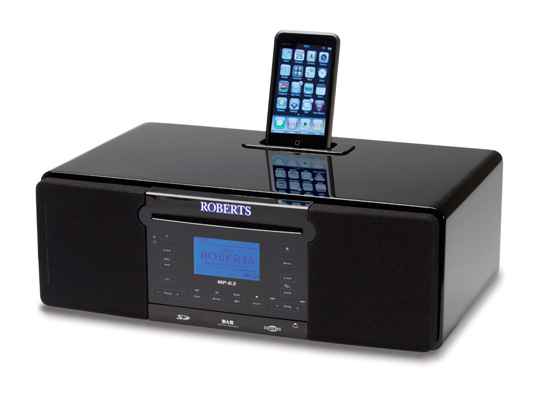
Versatile performer: Roberts' Stream 63i
The Roberts Stream 63i is a slick-looking device encased in piano black MDF – only one colour, but then it goes with just about anything. It measures a reasonably compact 358 x 120 x 260mm and weighs a reassuringly solid 5.2kg. Indeed, it’s big and heavy enough to promise some decent acoustics, but still small enough to fit in the bedroom, kitchen or wherever takes your fancy.
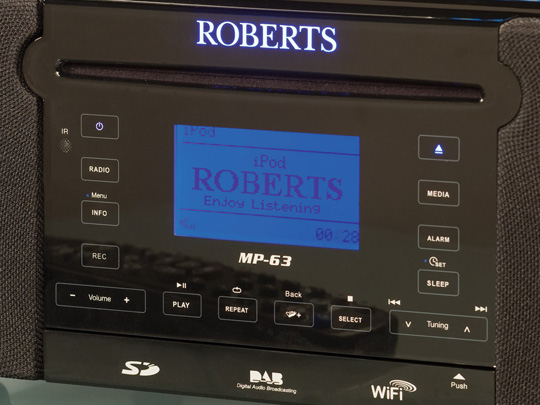
The touch-sensitive controls are arranged around a good-sized, six-line LCD display with a drop-down panel at the bottom masking SD memory card and USB slots. Around the back are 3.5mm aux in, line out and headphone jacks, as well as an optical digital output and Ethernet connection. There are also separate aerials for FM/DAB and Wi-Fi.
You certainly get a serious bit of bang for your 350 bucks – yes, I know, pounds sterling, really. After all, besides its functions for CD/radio/dock/streaming combinations, and playback from USB sticks and SD memory cards, you can also record directly from the radio onto your chosen storage option. It’s nice and simple too, just press ‘record’ once to start, and again to stop.
A full-function remote is provided if operation with touch controls doesn't appeal
There’s a six-preset equaliser on board, as well as separate bass and treble controls which you can programme to a set level on the equaliser. There’s an alarm clock and sleep timer too, and you can also adjust the brightness of the screen and the sensitivity level of the touch controls. A nice touch, or so it would seem.
Next page: Slip a disc
COMMENTS
Nice kit...
But, and I know I'm going to get some abuse for this, AirPlay would seem to be a big miss on this. It's certainly a deal breaker for me...
Appearance
It's a little disappointing the Roberts name on otherwise anonymous consumer kit like this. It should be covered in wood and leather, maybe even a little carpet, not chasing the shiny-shiny iPod design zeitgeist.
Generally, I am unsure about streaming. So you have 1 copy of your music that you can play in 3 different places in your home. Instead, I keep 3 copies of the actual music on separate players. All right, keeping them in sync adds a complication, but would setting up a streaming infrastructure and keeping a central storage unit switched on all the time. And with multiple copies, you can take one jogging or in the car.
Living with it is a different matter
I've used Roberts kit for years and there's always problems. The predecessor unit I have in the bedroom is quirky to say the least.
The touch front panel doesn't work; one needs to use the remote to control it. The screen is too bright but when dimmed to minimum can't be read in the dark as there's insufficient contrast. Blue is the wrong colour; red would be better at night. The snooze control works on all functions; adjust the volume and it switches off. The remote control's UI is unintuitive and needs to be learned. IPhones interfere with loud clicks & bangs. The radio alarm doesn't specify the channel; go to sleep listening to Radio3 and go through the channel changing rigmarole (snooze, etc.) to change to Radio4 in the morning. It's a bit unreliable and needs occasional rebooting (disconnecting) to reset.
In short lots of niggles.
On the good side, it's a brilliant high quality sound that belies it's size. Much much much better than anything else on the market. It looks great. It's solidly built. The functionality is great.
Would I buy another? Without hesitation as he positives far outweigh the negatives. But it still doesn't excuse the considerable annoyances.

IT infrastructure monitoring strategies
Agentless Backup is Not a Myth
Top 10 SIEM implementer’s checklist
Steps to Take Before Choosing a Business Continuity Partner
Enabling efficient data center monitoring