


This article is more than 1 year old
Google Translate for iPhone: hits and misses
'Egg freckles' redux

First look Google has released an iOS version of its free Translate app, and my first couple of hours of using it has shown it to be worth every penny.
Well, maybe a wee bit more than that, but I certainly wouldn't advise using it as the basis for any attempt at meaningful communication with someone with whom you share no linguistic common ground.
The app works in two ways. The more-accurate of the two works like Google's online translation engine: type or paste text into a search field the word or phrase that you want translated – 57 written languages are supported – and the app returns what it proposes to be a correct translation.
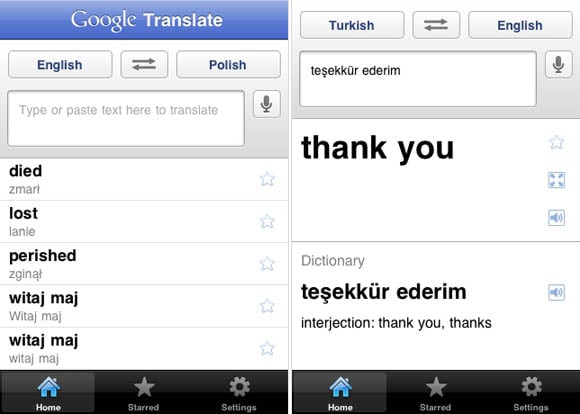
Google Translate's home entry screen lists your most-recent translation attempts (left)
An entry results in a translation – here a spoken Turkish phrase – sometimes with dictionary support (right)
When using the second method, supported in 15 languages, you speak your text into your iOS device (I tested on an iPhone 3GS), and the app gives you its best guess as to what you said, translated into the language of your choice.
This second method worked reasonably well when translating from English to other languages – as well as I could tell, that is, yours truly not being an overly accomplished polyglot.
The other direction, however, was at best spotty. If you plan to read menus, street signs, or Japanese robo-toilet instructions into Google Translate during your next trip abroad, prepare to be either disappointed or amused. Or both.
Proper pronunciation, as might be assumed, is everything. For example, when speaking in my reasonably decent Japanese, I repeatedly asked the app to translate the simple sentence "It is cold" (Samui desu ne, or 寒いですね). It occasionally gave the correct translation, but more often simply responded "Wow."
I can only assume I offended it.
Of course, to a native Japanese speaker my Japanese accent is that of a native Polish-American San Franciscan, so I tried a few phrases in Polish – and Turkish, Spanish, and German – with noticeably better success.
When I spoke French, however, my iPhone and I could agree on very little – I never could manage that fluidité parisienne. And when speaking Mandarin, well, all bets were off – though I did manage to get Google Translate to recognize a simple "Nǐ hǎo ma?" (你好吗), meaning "How y'doin', bub?"
The app also found it difficult to complete some spoken-translation duties at all, either hanging while displaying a "Working" display or merely announcing that the translation function was unavailable, and suggesting a restart.
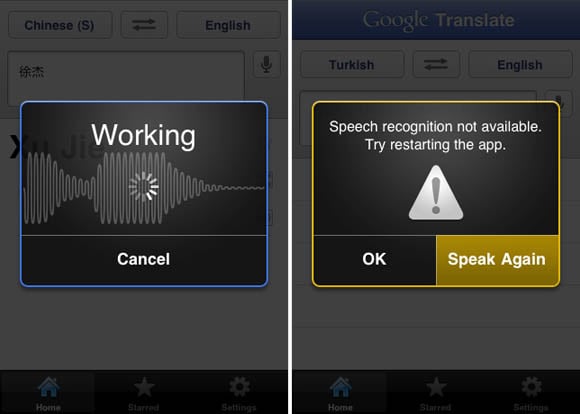
At times, Google Translate either hangs while "working" or suggests a retry
I look forward to taking the app home and trying it with on my wife, who speaks fluent Turkish and good French and German, and my Chinese-born daughter-in-law, whose Mandarin is better than my English. Perhaps well-formed vowels and crisp consonants will make it more responsive.
Speaking of vowels, I also briefly tested Google Translate here in Vulture Annex with my colleague Gavin Clarke, he of the Southeast-England accent. The poor app was thoroughly flummoxed. But, then again, so am I at times when talking with Gav – something about those British vowels, capisce?
The app does have a tiny set of bells and whistles that give it a chance of being somewhat of a boon travelling companion. You can, for example, line up a list of favorites that you can consult at any time, even when not online (the app requires an internet connection for its cloudy translations), tapping them to speak phrases in 23 languages, or to display them in screen-filling large print when you hold your device sideways.
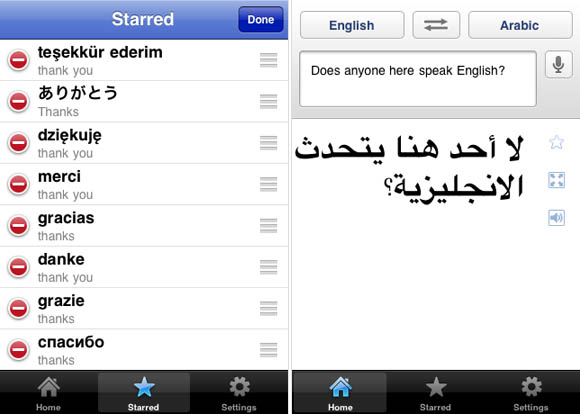
You can trim or reorder your favorites list – "Starred" – using the standard iOS editing interface (left)
Preloaded essentials can get you out of a bilingual jam – if you can trust their accuracy (right)
Google Translate for iOS doesn't have one feature than graces its sibling, Google Translate for Android: an alpha version of an English <–> Spanish "conversation mode" that allows you to hold a two-way conversation with a Spanish speaker, with each of you tapping speech bubbles on the display for instant translations.
In my brief experience with Google Translate, its Spanish-language capabilites proved to be superior to, say, its handling of Mandarin or Arabic – not to mention the fact that those latter two languages have vast numbers of regional dialects.
Personally, I'd trust Google Translate's Spanish-conversation capabilities far more than I would its ability to carry on an accurate conversation with, say, a Cairo cab driver. It would be awfully inconvenient to end up in Gaza when my goal was Giza. ®
Bootnote
Be forewarned that Google Translate is a linguistic literalist, with no understanding of cultural references. For example, the app translates the first line of the Polish national anthem, "Jeszcze Polska nie zginęła", usually rendered into English as "Poland has not yet perished", into a sentiment rather more prosaic and Pythonesque: "Poland is not dead yet".
 Biting the hand that feeds IT

