The Register® — Biting the hand that feeds IT

Feeds

Intel 'Sandy Bridge' mobile platform

Second-gen Core i7 CPU leaves its tyre marks

  • print
  • alert

Review Sandy Bridge is the codename for Intel's second generation of Core processors that covers Core i3, i5 and i7 for both side of the desktop-mobile divide. If you've been following the news lately, you'll know that Dell has discovered flaws in the Cougar Point chipset that, while not revealing a fault in the actual Sandy Bridge CPU, has implications for Sata devices used in this new generation of silicon. In the process of reviewing this whitebook sample, issues affecting storage did come to light as, you'll discover.
Sandy Bridge whitebook

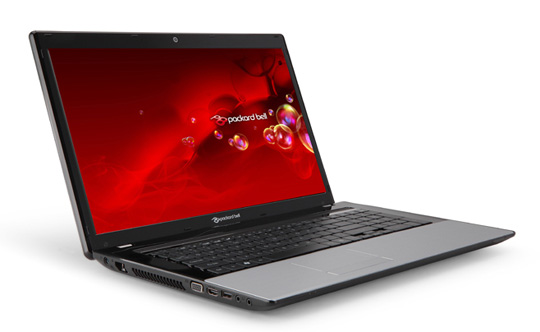
Intel's Sandy Bridge 17in whitebook review sample bore a marked resemblance to Packard Bell's Easynote LM

I have dabbled with Core i5 and Core i7 Sandy Bridge desktop processors and I must confess, I’m mightily impressed by the dynamic overclocking of Turbo Boost 2.0, the power management features and the minuscule power draw. It's a strange experience watching an overclocked Core i7-2600K system running at 4.2GHz as it draws a mere 155W at the mains socket and shreds the Cinebench 11.5 benchmark into tiny pieces.

I had anticipated waiting until late February or March to get my hands on a Sandy Bridge notebook, however, Intel came knocking with an unbranded whitebook that showcases the new technology. This chimera of a laptop is made by Compal yet shows Packard Bell branding on the mouse buttons. At a guess, I’d say that the whitebook is based on the same chassis as a Packard Bell EasyNote LM.

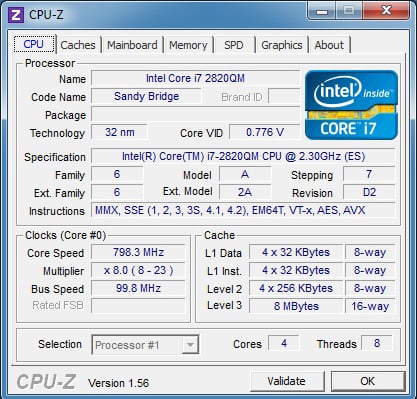
The specification is high end and consists of a Core i7-2820QM processor, an Intel HM67 chipset, and 4GB of DDR3-1600 RAM in two modules that operate in dual channel mode. The machine came preinstalled with 64-bit Windows 7 Ultimate Edition on a second generation 160GB Intel X25-M SSD.
Sandy Bridge whitebook

CPU-Z reveals all

On the face of it the weakest part of the specification of the unit is the Intel HD Graphics 3000 that is part of the Core i7 processor. Despite running at a sprightly 650MHz, the graphics only pack 12 shaders. At 1600 x 900 the screen resolution of this showcase laptop was a little disappointing, not quite managing Full HD .

Next page: Core competency

Battery Drain

Flash isn't necessarily less overall power if you don't account for the amount of work done. If you ran the system full tilt, you would spend less time waiting for disk. This implies more time the CPU spends in an active rather than a sleep state, and therefore at a higher power drain.

To test, you would need an application that has a fixed transaction rate versus time so that the SSD based machine would spend additional time in a low power state.

5
0

SandyBridge or "An study in trifle"

Whatever happened to Intel as we knew it over the years.

First they mess up their ticks from their tocks.

Then they go about releasing the weaklings and pushing the battleships further back in the queue.

Enthusiast Sandy Bridge (i.e. LGA 2011) has been on the cards for ages and yet months before its (intended) release there's nothing in terms of information out there.

Nehalem/Westmere have stayed at the top spot for longer than any other Intel CPU.

And don't start on Intel's Wireless Display or Toshiba's et al. Display Link. Neither do full-HD, their range is pitiful and the delay from compression/decompression means they're useless for anything other than media players. For gaming or other general work, there's (frustratingly) still no beating an HDMI cable on the back of a GPU :(

0
0

^ series chipset, UEFI and battery life

Frymaster - you're quite correct that the 6 series chipset/SATA300 issue should have nowt to do with battery life on HDD and SSD but it isn't impossible so we thought it best to make mention.

Robert Carnegie - I was focussing on the benefits (or otherwise) to the end user. In that context the UEFI implementation in this laptop is pretty damn similar to a BIOS. As for what it does - for instance support for hard drives larger than 2.2TB - well that's a tick in the box and make me pleased however it is invisible to the end user, at least for the time being. It's a bit like reviewing a motherboard and referring to whether the graphics slots are PCI Express 1.0 or 2.0. The standard and data bandwidth are all well and good but do they make your game play better or not? In this case the set-up screen is effectively a BIOS that you can control with the touchpad.

Enki and Irneb

You're both quite possibly correct. The fact is that I came across some strange test results and felt it better to put them on the page instead of sweeping them under the digital carpet. I discussed exactly this theory with Intel using a car analogy about how many miles you travel on a tank of fuel (work done) and how long you take to get there (battery life). If their tech people had come back and said 'yup, that's how it rolls with SSD, more work and less battery' I would have understood. Instead there has been a resounding silence.

0
0

RE: Battery Drain

Exactly! The test was done with using the benchmark in a loop. I.e. each time the benchmark completes it's started again. Now on the Core2 Duo I bet the benchmark was only done about 10% of the times that it ran on the Sandy Bridge (if that). And from the results it seems that the HDD would thus only have been used about 50% of the times, compared to the SSD.

Therefore the read/writes to the SSD would be so much more, while the CPU also has a lot less time spending idle while the disc is performing its function. While on the dog-slow Core2 Duo, the disc was actually waiting more on the CPU - thus you see the opposite happen.

I'd say a better form of battery life testing would be playing a video, opening and closing programs (which could be scripted), running a CPU and / or graphics intensive app, and leaving on idle - then deriving an average from that. That way you'd have comprehensive tests for the widest range of border-line applications, and probably a good average as well.

0
0

Go and find out what UEFI is.

It may look just like the standard BIOS configuration interface, but the point isn't how it looks, it's what it does. Anyway, my HP laptop runs graphical management/diagnostic tools through EFI.

0
0

More from The Register

New Lumia 925: This, loyalists, is the BIG ONE you've waited for
Nokia veep drills high-end master plan for El Reg
Review: HP Pavilion 14 Chromebook
All roads lead to Chrome?
Borked your iDevice? Pay EVEN MORE to have it fixed by Applecare
Or scream at their hapless techies on their forums
Euro PC shipments plummet into bottomless pit of DOOOOM
11th quarter of decline, 20pc drop on last year - Gartner
Report: AT&T dropping Facebook phone after dismal sales
Turns out folks won't buy that for a dollar
Nintendo throws flaming legal barrel at YouTubing fans
All your walk-through vid revenue are belong to us
Which petite model likes a fondle and GETTING WET? Sony's Xperia ZR
Take this new mobe swimming. Just not deep, or for long, OK?