
HTC Desire Z Android Qwerty smartphone
Touch or type
Review HTC may have been making a bit of a splash with its Windows Phone 7 handsets of late, but that doesn’t mean it’s been neglecting its Googlephone products. The Desire Z, features Android 2.2 OS, plus a slide-out Qwerty keyboard and an HD video camera.
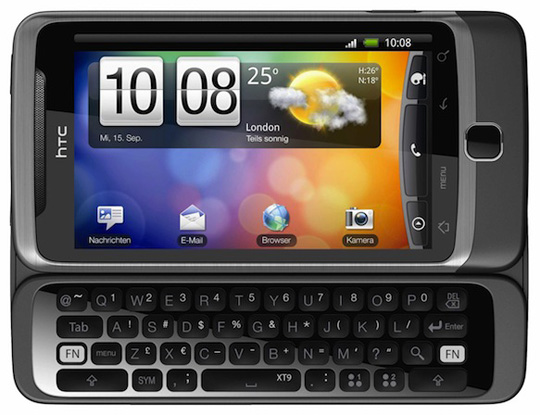
The best of both worlds? HTC's Desire Z
At 119 x 60 x 15mm and weighing a hefty 180g, the Desire Z is not a particularly subtle handset, due in part to its quality metal and rubberised plastic casing, and also the extra real estate of the keyboard.
The 3.7in capacitive touch screen sits above the usual four Android buttons (back, home, menu and search) on a touch-sensitive panel and beneath those is an optical track pad. Around the sides are a volume rocker, camera button and micro USB power/sync port with a power button and a 3.5mm headphone jack on top.
Strictly speaking, the keyboard doesn’t actually slide out, since it’s mounted on a powerful hinge. It snaps out, with a fairly unnecessary amount of vigour, which took me by surprise at first. Delicate it ain’t. A possible cause for concern is the ribbon cable that connects the two halves of the phone which is exposed during opening, which could potentially be damaged as well as attracting dust and other nasties.
As with HTC’s previous efforts, the keyboard is well designed and a pleasure to use, with 43 well-spaced keys made of rubberised plastic. There’s room for a couple of programmable smart keys, however, these can only be used as shortcuts, not for additional typing characters or symbols.
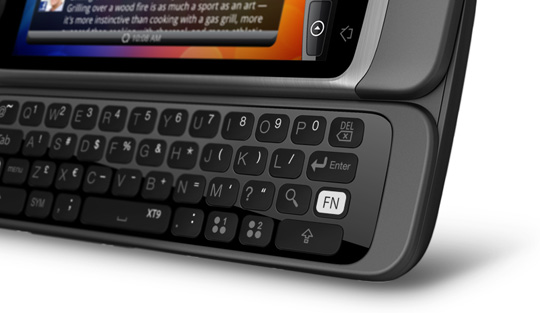
Smart keys are included, but only deliver shortcuts, not macros
Android 2.2 (Froyo) brings a couple of new tricks to the standard offering, including the ability to use the handset as a Wi-Fi hot spot and offering free navigation from Google Maps. Support for Flash video 10.1 is also a welcome addition, and one in the eye for Apple.
Next page: Common Sense
COMMENTS
Aspect ratio of videos
"However, the standard Android media player won’t stretch the film to fit the screen, which can lead to some unpleasant letterbox bars at top and bottom."
That's cos your film will probably be 2.35:1 and not 16:9. In fact, films generally aren't 16:9 at all.
So thank God for the media player showing it properly. I'd much rather the media player showed the film exactly as it was intended to be shown instead of either 1. stretching it vertically (making things look out of proportion) or 2. zooming into it, cutting off the sides in the process.
Make no mistake, watching stuff in the ORIGINAL ASPECT RATIO is better than zoom-to-fit or stretch-to-fit. Borders are hardly an issue and is far better than distorting the image.
@ Jom Coleman
Wow, looking at your post history it's obvious that you really have a bug up your ass about Android. What gives? Did nasty Google nick your dinner money or something?
Good upgrade from G1
I got one of these to replace my trusty old G1 when they came out back in November. So far there are no issues with the hinge or ribbon cable at all, although yes it gets a little dusty but can be carefully cleaned from time to time with a cotton bud or something.
Nearly 3 months on, and I still absolutely love this phone. 800Mhz is fast enough to make the phone snappy and handle Flash content, play Angry Birds et al, but not so fast that it burns out the battery in a ridiculous time - having a decent dedicated graphics chip helps on that score as well.
Syncing contacts with HTC is optional, and more intended as a backup thing. The phone still uses all the standard Android/Google contacts/calendar/mail as the G1. This was a major issue for me coming from the G1, and I'm pleased to say that if anything the Desire Z handles things better than the G1.
I have to admit that it is *slightly* annoying sharing number keys with letters. Day to day usage is no biggie, and you can lock it into Fn mode by double pressing the Fn key to enter a long number, but entering e.g. an IP address is a right pain in the backside because you have to keep switching back to normal mode to enter a dot. But on the plus side, the keyboard is so spacious, when I go back to my G1 it now it feels pokey and very cramped by comparison.
Reply
- Does the keyboard hinge last?
Yes. Had my HTC Desire Z since early December. No worries. Starting to get a little gunky there, though, the same way a PC keyboard gets gunky under the keys.
- Is the exposed ribbon cable really an issue?
Not so far.
- Do I have to sync my contacts with HTC, or can I continue to use Googles offerings?
Use Google's offerings. DO NOT USE HTC SENSE (online services). I did and I was horrified when HTC instantly suggested "friends" that were also using HTC phones. I felt my privacy extremely invaded and instantly deleted my HTC online account. Don't make the same mistake I did.
When the Desire Z came out it had a MASSIVE SMS sending problem - the phone would sit for whole minutes before sending a SMS. It f$#@ed me off no end. Fortunately, before I threw the phone at a brick wall, HTC sent a system update out on Christmas day. Now SMSs get sent in 1-6 seconds.
- How annoying is it having the number keys shared with letters?
Not annoying at all. Keyboard isn't the best but it's not that bad either. Unfortunately HTC are taking their sweet time adding symbols accessible from the keyboard. Before Christmas you couldn't even specify the caret.
BIGGEST PROBLEM WITH THIS PHONE IS LACK OF A HANG-UP BUTTON. You don't realise how serious this is till you try and hang up and find yourself having to navigate a touch screen. Imagine you're in a car, driving, and the brake function is a small button somewhere on your GPS touch screen. You wouldn't drive a car like that, would you? Now would you risk your mistress coming out of the shower during a phone call to your wife without the ability to suddenly and reliably hang up?
Not sure who's being pedantic here...
...you or the author.
Those phones you mention are all manufacturered by HTC for someone else, hence their customer doesn't want the sense software on them.
HTC phones made by them for them include it.
