The Register® — Biting the hand that feeds IT

Feeds
90%
Philips 58PFL9955H

Philips 21:9 Cinema 58in LED backlit TV

The film buffs' telly goes 3D

  • print
  • alert

Review How much do you like your movies? Enough to spend £4,000 on a telly? If so, you’ll find the new 21:9 ratio TV from Philips to be very good value. Not only does it give you the best way to watch widescreen movies in close to native proportions, it has some of the best image quality yet seen. Plus Ambilight, oh and outstanding 3D fidelity too.
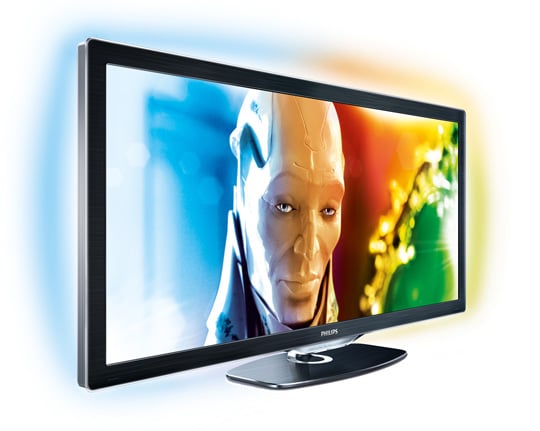
Philips 58PFL9955H

Philips' 21:9 Cinema TV takes the long view:

Let’s get the negatives out of the way first – actually, that won’t take long. It looks weird, frankly, at first. You need to get used to the gargantuan super-wide proportions. Secondly, its greatest strength – near-perfect movie playback – is also a weakness. You won’t always be watching movies and the news looks peculiar when stretched or zoomed to fill the display.

And although this TV truly has cinema screen proportions, lots of DVDs and Blu-rays are formatted to 16:9 ratio, or thereabouts, so the TV has to adjust the onscreen image to fill the TV (which it does very well, by the way).

There’s also the matter of set-up which is notoriously finicky with Philips TVs. Such is the power of the image processing it can easily make content look over-sharp, so filmic subtleties can be lost. Trial and error will set you straight.

Finally, I’d have liked to have seen a Freeview HD tuner in a machine this price, but if you’re this keen on movies you probably have Sky+ HD Or Virgin Media with their many HD film options.
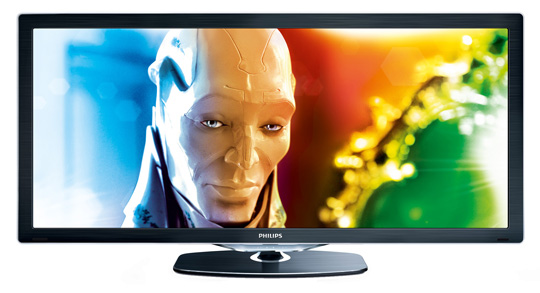
Philips 58PFL9955H

Alas, no Freeview HD tuner on-board

Right, let’s see what’s good. The curved-edge frame with brushed-metal bezel looks pretty classy and the stand is understated but attractive. For its size, the Philips 58PFL9955H isn’t as heavy as you might imagine, though you won’t want to move it around. It utilises the Philips visual menu system, all controlled through the Home button on the remote. Press it and you’ll see a grid of icons including your inputs (PVR, Games console and so on) plus Setup.

Next page: Shadow play

Really?

I'm sorry, I can't take seriously any high-end home cinema review where the reviewer talks in a positive light about zooming the picture to fit the screen. DON'T DO THIS! The bars on the side of the screen are there for a reason and really don't make a difference to the viewing experience.

And besides, for that price you could get a far better projector which throws a picture twice as big, with better colour reproduction and a screen that discreetly hides away instead of overpowering the room when switched off.

6
0
Anonymous Coward

Maybe I'm wrong, but

if you can't get films in the 20:9 ratio, then every film you watch on this TV will be stretched, and therefore a imperfect picture?

5
0

Quality lost?

Explain to me how you would bloat a 1920 pixel wide cinema-scope material to 2560 pixels without loosing some picture quality.

You have pixels XYZ and you need to fit them into four new pixels ABCD.

This TV is a stupid concept. Just buy a bigger 16:9 screen.

2
0

I don't need no stinkin' title!

Ambilight is merely there to hide poor black levels in a panel.

Philips can't build a panel with decent black levels so Ambilight is there to fool the eye.

Did the Kuro have Amblight?

Answer.......no!

1
0

Such is the power of the image processing ...

it can easily make content look over-sharp

So it's the usual crap. Works best when you turn it off.

1
0

More from The Register

Is the next-gen console war already One?
Microsoft’s new Xbox - and more
 breaking news
Apple cored: Samsung sells 10 million Galaxy S4 in a month
Beware of South Koreans bearing Android
US boffin builds 32-way Raspberry Pi cluster
Beowulf cluster built for the price of a single PC
STROKE this mouse to make apps POP, says Microsoft
Windows 8 Start button comes to Redmond's rodents
Nintendo throws flaming legal barrel at YouTubing fans
All your walk-through vid revenue are belong to us
Fairphone goes on sale to all
The Android handset that's PC can be yours

Hands on with Hyper-V 3.0 and virtual machine movement

Our award-winning Regcasts have teamed up with training provider QA for the deepest of deep dives into Hyper-V, including a live demo.

Understand VM movement - just click to play, or go here for a bigger version.