
TomTom Go Live 1005 satnav
Routefinder General
Review TomTom's Go Live 1000 series of high-end PNDs debuted in September in 4.3in form but the recently arrived 1005 model is the first TomTom to break the 5in barrier. In common with the lesser 1000 series models, the 1005 also has a capacitive touchscreen – Fluid Touch in TomTom speak – redesigned map and UI graphics, a revised menu layout and allegedly faster route planning.
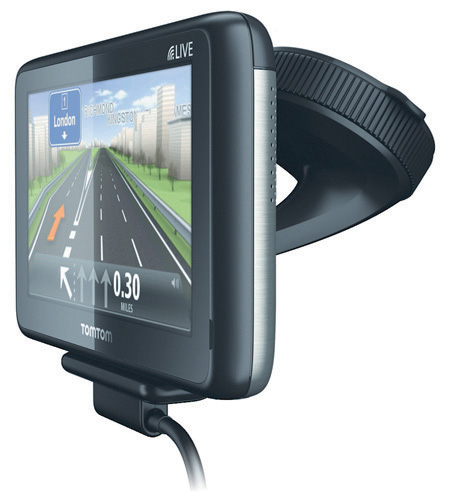
Traffic shaper: TomTom's Go Live 1005
Compared to Navigon's 5in 70 Plus – reviewed here – the TomTom Go Live 1005 Europe is heavier and is a shade larger along all axes. Of course, if you wan't a pocket-portable satnav, you probably shouldn't go for a unit with a 5in screen to begin with. Size aside, it’s a smart looking bit of kit, with a nicely rounded shape and sturdy body.
The gloss finish capacitive screen doesn’t match the resolution of that on the Garmin 3790T and hence isn’t as crisp, and there’s no multi-touch either. Nor is the UI quite as slick but, to be fair, both screen and user interface are better than you will find on any other PND apart from the Garmin.
TomTom's map designs had started to look just a little weary of late, but the restyle goes a long way towards rectifying things. Now with richer colours and better definition, the graphics are much clearer and text easier to read.
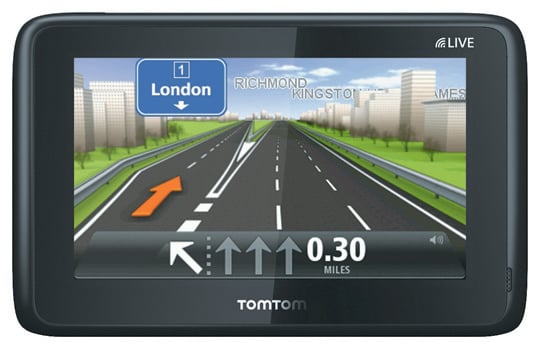
Enhanced graphics are among the improvements
The adaptable data strip along the bottom of the screen has also been re-jigged and now shows information in either one, two or three distinct areas. The 5in screen leaves plenty of room for POI locations, traffic problems and other journey information to be displayed without clutter. The menu structure has also been updated and everything is now laid out in a far more logical manner.
Next page: Eco tour
COMMENTS
Mapping?
The satnav companies do seem to spend a lot developing their devices, but not enough on the mapping. UK sat nav mapping still seems to leave a lot to be desired. Once you get away from population centres and major roads they still have a habit of trying to send you down roads that aren't actually rights of way. And yes a new TomTom tried to do that to a friend near my house recently.
Relying on users to point out mapping errors is a bit rich. And blaming the mapping companies won't wash either, users buy their device and maps from the sat nav companies not the mapping companies. There is no contract between the user and the mapping company.
Date? Time?
Have they managed to get these units to set their time and date automatically yet? This was always a problem with the previous units.
I understand how hard it can be for the coders to find a source for the date and time, given that the units are receiving data from several clocks simultaneously and occasionally have a data connection.
Daylight savings changes sorted? How about timezones - it's not like the use tells the unit what mapset they want to use, or that the units have any way of knowing where they are on the Earth's surface.
Joshing aside, the first few generations of Tomtom were great - head and shoulders above the rest. As the line's worn on i've been less and less impressed.
For example, my most recent unit when calculating a route from Gloucester to Leeds took a minute or so to bring up an initial route. It then took over TWENTY MINUTES to process the HD Traffic info and re-route. By which time I was already halfway up the Fosse, so to speak. Downgrading my unit to the previous major release of the OS helped somewhat, but you shouldn't expect an end-user to have to consider that.
Tomtom were great five years ago and their UI is gorgeous but their development decisions have left me looking for something better considered and supported.
I liked the old ones
I still have my TomTom One V2 and it still works great, I've seen people with the newer devices fail so often (especially the Start, I thought their stuff would get better over the years not worse.

Requirements Checklist for Choosing a Cloud Backup and Recovery Service Provider
Cloud based data management
Agentless Backup is Not a Myth
SaaS data loss: The problem you didn’t know you had
What you need to know about cloud backup