Apple ships Mac OS X 10.6.5 update
Mac Pro RAIDers rejoice
Customer Success Testimonial: Recovery is Everything
As world+dog rumored it would, Apple released its latest update to Mac OS X Snow Leopard on Wednesday: version 10.6.5.
Enhancements include improved Microsoft Exchange reliability, a variety of performance and stability improvements, security fixes, a couple of Bluetooth tweaks, and — in answer to some Mac Pro owners' prayers — systems with a Mac Pro RAID Card from early 2009 can now be put to sleep.
And, no, we don't mean with a bullet in the brain, we mean at Apple Menu > Sleep.
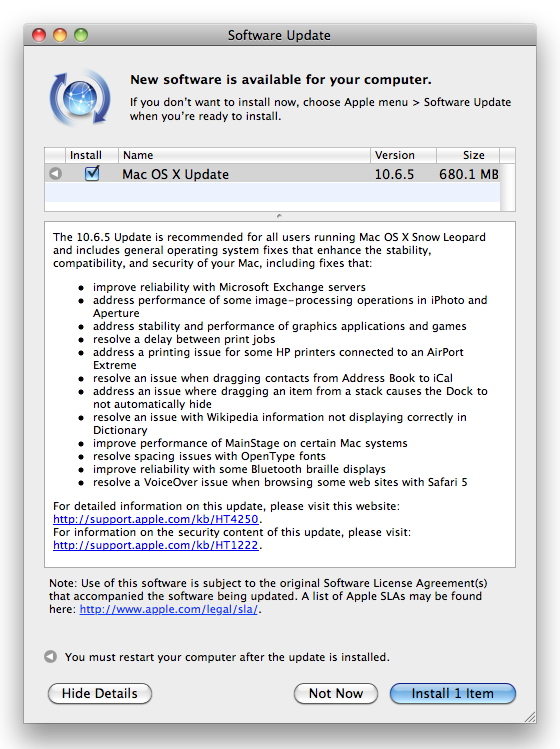
Remember, update sizes vary from Mac to Mac — this one is for a 27-inch iMac
10.6.5 also comes with a ton of security fixes — by our count, for 134 separate vulnerabilities in everything from Adobe Flash to MySQL to Apache.
You can find more information on the update at Apple's About the Mac OS X v10.6.5 Update page. You should also soon be able to download the installer from the Support Download page. As is Apple's tradition, updates to that page trail the release of the updated OS — which you can obtain by simply going to Apple Menu > Software Update and letting your Mac take charge.
And remember, back up before you update — but you're a Reg reader; you already knew that. ®
Regcast training : Hyper-V 3.0, VM high availability and disaster recovery
COMMENTS
Backup
Assuming you're using Time Machine (and why not), then yes - it just works.
Stanford U sees PGP disk encryption corruption issue with 10.6.5
Here's the email I received today:
Subject: Serious Compatibility Issue with SWDE/PGP Whole Disk Encryption and OS X 10.6.5
Date: Wed, 10 Nov 2010 16:45:21 -0800
From: Jeremy Tavan <jtavan@stanford.edu>
To: netadmin@mailman.stanford.edu, partners@mailman.stanford.edu
Partners, LNAs:
Today Apple released an upgrade to version 10.6.5 of MacOS X. IT Services has become aware of an interaction between this upgrade and the PGP software used in the Stanford Whole Disk Encryption service which renders PGP-encrypted machines unbootable following the upgrade to 10.6.5. Machines which no longer boot as a result of this upgrade can be fixed by following the instructions in section 1 of https://supportimg.pgp.com/guides/Tech_Note_PGP_WDE_Recovering_Data_Mac_OS_X.pdf
Please let your SWDE-using Mac users know that they should NOT upgrade to 10.6.5 until this incompatibility is resolved. PGP support is aware of the problem and will keep us informed of their remediation process.
If you have any questions or need any assistance please submit a HelpSU Request: https://remedyweb.stanford.edu/helpsu/helpsu?pcat=WholeDiskEncryption
--
Jeremy Tavan
Stanford University IT Services CRC

IT infrastructure monitoring strategies
Agentless Backup is Not a Myth
Top 10 SIEM implementer’s checklist
Steps to Take Before Choosing a Business Continuity Partner
Enabling efficient data center monitoring