
Apple MacBook Air 13in late 2010
Boots in a flash, but you'll need a lot of cash
Review When Apple introduced the MacBook Air in January 2008, one of the biggest price hikes in its build to order options was the choice of a 64GB SSD. Those with slightly shallower pockets for this slimline ultraportable wouldn’t hesitate to opt for the 80GB hard drive version instead. Yet if you’re tempted to take the Air today, you’ll have no choice apart from capacity, as it’s SSD all the way.
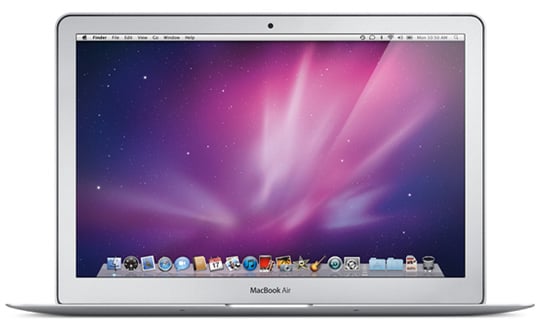
Light breeze: Apple's MacBook Air 13in
Indeed, the finely tapered wedge that is the new 13in MacBook Air is thinner and lighter because of this. With no need to make room for a hard disk, Apple discards any SSD enclosure and mounts the naked flash chips above motherboard. It’s a move that has just about all the circuitry covering a third of the base at the fat end of the wedge, with the rest given over to the battery cells. The 11.6in model is fitted with a 64GB or 128GB SSD, but the 13in model has either 128GB or 256GB capacities.
So if you’ve glanced at the spec and noticed a few similarities with the previous Air, then the main changes Apple is flagging up here, besides tweaks to size and weight, are battery life and startup times. With the latter, from sleep it’s ready to go within moments after the lid’s fully opened, and booting from cold, the digits on two hands and on foot should suffice to count the seconds.
When trying to marry concepts in both the Mac and the iPad, Jobs and co. were at great pains to point out that touch devices work well as a pad (be it a trackpad or bearing down on a touchscreen) but not on a vertical computer display. Fatigue plays a part, and I have to say I’ll go along with that. So the new Air gets the same sized glass trackpad as the MacBook Pro range.
This single clickable pad supports multitouch gestures to perform a range of tasks. Press with two fingers and it’s a right click, but if you just drag, it scrolls in any direction. A four-fingered swipe allows you to switch between apps, but swipe down and Exposé kicks in to show all open windows in miniature, filling the screen. Once you get in the habit of using these gestures, it feels like an imposition when moving to more conventional trackpad arrangements.
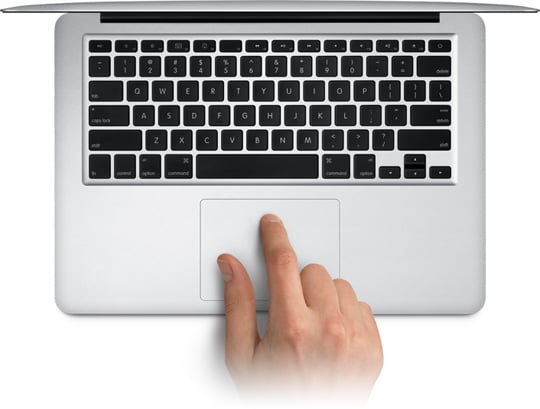
Ultra portable, yet retains a full-sized keyboard
The full-sized keyboard featured on the new Air has foregone the backlighting of previous models, which no doubt impacts on cost and battery life. With the key dimming function keys now absent, Apple has the far right function key performing the power on duties. Gone is the flush circular power button in the body, which, while a bit of surprise, is certainly no great loss.
COMMENTS
This should be fun...
I shall offer a prize to the first person to post that their laptop is 50 times faster and only cost 12 shillings and sixpence...
More instant on
Well, Linux and OS X wake-from-sleep times have always been pretty good but these laptops will usually be compared to Windows laptops, and the Windows wake-from-sleep is a stuttering mess in comparison.
I can easily use my MacBook Air on my lap. Actually that is one of the key reasons I bought it--better LAPtop computing experience. My MacBook was heavy enough that it became uncomfortable to use for more than an hour or so at a time, and it would also get hot enough under load that it became uncomfortable. And actually once it had warmed up for a while it was a little too warm for me. So the MacBook Air is light enough and cool enough that I enjoy using it on my lap for hours at a time. I don't know why you can't seem to keep yours from shaking around while using it. Might want to consult your doctor about that.
Well....
bugger me backwards with a bargepole!
A reasonable group of comments with no WinTards thinking they are gods gift for picking something a tenth as good for a third the price!
Okay, you can take the bargepole out now!
Agree on value
I've long looked at MacBooks and even Macs in general, and could never quite pull the trigger except on two base spec iMacs (one in 2005 and an upgrade in late 2009) which I bought for my wife. Reason being that I do at least want *some* value for money, and in the higher-end models and until now MacBooks you are paying quite rip-off prices (hundreds of EUR for slightly smaller screens or 10-20% increases in CPU speed anyone?). And that's coming from someone who grew up (starting as a 5 year old) with the Lisa and later Macintosh (which taught me my love of all things computer).
So I spent the last couple of years with a 4 kg Dell 17" laptop (rather desktop replacement), dreaming about the day Apple would deliver a good value for money laptop. Then the new Air came out, and I ordered a 13" with 4 GB RAM upgrade the same day. Is it good value if you purely look at the raw 'technology' specs? Not really, at least it's no better than the MacBook Pro's which I passed on until now. No, where the real value is with this machine is the design and useability. In there are attributes which the MacBook Pro's also have, but complete that with the miniscule dimensions (given size of an USB port and 13" screen they physically could not have made it any smaller) and 'instant-on' (which really is an eye opener to me) and you just have a package that as whole is so 'right'. But most importantly based on the engineering challenge which I'm sure was involved (and probably written off over the first gen MacBook Air) I think it's actually great value.
I've been using mine for 3 days now, and already I can't imagine that in the next 5-6 years there would be anything I'd want to replace it with as my general-purpose leisure computer. That too makes it good value. Sure, eventually it won't be able to run the latest/greatest games anymore (something which remarkably it is actually capable of doing today, which is amazing when you put it next to my 3-year old top-of-the-line Dell which can't outperform it), but with the 4GB RAM upgrade I figure I'm safe for browsing, mailing, office tools, etc. for a very long time. And it's not as if they are going to release a version that is significantly lighter or smaller (laws of physics and all that).
In fairness...
2-3 seconds would be waking up from hibernate - deep, deep, deep sleep. Waking up from normal sleep is quicker than blinking. At any rate, it's quicker (by far) than opening the lid of the laptop.
Mine (a fully maxed 13") is on order (after extensive testing of a demo unit). I was deeply impressed - so much so that I decided not to buy a 'Pro after all. Mine will mostly be used for coding (Mac and Windows), Office, 'Net and Email, and (almost certainly) Civilization V.
Woot!
