The Register® — Biting the hand that feeds IT

Feeds

The changing face of branch offices

Hot workers, hot desks, stressed IT?

  • print
  • alert

Workshop It is not only data centres and computer rooms that have started down the path of the “strategic consolidation” of resources. Whilst organisations rightly rate their people as amongst their most valuable assets, many have also begun to optimise the accommodation that they make available to their workers.

The shift to “hot desking” for staff who are not routinely based in an office began even before the economic crisis of the past couple of years accelerated the need to rationalise facilities costs.

Today, with desk sharing in head offices becoming almost a matter of course, many organisations are looking to “streamline”, i.e. reduce, the cost of running their remote and branch offices. What impact are these changes having on IT systems and the support delivered to remote office-based workers?

All consolidation initiatives start off with the goal of saving money, and whilst few organisations possess accurate figures on the true cost of supporting IT operations in remote locations, many are aware there are real savings to be made. A primary indicator of this is that today, few remote offices / branch offices contain skilled IT support staff on site. With no-one available to help users locally or to carry out routine maintenance procedures, the onus has shifted attention to remote management of systems. And as everyone knows, it is usually the systems operated by end users that require most hands-on support, namely desktops and laptops.

It is fair to say that whilst desktops, laptops and printers form the bulk of devices to be supported in remote locations, most offices in the past may have held several servers, printers and no small amount of storage. Following on from server consolidation projects in HQ, many organisations have subsequently undertaken similar projects in their branches. In some scenarios it may have been possible to completely remove most servers and storage systems from the branches, perhaps by the utilisation of WAN optimisation technologies, to allow users to keep response times within acceptable levels. This has also left the sometimes tricky conundrum on how to provide effective and secure local printing capabilities.

Where this is not possible, it may be an option to run just a single, more powerful server in the remote office by using virtualisation to run several servers locally in the office but making the remote support of a single physical server more manageable. Using remote control and monitoring tools coupled with automatic data protection and replication technologies to stream backups and snapshots over the network connection in “trickle mode” can help to make this more manageable and reliable, not mention cost-effective.

On the desktop side, similar remote control tools can help central support staff better assist users in the remote location, especially when automatic software deployment and asset management systems are in place, to get corrupt software operational quickly. Another approach is to take a “thin client” approach to desktop services, thereby effectively running most applications back in the nice, secure and manageable data centre.

Today the advent of desktop virtualisation solutions offers a far wider range of options that extend the ability to run remote desktops to a much broader community of users without adverse user reaction. More importantly, these solutions also offer potential cost benefits, as well as opening up the potential for far more systems to be “fixed” without having to send IT staff to the site.

Remote locations do require specialist support tools but, much more importantly, they also need IT support processes that are tailored to meet the particular demands and expectations of users in these offices. Even with good support technology and processes, it should still be remembered that for end user support, calls usually occur when something has gone wrong. As a result, the end user in the remote office can be more than a little stressed and in these circumstances it is amazing just how effective it can be when the help desk staff have a good “telephone manner”. Indeed, experience shows that good interpersonal skills help get problems resolved more quickly and, not coincidently, the user’s perception of IT as a whole can be elevated dramatically. The personal communications factor is even more important to users at the end of a phone than it is with a desk side visit.
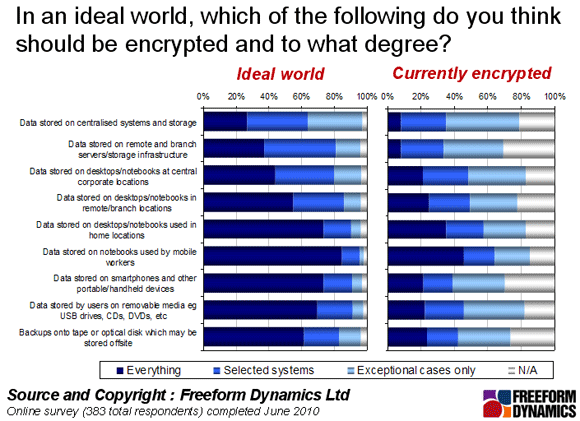
Another factor that is forcing its way up the branch office IT agenda concerns the growing need to secure the data held on systems in remote locations, some of which may be located in neighbourhoods where office break ins may be more common than at HQ, and where security may not be as comprehensive. The results highlighted in the figure above show that whilst the need to encrypt data in remote locations is widely recognised, the actual level of protection achieved leaves something to be desired.

This is an area where legislation, regulation and customer expectations will increasingly add pressure on organisations with remote workers to ensure that sensitive data is protected robustly. It is therefore a topic in which organisations who do not have adequate encryption and data protection / data recovery systems in place will need to expend time, money and skilled resources in the coming months and years.

Remote offices are changing. Hot desking is making the job of IT to support users in branch offices more challenging, especially as IT professionals are removed from such locations. Automation, virtualisation and remote monitoring and control are the order of the day to keep such offices functioning effectively and without breaking the bank. ®

Old news

I worked in Germany in 99' 00' and we had remote offices all over the country with visiting support . Also supported a lot of home users. We got around the problem by shipping them computers that worked. Plus a user base that didn't usually mess around with their works laptops.

Took a bit of testing and I credit the reliability to solid adherance to writing good procedures which were rigidly followed by the remote, visiting engineering staff. Typically it paid off and the more usual issues we had were the much rarer hardware failures ... as opposed to todays software issues, OS updates that brick the machine, badly written applications thrown together, etc.

I got a phone call one day from a home user. I'd built and sent him his laptop and it worked so well for him, that he telephoned me in Muenchen to thank me. I was on cloud 9 all day. I love it when hard work, where it counts, pays off.

1
0

Well, yes, it is a bit

However, I'm deliberately not blaming the Microsoft technology in-and-of-itself. The built-in design assumptions that are now failing those protocols, are exactly the assumptions that were sensible to make, at the time they were first developed, over a decade ago. (True, the complete lack of effort, by the vendor, to update them is what lies at the heart of quite how awful it is, of course, but even the best efforts would not have addressed the core of the problem. I really don't think any completely stateful networking protocol makes sense, over such ranges.)

This is why I made my fairly flippant, but entirely valid, point about HTTPS web-based systems being used as a quicker and more reliable means of data exchange within the business. There isn't a strategy dictating it's uptake; there's just a need.

One of the reasons we still connect to some of our machines using PuTTY, here at work, is that an established PuTTY session will always keep responding, even when the machine it is hosted on is completely frozen. Since this Dell laptop can freeze for upwards of ten seconds if I accidentally click on some HR share, that I don't have permissions to (while it relays this message back to me, from Vienna, or Madrid, or wherever), the temptation is to proceed with the assumption that what you are using is a truly "multi-tasking operating system" and try to give it something else to do while it waits.

This id a Bad Idea, since it completely jams up it's buffer, with extraneous requests for work, that its hasn't the processing power to cope with. Its task priority was built for an age where a simple permissions message didn't have to cross mountain ranges and great stretches of sea water, just to tell you "you can't come in". And Microsoft are the world's great optimists, of course: they always prioritise the displaying of error messages right to the top of the pile (as I say, where I work, even our bollox-ups have to undertake journeys that would make Bilbo Baggins flinch.)

So we learn to just switch to one of the PuTTY sessions and get on with something more productive in the mean time. We have two or three screens, as standard, anyway, so you just request some action from the Windows box, that will cause some visible change on one of the other monitors, when the queue finally clears, and in the meantime you get on with something more useful in the PuTTY session.

Ah yes, green text on a black background. Welcome to the twenty first century: please form an orderly queue... However, if the damn machines themselves can't task-switch with any grace, then I guess we'll just have to (I've become much better at marshalling myself, than I ever was in C++).

Ultimately, this points to hardware hypervisors, and Chrome-like operating systems, of course. But I restate my point. The problem isn't the Microsoft: it's this whole "desktop operating system" thing, which is failing us. The relaying of computing work backwards and forwards - when all I need to see is the outcome - is where the waste comes in.

This isn't the future, of course; it's the past - since it's just a dandified version of the old client/server mainframe world. However, if it makes me more productive, because my productivity falls back to below the levels of the machines I use, then I'll be happy.

(Our motto at work is: "You wait around for ages because the bus-errors arrive in threes".)

0
0

Wow.

@Daniel1, that sounds absolutely ghastly. I can't say it's really feasible, but a minute penalty for clicking on the wrong share? This really sounds like a setup that needs the remaining Microsoft stuff taken out.

0
0
Anonymous Coward

More expensive to host centralized data?

That all depends on the network costs, and while I don't see the network quotes for my clients I can say at least anecdotally that they appear to have been dropping significantly in the last 5-or-so years because most of my clients are aggressively consolidating/centralizing and it's not because their costs to manage distributed infrastructure have gone up. Larger branch offices might maintain a local domain controller and file and print server (sometimes on the same server), but pretty much everything else runs over the WAN (which, if you're talking Microsoft definition would probably qualify as a Private "Cloud" or sorts). Other than network, and back in the day server capacity issues in the old NT 3.51 and 4.0 days, it has never made sense for infrastructure to be highly decentralized primarily because you're wasting hardware and software costs with some amount (if not major amounts) of over-allocation for the smaller sites (ex: a small F&P server capable of hosting 100 seats only serving 30)... to say nothing of the management costs for having to deal with more smaller boxes vs. fewer larger ones.

0
0

It really stresses your network protools

When you run networking over such vast distances - especially Microsoft technologies, which simply weren't written to cope with this sort of scale, you really start to notice the latency. I'm here in North Tyneside, and I have mapped network drives to iSeries servers located in Brussels. You really do start to see how much NTFS and SMB/CIFS fails to cope with this scale of networking over that sort of range (bearing in mind that iSeries doesn't even run Samba, but IBM's own breed of CIFS-emulation, called 'Netserver'). Sometimes its actually easier to open a stunnel and TS or VNC into a machine in Belgium, if you only need to take a look at something, rather than connect to it direct.

There is an estate of hundreds of physical and virtual servers, spread all over Europe, where I work, and if you should inadvertently click on the wrong folder, or server, your machine will completely stop responding for over a minute, while it dicks-around updating it's MFT.

In our case, a lot of this consolidation is driven by legislation, which either requires the sensitive data, we handle, to be held in ever more secured and centralised locations, or simply makes it uneconomical to do otherwise. Only two people in IT, here on this site, actually have access to the room which holds our few remaining on-site servers (and these are test servers). Laughably - again for legal reasons - one of them only has access, because he's the Fire Warden.

More of our sites are using these throw-away solid state devices for local file-and-print, because it is so much easier to manage and replace the things. Over longer distances, ad-hoc deployments of Sharepoint and Wikkis seem to be getting adopted (hooray, the 'cloud' has arrived). HTTPS actually beats dedicated networking protocols over these sorts of distances (or, at least, networking protocols and file systems, that were designed in the days when ten computers, sharing coax was a 'network', and half a gig was a 'big' hard drive).

0
0

More from The Register

Android is a mess and needs sprucing up, admits chief
Can Google really fix it? It isn't in control any more
New Lumia 925: This, loyalists, is the BIG ONE you've waited for
Nokia veep drills high-end master plan for El Reg
Android device? Ooohhhh, you mean a Samsung phone
Koreans nabbed nearly all the Q1 profits – more even than Google
Review: HP Pavilion 14 Chromebook
All roads lead to Chrome?
Borked your iDevice? Pay EVEN MORE to have it fixed by Applecare
Or scream at their hapless techies on their forums
Euro PC shipments plummet into bottomless pit of DOOOOM
11th quarter of decline, 20pc drop on last year - Gartner
Report: AT&T dropping Facebook phone after dismal sales
Turns out folks won't buy that for a dollar