The Register® — Biting the hand that feeds IT

Feeds
80%
HP MediaSmart Server EX490

HP MediaSmart Server EX490

Home backup goes large

  • print
  • alert

Review Beyond the entry level market for NAS (network attached storage) there is the kind of buyer who has big server requirements within a small operation, and thinks they might get a great deal bigger later on. That's who HP's MediaSmart Server EX490 is aimed at.
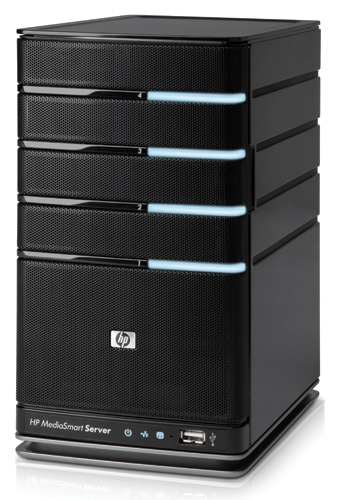
HP MediaSmart Server EX490

HP's MediaSmart Server EX490: looks like a hi-fi speaker, but much quieter

Except that it's a curious market segment: these buyers might be running a small business with multiple computers, or they might be domestic users who want something to maintain their rapidly expanding media library and drive their home entertainment setup. To its credit, HP has created a product that should satisfy both types of buyer without sacrificing power or ease of use.

The MediaSmart Server EX490 stands 24.8cm tall, 14cm wide and 25.1cm deep, encased tastefully in black with a cage-like metal grill mesh at the front and rear. Four bar-shaped lamps indicate the presence of hard drives inside, although only the bottom one is lit. The front swings open on hinges like a door to reveal four 5.25in hard drive bays in a stack, the bottom one being filled with a 1TB drive.

The idea is that, as your storage demands increase, you can simply add more SATA drives one by one. The unit allows hot swapping so you don't have to shut down the server entirely in order to add or remove a drive. Each bay is accessed by swinging out a handle and pulling out a tray in which the drive sits. To fit a new drive in an empty bay, you would pull out its tray, snap the drive into it (no screws required), then slot the tray back in until it locks. It couldn't be much simpler.

Unlike other multi-bay NAS products, the MediaSmart Server EX490 does not support conventional RAID options. However, you can set up what HP calls 'disk duplication' between pairs which works similarly to a RAID 1 array: if one of the disks fails, its duplicate continues to operate without interruption. For this, you will need two or four identical drives, and the duplication means you can only make use of half their total capacity.
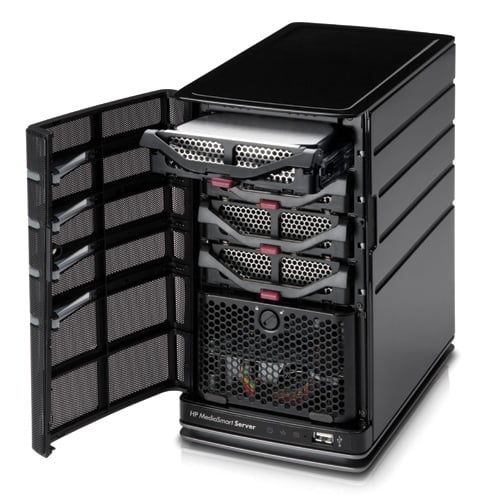
HP MediaSmart Server EX490

Hot swappable drives

Further storage devices can be added externally, either to expand server capacity or to back up the server content. To this end, one eSATA port and three USB 2.0 ports are fitted at the rear of the unit, and there is a fourth USB 2.0 port accessible at the front. For even more expansion, you can connect a SATA port multiplier rather than an eSATA drive directly. These are pretty good storage expansion options for such an affordable little product.

EX495

Like the other commenters, I love this thing. You can't do what this box does in a free solution. You get backup deduping and bare metal restores that are rock solid. I had a drive loss on a RAID 0 set over the weekend. Bought a new drive, did a restore and I was back up in a few hours.

I also agree with the first poster that a lot of the remote access funtionality was left out. It is also a terminal server gateway, so you can Remote into any RDP capable system from anywhere.

The drive pooling is works great too.. there's no performance benefits to multiple disks, but for large cheap storage it works great. I'm at 12TB.. The early boxes EX475 and the newer boxes EX495 support SATA mutipliers, so an external drive cage via ESata port is also an option for expansion.

3
0

Errors

'For this, you will need two or four identical drives'

This is not required on Windows Home Server, only that you have sufficient space to store a duplicate somewhere. The disks you use can be any size you want.

3
0

Great bit of kit

I've had an EX470 which was an earlier version with a little less processing power and ram. I threw in a 1GB stick and its been fine since.

In respect of some of the other comments though, its method of drive pooling (and per share configured file duplication if you want it) is not as good as raid in some senses but this is a home server and it does allow you to use whatever drives you have spare. Another upside is each drive is readable in its own right and should your server get trashed you can plug a drive into any windows box and access the files, although this will be lost in the upcoming version of WHS which uses a new filesystem instead of NTFS. Also the OS and all configuration sits on the first drive. You can upgrade it but if you plan to do so i recommend replacing it before you start loading data onto the server.

You probably could put Linux on this but its a headless server there is no monitor connection unless you look up the hacked together cables that some people have made. Its built/rebuilt via a network enabled imaging package. This might cause you some difficulty in actually getting Linux on there or troubleshooting it if you have an issue

Pros: You can run windows services off it, I have mine configured as a shared print server, bind DNS server (because ISP dns servers are flakey), Teamspeak3 server for gaming, it also runs uTorrent and i've even put a dedicated game server or two on there at times. HP also build there hardware to be friendly to being taken apart and dont invalidate your warrantee if you want to upgrade the RAM. I bought mine as an ex-display with no drives, drivetrays, cables and no software. I had my own spare drives and cables and HP sent me out drive trays and software for free. The remote access works great if you make sure your router is forwarding the ports correctly

Annoyances:

Its features list being able to stream your video files but this is not done via on-the-fly conversion. Instead it runs a video converter that will create streamable copies using up additional space. It does this by default for your entire video library which is downright annoying. Also the media sharing options are a bit all over the place. Itunes/Windows Media/Inbuilt uPnP media server are configured separately and the windows media network sharing service is just a horrible performance killer

Overall though, its a cut down windows server and that has advantages. Disable the stuff you dont like and enjoy the fact that your high powered gaming rig doesnt need to be online all night for the sake of some low speed downloads that you want to leave running, Not to mention offloading your storage onto one of these means you dont need masses of storage on your PC and can switch to SSD disks

2
0
Anonymous Coward

le grumble

This was looking promising until the WInders part. I don't have any 'doze anymore, and wouldn't want to pirate some just for this. A shame, looks like a nice unit, otherwise.

2
0

So far so good

So, i agree with a lot of comments, that this review now, is rather "late" for this particuliar model. But, since I really did not have the budget for more that what this model costs and could not afford to have a solid backup solution (at least better than I had), this thing is amazing.

It arrived yesterday and although i have not done the backup of my pc yet, i have most of it all figured out. It really is ready to go.

One feature I love, is the backup to the backup. I had ext 1tb drive taht the power supply went out on. That drive happeded to have a lot of pictures in which i had no other copy. I simply took the external apart, popped the drive in, designate it as a backup and retain the data and i was good to go. I remoted in to the Server and am in the process of copying the data to a new external now.

the price of the unit with the ease of getting to that day was worth it alone.... now once i play with the media server stuff, i bet i'm really going to be happy.

1
0

More from The Register

The iWatch is coming! The iWatch is coming!
Reports: Apple's wrister to have 1.5-inch OLED, test units being built
MYSTERY Nokia Lumia with gazillion-pixel camera 'spotted'
With 20Mp sensor - NOW will you try Windows Phone 8?
US boffin builds 32-way Raspberry Pi cluster
Beowulf cluster built for the price of a single PC
 breaking news
Dell's PC-on-a-stick landing in July: report
Wyse up, suckers, could this be a new set-side-stick?
Review: HP Pavilion 14 Chromebook
All roads lead to Chrome?
Borked your iDevice? Pay EVEN MORE to have it fixed by Applecare
Or scream at their hapless techies on their forums
Euro PC shipments plummet into bottomless pit of DOOOOM
11th quarter of decline, 20pc drop on last year - Gartner
Review: Sony Xperia SP
The new mid-range marvel? Oh yes.