
Sony Ericsson Xperia X10 Mini Pro
Keyboard gives the edge?
Agentless Backup is Not a Myth
Review Sony Ericsson reckoned it was on to a winner with its impressive Xperia X10 handset, which in one swoop helped us to forget the pain of flawed Xperias past. Then it squeezed the formula into the tiny palm-sized X10 Mini - reviewed here - which offered smart functionality in a handbag-sized package.
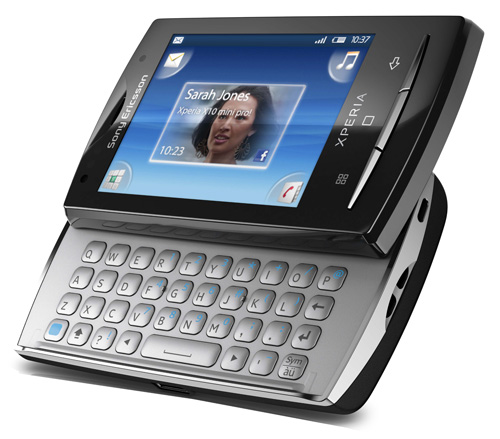
Sony Ericsson's X10 Mini Pro: keys to the kingdom
And now there's the Pro version. The word 'Pro' is just Sony Ericsson's shorthand for a Qwerty keyboard - we've seen it before with the Vivaz and Vivaz Pro - and, sure enough, this is more less an X10 Mini with a slide-out keyboard, though there are a few other differences.
Of course it's a little bigger - 90 x 52 x 17mm as opposed to 83 x 50 x 16mm - but the 2.5in, 240 x 320, 16m-colour capacitive touchscreen is the same, as are the three slivery buttons below the screen for back, menu and home. It doesn't come with the Mini's choice of colourful back covers but it is available in red, black or white livery.
The micro USB power/sync port has slid from the bottom to the side, while the 3.5mm headphone jack - with an additional slot attached, designed for future accessories like an external speaker, apparently - has helpfully moved to the top to nestle next to the power button. Volume rocker and camera shutter button are now black instead of silver but remain on the side.
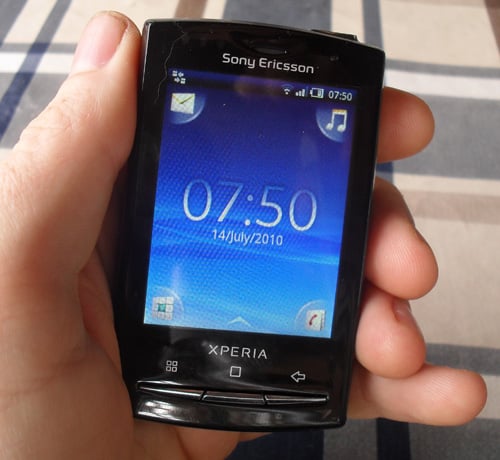
Barely a handful
The back features the same rubberised plastic and the same 5Mp camera lens with LED flash. Inside, there's a conventional replaceable battery – something that isn't available with the even more titchy X10 Mini.
COMMENTS
As someone who has this phone . . .
. . . and has been using it for a couple of weeks, some of the points in the review are a little off.
The time to get the screen on, for me, is a second or two - which, until the review mentioned it, I hadn't even noticed. It's that much of an issue.
The browser zooms by tapping the screen. Granted, the browser that comes with the phone isn't the best, but isn't the point of smartphones to be able to get other tools to do the job ? Mine now has Opera as default and it is much better than the supplied browser.
The keyboard, for me, is an absolute joy to use. I've had a touch screen phone for a couple of years and have never got used to a touch screen keyboard, it's been the bain of my life. The fact that almost all phones were going down the route of touch-screen only was really pissing me off. I was looking at an HTC Droid, but the size was putting me off - I don't need a screen that large on a phone. As many have said, the whole point of Android and it's myriad options, is that manufacturers can make different types of phone for different markets/people - this keyboard will not be to everyones taste, but for anyone like me who's been searching for one, it's ideal.
The only big problem is the battery life. I use it reasonably heavily, including firing up GPS to track cycling times, speed etc on SportyPal for over an hour each day. The battery will last about 36 hours of my level of usage, when you take care to switch off GPS when not in use and make sure you aren't leaving app's open unnecessarily - it's not good, supposedly the switch to Android 2.1 improves the situation. However, given it's a standard micro-USB connection, I don't find it a huge deal to recharge each night plugged into my PC.
2 quick points
1. I have an HTC touch pro with swype installed as a software keyboard. Swype is NO match for a hardware keyboard if doing serious typing e.g. note taking in educational meetings, need to touch type, accuracy
2. 80% for a phone still running android 1.6 (and a customised version at that) with no mention of a planned upgrade to 2.1/2.2 PLUS all the other misgivings!?
Could do better
The review together with the 80% rating show what a low standard is expected of smartphones. I suspect that an Apple phone with these bugs would get a lower rating. Still, fixing it is a simple matter of software ...

IT infrastructure monitoring strategies
Agentless Backup is Not a Myth
Top 10 SIEM implementer’s checklist
Steps to Take Before Choosing a Business Continuity Partner
Enabling efficient data center monitoring