


This article is more than 1 year old
Universal Tech MyXerver Pro MX3800
World's first wireless Nas, apparently

Review It was only a matter of time before someone thought of putting Wi-Fi connectivity into a network-attached storage (Nas) drive for small networks. Come to think of it, we must have thought of it at least three years ago, but at the end of last year, Universal Tech lay claim to being the first to bring the idea to market.
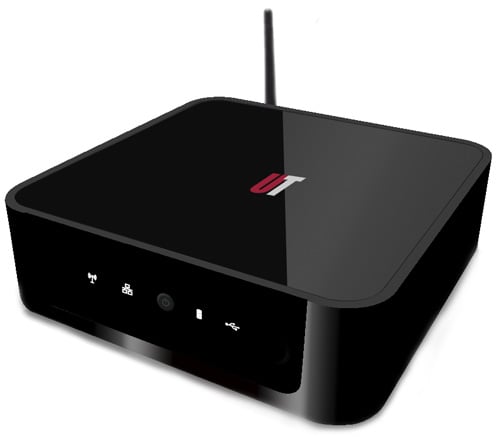
Wi-Fi and Nas make a baby: MyXerver Pro MX8300
The MyXerver Pro MX3800 is built inside a compact 178 x 178 x 55mm case that is reminiscent in size and appearance of an Apple Mac Mini. You can choose between white, grey and black models: we reviewed the latter, referred to rather fancifully as ‘Piano Black’. The company website indicates that you can also pick from a range of hard disk capacities between 500GB to 2TB, which made our 250GB review model seem out of place.
The versatility of a wireless Nas in a typically cluttered small office or digital home environment is welcome. You can locate it just about anywhere within the full Wi-Fi range of an existing wireless router, for example, rather than having to keep it nearby a physical hub/switch.
Doing so could extend your Wi-Fi reach within the building, employing the MyXerver Pro as a supplementary access point. Alternatively, you could just plug the device into an existing wired network (or directly attach it to an Internet modem) to create a new Wi-Fi network, complete with DHCP server.
Note that you will need to connect the MyXerver Pro MX3800 to an Ethernet network in order to configure it for the first time. Once you have enabled the Wi-Fi function, the device is fully accessible wirelessly via its built-in web interface.
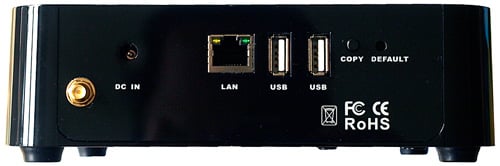
Having two USB ports allows you to dedicate one for printer sharing with the other free for an external backup drive
Unfortunately, the web interface is not as user-friendly as its pop-up icons initially suggest. For example, we could not work out how to convince the gigabit Ethernet port to operate in gigabit mode: despite being connected to a gigabit switch, it defaulted to 100BaseTx and refused to budge.
 Biting the hand that feeds IT

