


This article is more than 1 year old
Dell Latitude XT2 XFR ruggedised laptop
A tablet to take for the rough and tumble

Review Dell’s XT2 tablet PC has been around for just over a year, and now the company has come up with a fully-ruggedised version in the form of the XT2 XFR. Able to withstand drops, freezing temperatures and rain, it’s primarily aimed at those who have to cope with something a little more testing than a daily commute on the train.
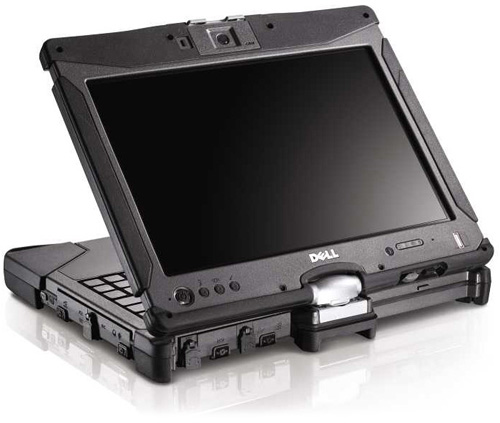
Hard as nails? Dell’s fully-ruggedised XT2 XFR
With a sturdy, rubber-edged chassis, the XT2 XFR has much in common with similar ruggedised laptops from the likes of Getac and the Toughbook range from Panasonic. One of the downsides of these designs is that they tend to look almost toy-like, and the XT2 XFR is no different.
All ports round the edge are covered up by small waterproof doors, while a catch at the front securely locks down the lid. At 2.7kg, it’s fairly heavy for a tablet, but that’s to be expected given its robust nature. On the underside the 42Wh battery is removed by unlocking and releasing two catches – take it out, and a 128GB Samsung SSD is also revealed.
The 12.1in flip-and-twist screen (1280 x 800) is a capacitive multi-touch display, and Dell supplies a stylus that slots neatly into the side of the chassis. Being bright and lacking a glossy coating, the display is also perfectly suited to outdoor use. It welcomes finger prods, but if you whip the stylus out it’ll ignore them, so if your palm touches the screen your scribbling won’t be interrupted.
Inside, the keyboard is comfortable to type on and Thinkpad fans will appreciate the nipple control sat in the middle. The touchpad seems unnecessarily small, though, and the rubber buttons are awkward to use.
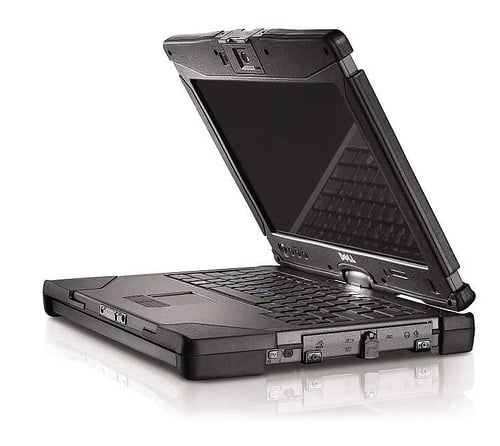
All ports are hidden away behind waterproof doors
The laptop’s powered by a 1.6GHz Core 2 Duo SU9600 processor, has 2GB of DDR3 memory to play with and uses Intel’s integrated GMA 4500MHD chipset for the graphics. Other features include 802.11n wireless, Gigabit Lan, an ambient light sensor, fingerprint reader and Windows 7 Professional 32-bit.
 Biting the hand that feeds IT

