


This article is more than 1 year old
Beafon S50

Review Beafon's S50 is one of the more stylish handsets here. It's a sleek and curvy slider finished in gun-metal gray, and when the handset is shut, the only controls on display are the call make and break buttons, and a vertical rocker nav control.
The rocker may lack the four-way steering of a navpad, but it's a lot more straightforward to use and avoids those frustrating 'what do I press now?' moments.
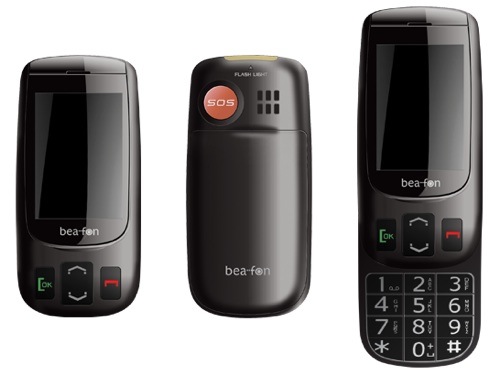
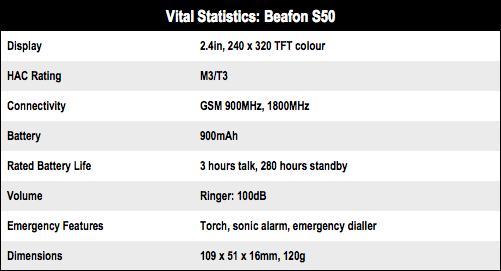
Slide the top half of the handset up and a large keypad is revealed - the keys themselves are more than twice the size of those fitted to the Nokia 7230. Like the Binatone, the S50 has a built-in torch though it's considerably brighter than the one fitted to the cheaper handset. The warning about not looking directly into the beam when it's on is not entirely unnecessary.
The essential call controls are models of simplicity: press the call key and your call log appears; press call end and the phone book opens; press up/down and the main menu list pops up. Seemple, as that annoying Meerkat would say.
On the reverse of the handset is a big SOS button that fires up a loud alarm, triggers an auto-dial sequence through to four user-defined numbers and puts the phone into speaker mode.
Unique to the S50 is the facility whereby if the handset is called within one hour of the alarm being triggered, the handset will automatically answer the call and enter hands-free mode with the speaker turned up to maximum.
It's not all good news, though. The review unit had a nasty habit of losing network connection in low-signal locations, even though none of the other handsets had any similar trouble. So I can't really recommend the S50 to folk living in poor signal areas.
Verdict
Stylish and well specified but the poor signal reception is a worry. ®
Next Binatone SpeakEasy Mobile
 Biting the hand that feeds IT

