The Register® — Biting the hand that feeds IT

Feeds

Buyer's Guide: Mini Desktop PCs

The Pros and Cons of tiny PCs

Agentless Backup is Not a Myth

Reviews When you choose the components for a new desktop PC, it’s pretty much a numbers game. The more you pay, the more CPU cores, gigahertz of CPU speed, and gigabytes of memory and hard drive space you get. You don't have to worry about very much else.

Dell Inspiron Zino HD

Looks are more important when your PC is in your living room

It’s a different story with a mini PC. Manufacturers are limited by the size of the machine as to what they can include. That's not just a factor for the physical size of the components - hard drive, optical drive, chip coolers and so forth - but also how effective that cooling is. Less airspace around the components means the cooling system has to work harder and that may mean it makes more noise.

The size of the case also dictates how easily you can find room for your mini PC on a desk or beside your TV. It also has a major bearing on how portable the PC might be. The Acer Aspire X5900, for instance, is quite small but is effectively a regular desktop PC so you are unlikely to move it about. By contrast, you could drop the Cape 7 Ion or Viewsonic PC Mini 132 in the pocket of your coat.

Smaller machines can also be attached to the back of the screen if space is tight or you simply want a more all-in-one computing experience. Look out for machines that include - or provide as an option - a Vesa mounting kit. The Video Electronics Standards Association's spec ensures the computer's mount will fit onto the display or TV correctly.
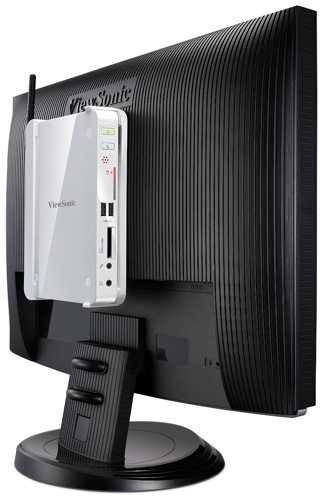
Mini Desktop PCs

Some Mini PCs can be mounted onto the backs of monitors and TVs

Every desktop will give you wired Ethernet network connectivity, but you may prefer the convenience - at the cost of speed - of wireless networking, especially if you're after a mini PC for its portability. Some mini PCs have Wi-Fi built in, others simple bundle a USB adaptor, while the rest may not include it at all.

Customer Success Testimonial: Recovery is Everything

Latest Comments

"Having a dual-core processor makes ..."

"Having a dual-core processor makes a big difference to the performance available to you"

You use those words as the caption to a Windows performance graph which shows four CPUs. It also shows the current CPU utilisation as zero %, average CPU utilisation at well under 20% with a very very brief spike at around 60% on two CPUs, and the fourth CPU might as well not exist. Do you think this is representative of typical SFF/entertainment PC usage?

I've largely lost interest in GHz wars, but I'd have thought one single faster core would in general be a better buy than multiple slower cores with the same price and/or same total power dissipation, because most applications are still basically single threaded and therefore gain little benefit from the extra cores but may well benefit from extra GHz. Your graph shows this - the fourth CPU barely wakes up at all.

In a small form factor entertainment PC where fans are an undesirable complication, this consideration applies even more so than in standard desktop PCs.

Still, if you want to blithely repeat the industry's multi-core hype, feel free.

0
0

Objection your honour

"VGA is best avoided if you can".

Not quite so. A very large fraction of the TVs out there have a very limited tolerance on what they will accept on their HDMI port. So if you are using the PC's HDMI output or DVI-to-HDMI adapter you have a very high likelihood of running into overscan/underscan issues where the PC picture cannot be fitted onto the screen correctly. This is especially the case for 1366x768 (HD ready) systems. I have yet to see one that accepts DVI-to-HDMI (or PC HDMI) 720p and works properly.

As far as using VGA for full HD the problem is usually not the VGA itself, but the cables and in the case of Radeon on-board connectors and cables "to bracket". Very few cables on the market are OK with the frequencies required by full HD which results in a significant amount of ghosting. If you get a cable that is OK in that range you are OK with VGA.

Overall - it remains a trial and error game and VGA remains the "old faithful" fallback which (subject to having good cabling) can save the day when HDMI/DVI does not work properly.

0
0

More from The Register

Samsung Galaxy Note 8: Proof the pen is mightier?
Sammy’s iPad Mini killer has a stylus to stab other rivals too
First look: iOS 7 for iPad
No, Apple hasn't released it yet, but that doesn't stop intrepid devs
Microsoft lures buy-curious vixens, corduroys with a cheap fondle
Surface slab sales latest: Will no one rid Ballmer of these turbulent tabs?
 breaking news
Curtain drops on Apple Store ahead of WWDC: What lies behind?
Steve Jobs watching from on high. No pressure, lads
 breaking news
Cold, dead hands of Steve Jobs slip from iPhones: The Cult of Ive is upon us
Billionaire biz baron's death clears way for uber-shiny iOS 7
Airbus imagines suitcases that find themselves
Point your mobe at your smalls to track their every move
Surprise! Intel smartphone trounces ARM in power trials
Tests show equal performance while sipping significantly less juice
Samsung plans LTE Advanced version of Galaxy S4
1Gbps download capability could stiffen drooping S4 sales forecasts
Apple said to be 'exploring' 5.7-inch iPhone
Who's the copycat this time, Mr. Cook?
Google Chromebooks now in over 6,600 stores
Major, worldwide retail push begins this summer