


This article is more than 1 year old
Microsoft's Office Web Apps - Google killing not included
Sharepoint power, cloud cracks

Rough around the edges
So far, so good. But there are plenty of annoyances. Performance is only fair, and while I did not see major bugs, I did notice some odd behavior, such as clicking in Word Web App and finding that the caret did not follow the click.
There are many inconsistencies. The buttons for opening a document in desktop Office depend on an ActiveX control or a Firefox plug-in that does not work in Firefox with Office 2007 or 2003 and only works on Windows. Another annoyance is Microsoft disables the ability to create documents in the browser if desktop Office is available, though you can get round this by using Chrome. A further inconsistency is that PowerPoint, Excel, and OneNote save on the fly, but Word makes you click Save.
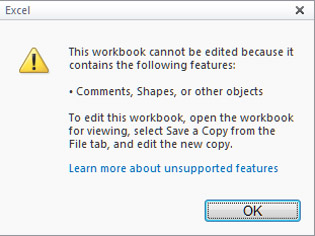
Add the wrong kind of content to Excel,
and the Web App will refuse to edit it
I tried Office Web Apps with Firefox on Linux. It works fine, provided that Moonlight - the open source implementation of Silverlight - is not installed. But in this case, it nags you to install Silverlight. If you follow the prompts, they eventually lead you to Moonlight which breaks the Web Apps.
The Moonlight team is working on this and will probably fix it soon, but it shows that Microsoft apparently did not bother testing this combination, despite saying that Novell is its official partner for Silverlight on Linux.
There is also the matter of limited features. All the web apps are greatly simplified. In Word, you can apply paragraph styles but not modify them, and there is no find and replace, for example. Excel Web App offers no way to insert a new worksheet, or to run scripts.
In general, each web app has a minimal set of features, though there are occasional pleasant surprises like the Smart Art tools in PowerPoint Web Apps, or the ability to search and insert Microsoft's online clip art in Word Web App, with tools for scaling the image, though no way to apply borders.
The "G" question
An obvious question is how Office Web Apps compares to Google Docs. Google's offering is more mature, and it has the edge on features, performance, and cross-platform support. Google allows simultaneous multi-user editing in word processor as well as spreadsheet documents. But Google's document format is different, making Microsoft's online suite a better choice if you want to move documents back and forth between the cloud and the desktop. Despite their similarities, Google Docs and Office Web Apps meet different needs.
In the end, Office Web Apps both gains and suffers from its determination to live both on the desktop and in the cloud. Sometimes, the cracks show, like when you click to create a new document and get a dialog starting "Some files can harm your computer." Google and other pure cloud providers do not have this problem.
Even in their imperfect form though, Office Web Apps add real value to SharePoint, and their sheer convenience mitigates other failings. Flawed, but still a turning point for Microsoft Office. ®
 Biting the hand that feeds IT

