


This article is more than 1 year old
Sony Vaio M Atom 2.0 netbook
If you can't beat 'em...

Review The new Vaio M is the first Sony netbook to be pitched at the increasingly common £300 price point and it is also the first to use the now equally common 1024 x 600 resolution screen. This display choice suggests that – after the highly desirable but horrendously expensive P Series and the cheaper but still unpopular hi-rez W Series – Sony has decided that if it can't beat them it may as well join them.
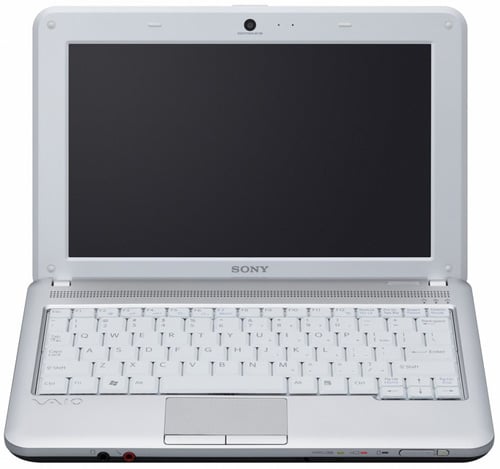
No surprises: Sony's Vaio M netbook
To get the nuts and bolts out of the way first, internally, the Vaio M is just what you would expect from a netbook. So you get a 1.66GHz Intel Atom N450 processor with associated GMA3150 graphics core, 1GB of DDR2 SDRAM, a 250GB, 5,400rpm hard drive, 802.11b/g/n Wi-Fi, 2.1 Bluetooth, Windows 7 Starter along with a 0.3Mp webcam and microphone.
Externally things are a bit more interesting. Stylistically, the Vaio M is a more rounded evolution of the Vaio W and looks not dissimilar to Samsung's bar-of-soap N310. Just in case you or those about you are in any doubt to the provenance of your netbook, the smart satin finish lid not only boasts a Sony badge but also an enormous Vaio logo. This is replicated on the keyboard deck, just in case you forget between opening the lid and starting to type.
At 183 x 268 x 26.5~33mm and weighing just over 1.3kg the Vaio M is very similar to Samsung's N220 which is the Vaio M's main high-street competition. The bodywork of the M incorporates some pleasing touches such as a physical Wi-Fi switch and the Caps, Number and Scroll lock lights usually only found on grown up laptops. You also get status lights for the power supply, wireless connection and HDD which is a nice compromise between Dell – that gives you none – and Samsung, that gives you enough to mimic the flight deck of an A380.
Unlike other netbook makers, Sony has opted to put all three USB ports side-by-side on the right edge of the machine with the 3.5mm audio jacks situated at the front. That's hardly revolutionary, but appeals to my sense of order more than the usual rather haphazard distribution of these things.
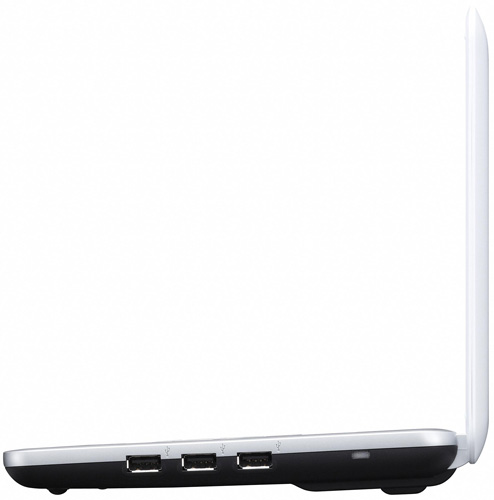
USB is neatly lined up on the right, with VGA, card reader and Ethernet on the left side
The left hand side of the chassis houses the power, VGA and Ethernet jacks along with a multi-card reader while the on/off switch is situated on the front right of the case. I'm not a fan of slider power switches but at least the design and action of the Sony switch is better than that on recent Samsung netbooks. Stereo speakers of indeterminate power output are located under a grille above the keyboard to the general benefit of sound quality. Above them sits a rather fine matt finish screen which is as crisp, bright and colourful as any I have seen.
 Biting the hand that feeds IT

