


This article is more than 1 year old
Dell Latitude Z
Super-slim designer notebook, anyone?

Review If you want a laptop to impress, then a likely choice is a high-end MacBook rather than an amorphous black box Windows notebook, that looks about as cool as a fridge-freezer. With admiring glances in mind, is Dell's Inspiron Latitude Z, a machine the company is heralding as the thinnest and most stylish 16in laptop around.
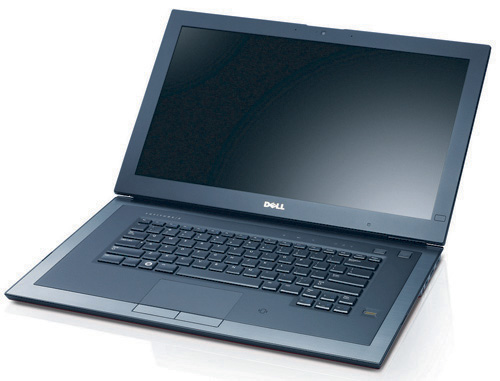
Form over function? Dell's Latitude Z
Indeed, the Latitude Z is a fine piece of design. The satin finish 'dark cherry' casing looks and feels exquisite, as do the chamfered chrome screen hinges at the rear corners that also house the Ethernet and power sockets. The good looks are matched by the first rate build quality and solidity. The latter being especially important in a machine that, while having a pretty broad footprint of 396 x 272mm, is no more than 20mm thick at its maximum. As with most skinny notebooks the lid will bend if given a good twist, but you have to be pretty brutal.
That solidity hasn't come at the expense of increased weight – at 2kg you couldn't reasonably expect it to be any lighter. Thankfully, Dell hasn't stripped the Z of all the useful stuff in the quest to shave a extra few mm off the thickness. So you still get two USB ports – one of which doubles as an eSATA link – a DisplayPort socket and a 3.5mm headset jack. The Latitude comes with a DisplayPort to VGA adapter with an HDMI version being an optional extra. Absent from the Z is a memory card reader and an optical drive, but the unit does come with a sleek external 8-speed DVD+/-RW slot drive.
The lid houses a widescreen 1600 x 900 backlit LCD panel with a matt finish. That finish takes away the final degree of crystal clarity when watching video, but it cuts down on surface reflections, which is more important for a machine targeting the business user. In use, it is a crisp, bright and colourful display with wide effective viewing angles that should satisfy the vast majority of users.
Press a button next to the lower right hand corner of the screen and that side of the bezel becomes a touch sensitive control panel incorporating what Dell calls EdgeTouch. The area can be used to either launch one of seven selected applications when tapped in a certain place or it can act as one long scroll bar which was how we tended to use it.
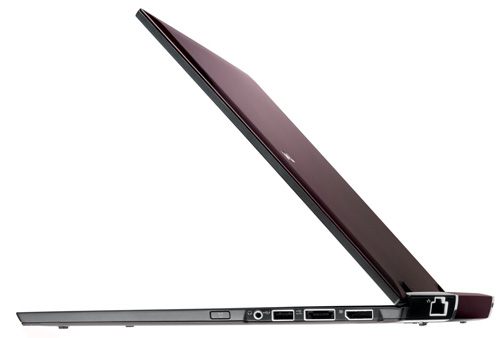
Indubitably slim
Dell hasn't dropped the soap with the keyboard either. The shiny and slightly concave keys are well spaced and pleasant to the touch, though the travel may prove a little short for some tastes. The keyboard is also backlit and the illumination can be set to either on or off or automatic which lights up when you start to type and then switches off when you stop. I had no complaints about the large multi-touch touchpad either which was precise and sensitive in equal measure.
 Biting the hand that feeds IT

