The Register® — Biting the hand that feeds IT

Feeds

Power monitoring across the desktop estate

What can be done and is anyone doing anything?

  • print
  • alert

Workshop Despite the pressure on organisations to operate to more “green” agendas, the reality is that for many the reasons they actually fund anything are related to a desire to save electricity or to meet external requirements, usually legislative. So far the majority of “green” projects have usually been focussed on reducing electricity consumption and thereby saving operational costs.

To date, the majority of such power reduction projects have focused on data centres and computer rooms. Considerably less attention is paid to the electricity needed to operate often extensive desktop estates. Is there any evidence that this could be about to change?

Research we carried out last year with readers of The Register highlighted that even in large organisations the cost of power / electricity to operate data centres has yet to become a major focus of attention. Less than 10 per cent of you that took part in the research told us that the cost of power was a major challenge. Only a few more acknowledged that availability of power for data centres was a real issue.

So is desktop power consumption creating any pressure for change? Some insights we captured from the audience last October shows that the answer is apparently no, at least so far. As you can see in the graphic, power management and savings on electricity costs are nothing like the most significant criteria when evaluating changes to the desktop systems deployed in mainstream business.
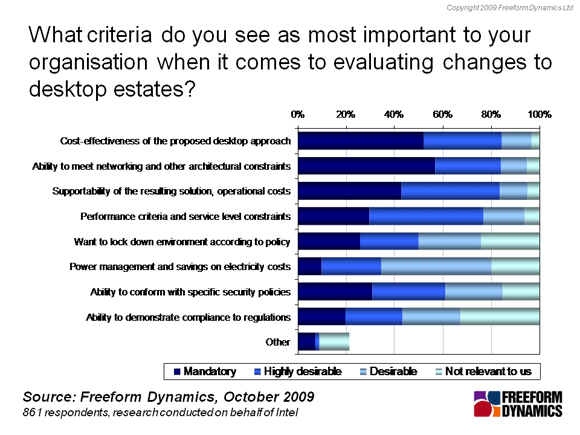
It will be interesting to see if this sentiment changes over the course of the next year as projects focussing on desktop refresh come into play. It is likely that previously overlooked components (such as power) in the overall cost of managing desktops may become a factor, especially when considering the various options for introducing virtualisation into the environment.

In fact, it is worthwhile considering the comments of an IT professional with whom I recently recorded a video Webinar. The Lancashire Constabulary has already virtualised more than 1,000 desktops with another 4,000 scheduled to follow over the course of this year.

We discussed the effects of desktop virtualisation on electricity consumption, and there was an interesting twist. The spokesperson said that rather than being credited with saving power, the data centre was actually being called out for the increase in consumption as centralised virtual desktops were rolled out. Although the electricity used by the offices will fall (eg as older desktops are progressively replaced with thin clients), the data centre power bill goes up, and there was no mechanism in the project to link the two.

But even if there is a desire to gain better control over power consumed by desktops, is it actually possible to monitor and manage power consumption across tens, hundreds or thousands of PCs? Companies such as 1E and Sentilla offer software tools to help make more sense of energy consumption information. The systems management, hardware and chip vendors are all progressively adding to their power monitoring and management capabilities.

But what’s happening in your organisation? Is monitoring the electricity consumed by your desktop estate of any interest at all? Please let us know, especially if you are already tacking the challenge head on, or even from the side. ®

Latest Comments
Anonymous Coward

Fred

Angus

How does Green trac manage the quite common need to perform patching / software distribution / anti virus etc after hours? Is it possible for it to wakeup remote PCs?

Does it use magic packets? I heard that there is an issue of security exposure over

subnets boundaries

Thanks

0
0

A Solution

I noticed that you didn't mention Event Zero's 'Greentrac' as a PC power management solution, perhaps you've never heard of it.

Greentrac goes above and beyond 1E's nightwatchmen and all the other PC power saving software available. While those other programs basically just shut down the computers at night, Greentrac's focus is on saving power during the day (though it also has shutdown capabilities).

Greentrac installs across an enterprise's network (no size limits) and tracks each individual user's power wastage (something you mentioned you were having trouble doing). It provides a user interface that users log in to and can see how much power they waste during the day by leaving their computer idle. The users can see how they're doing in relation to other employees, and are given a score on how much energy they waste.

The idea behind Greentrac is that users have the power to save far more energy than automated software – they know when they’re going out to lunch, they know when they’ll be away for a meeting etc. Greentrac simply gives users the motivation to want to save power. The user interface provides tips on saving power, and encourages users to either turn their computer off or put it to sleep whenever they’re not using it.

Even if you're already using automatic PC shutdown software like Nightwatchman etc, reducing power wastage during the day by 80% on 10,000 PCs (which Greentrac makes possible) can save you a further $200 000 on your electricity bill and cut CO2 emissions by 1.4 million kilograms annually.

The Greentrac software has a huge number of other features as well, it really is the best power saving software available to date, there's plenty of more information on the Greentrac website (http://www.greentrac.com).

0
0

OS/Hardware issue

The lack of time sync on wakeup from standby is an issue on a few hardware and OS combinations - the Win32Time service was tardy at getting time back in sync, so the next release of NightWatchman will address this by forcing a time sync as soon as the machine wakes up.

0
0

Go to sleep

We rolled out Nighwatchman to a few hundred PCs in a pilot. It worked pretty well. Over 20,000 workstations it would have been a very feelable saving. But a jumpy exec missed a meeting because time sync was too slow on reanimation, and the pilot was rolled back.

0
0

Network Components too...

Another aspect often overlooked is the power consumed by network components, which normally stay powered all of the time. Extreme Networks actually have a pretty cool setup by which they power off ports that aren't in use, they also have great power control if you happen to use their devices for Power Over Ethernet, if you have a POE compliant device then the switch can give it exactly the right amount of power, so thin client devices and phones aren't consuming too much.

The switches are also able to take script events, so for example devices could be powered on for a software update or powered off at a certain time of day, or a phone and a PC can be linked so that when the PC is switched on the phone powers up, or so that when a user swipes in to the office door their ethernet ports are activated and the phone powers up.

0
0

More from The Register

Android is a mess and needs sprucing up, admits chief
Can Google really fix it? It isn't in control any more
New Lumia 925: This, loyalists, is the BIG ONE you've waited for
Nokia veep drills high-end master plan for El Reg
Android device? Ooohhhh, you mean a Samsung phone
Koreans nabbed nearly all the Q1 profits – more even than Google
Review: HP Pavilion 14 Chromebook
All roads lead to Chrome?
Borked your iDevice? Pay EVEN MORE to have it fixed by Applecare
Or scream at their hapless techies on their forums
Euro PC shipments plummet into bottomless pit of DOOOOM
11th quarter of decline, 20pc drop on last year - Gartner
Report: AT&T dropping Facebook phone after dismal sales
Turns out folks won't buy that for a dollar