


This article is more than 1 year old
LaCie LaCinema MiniHD
Small box, big picture

Review We weren’t wildly enthusiastic about LaCie's Black Max set-top box. Thankfully, its new LaCinema MiniHD is a more modest affair that just concentrates on being a media player. As a result, it’s more successful than the Black MAX, although it does still have some rough edges.
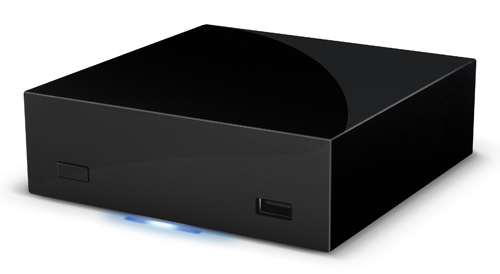
Honey, I shrunk the vids: LaCie's diminutive LaCinema MiniHD
The MiniHD certainly lives up to its name, as it’s an extremely compact little device that measures just 118 x 118 x 40mm. That’s not bad going considering that there’s a 500GB hard disk crammed inside it and that it plugs straight into the mains, with no bulky PSU to get in the way. Indeed, you could easily carry it around to a friend’s house and bore them senseless with your holiday photos and videos.
Tucked around the back of the unit you’ll find an HDMI interface that provides full 1080p output, along with composite video and stereo audio, S/PDIF digital audio interface and Ethernet. There’s no Scart, though, so you can only connect the MiniHD to an HD TV that has HDMI, unless you can live with composite video output alternative.
There’s a mini USB port on the back that allows you to connect it to a Mac or PC so that you can copy files straight onto the MiniHD, and two further USB 2.0 ports that can be used to plug in memory sticks or additional hard disks. Mac users take note, the MiniHD can work with USB storage devices that use the Mac’s HFS+ file system, as well as Windows and Linux formats. The MiniHD also scores brownie points for its built-in 802.11n Wi-Fi, although it’s a shame that the Ethernet port is 100Mbps only.
LaCie includes all the HDMI, video and Ethernet cables you need, so you can plug everything in and get started straight away. The MiniHD takes a leisurely 28 seconds to start up when you initially plug it in, but only five seconds to subsequently start-up from standby mode. Power consumption during our tests never rose above a modest 10.5W, although that only drops to about 8.4W in standby mode. The internal fan emits a low hum while it’s running, but you have to lean over it to hear this so it’s not going to overwhelm any music or films that you might want to listen to.
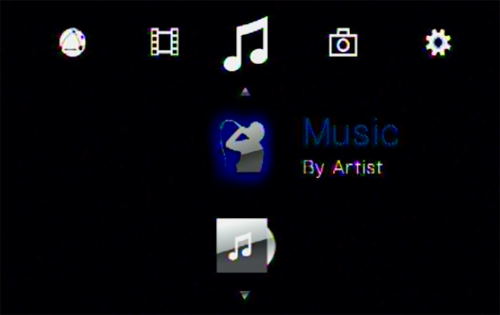
Browsing looks simple, but could be more effective
When you turn it on, the MiniHD displays a simple horizontal row of icons on your TV screen that allow you to select music, video or photo files, or to adjust system settings such as the Wi-Fi password, video resolution or aspect ratio. Several of the media players we’ve seen recently merely list music files alphabetically or leave it up to you to organise the files into folders, so it’s good to see that the MiniHD does enable you to browse by artist, album title or genre.
 Biting the hand that feeds IT

