The Register® — Biting the hand that feeds IT

Feeds

OCZ's low price Onyx SSD

Slips under $100 price point

SaaS data loss: The problem you didn’t know you had

OCZ has a sub-$100 SSD offered as a netbook, laptop and desktop hard drive replacement.

It only comes in a 32GB capacity for now, using multi-level cell (MLC) NAND, and has a SATA II interface, TRIM support so it works better with Windows, and poor-to-respectable performance. The read speed is up to 125MB/sec with writing peaking at 70MB/sec.
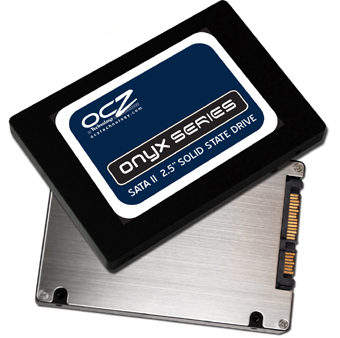
OCZ Onyx SSD

There is a 64MB cache and some form of wear-levelling, described opaquely as "unique performance optimisation to keep the drives at peak performance over the long term". There is a three-year warranty and a 1.5 million hours MTBF (Mean Time Before Failure) statistic.

If we compare it with OCZ's Vertex range we find a 30GB MLC vertex costs about $130 from an e-tailer and delivers up to 250MB/sec read and 180MB/sec write speed. It too has a 64MB cache and the SATA II interface. Assume the Onyx's sub-$100 price point is actually $99.99 and you're getting half the read speed and less than half the write speed for a $30 saving.

The lower the Onyx's street price goes the better this deal gets.

WD's recently introduced SiliconEdge Blue product has its lowest capacity point at 64GB, reads at up to 256MB/sec and writes at up to 170MB/sec, and is priced at $279 for the 64GB product.

At the other end of the scale is SuperTalent's SuperSpeed USB 3.0 SSD. which is expected to come in around $70 for 64GB. It has a 125MB/sec peak writing speed and a write speed up to 50MB/sec. There's a question mark over whether we need both SATA II and USB 3.0 for SSD interfaces, and if one predominates which one will it be?

The Onyx and SuperSpeed products are Ladas compared to WD's Porsche, but both are still faster than a hard drive. How will Onyx compare to SuperSpeed? It will be interesting to see what the product reviewers say. ®

Steps to Take Before Choosing a Business Continuity Partner

There is no question mark.

"There's a question mark over whether we need both SATA II and USB 3.0 for SSD interfaces, and if one predominates which one will it be?"

If USB 3.0 has the same or similar CPU destroying ability that USB2 has then SATA will be the winner by a country mile.

Have you tried to write large amounts to a USB HDD while using the same PC for other stuff?

The performance is ridiculous and and completely negates the benefits of the however many hundred megabytes per second transfer speeds that are claimed by the theoretical technical specifications.

1
0

Dumb question.

The article asks "SATA or USB for SSD drives?". Frankly, this isn't even a valid question until USB supports some form of DMA.

Unlike PATA, SATA, Firewire, SAS and every other internal mass storage standard, USB does not have any form of Direct Memory Access and relies heavily on the processor for it's data transfer, the more saturated the processor, the more your transfer rate capacity suffers.

USB is great for consumer level where most computer systems are severely overpowered for the demanding task of checking email and/or facebook so a bit of overhead for transferring data from a mouse, keyboard and maybe a USB flash drive and/or a printer is flat out ignorable.

However, when you're using your system for more demanding tasks and require more data throughput the additional cycles required begin to make a larger impact from an already taxed processor.

End of spiel.

1
0

Hmmm

My compile tree happily fits in RAM so why not use a ramdisk.

Much easier on Linux but Windows can have it to :

http://download.microsoft.com/download/win2000ddk/sample01/1/NT5/EN-US/Ramdisk.exe

1
0

More from The Register

SCO vs. IBM battle resumes over ownership of Unix
Zombie lawsuit back and wants to suck the brains out of Linux
 breaking news
You don't need phone lines or cable for ANYTHING, says Dish
The satellite-dish man can sort you out with phone and broadband over the air too
 breaking news
What's HP got under wraps? Looks awfully flash and tape shaped
What happens in Vegas won't stay there - we've got the details
Microsoft borks botnet takedown in Citadel snafu
Stupid Redmond kicked over our honeypots, wail white hats
IBM's $1bn layoffs latest: Now axe swings in US, Canada - reports
Union claims 121 storage bods canned after dismal sales
NetApp musters muscular cluster bluster for ONTAP busters
Storage array OS overhauled to juggle more nodes, go down on you, er, less
HP adds 'Haswell' Xeon E3s to entry ProLiant servers
Gussies up MicroServer for SMBs, adds baby switches