


This article is more than 1 year old
WD targets Win XP users to ease 4KB drive upgrades
Sector inspector

Western Digital is to help Windows XP users more easily make the transition to so-called '4K' hard drive technology, the new standard for basic drive formatting.
Hard drive makers segment each data-storage platter into small, addressable units called sectors. For years, the sector size was set to 512 bytes - a standard set by IBM when it was developing the floppy disc drives for its original PC.
But now that HDDs deliver significantly greater capacities and higher rotational speeds than those ancient media, and with the subsequent addition of technologies such as error correction, 512 bytes is no longer the most efficient size. HDD vendors have settled on 4KB instead.
Operating system vendors have kept pace, with Windows Vista and Windows 7, plus Mac OS X Tiger, Leopard and Snow Leopard already able to interrogate a drive and, if they discover it uses 4KB sectors, align their read and write operations accordingly.
Version 2.6.31 of the Linux kernel also supports 4KB sectors, and the many open source disk utilities and drives are being updated too.
That just leaves Windows XP users without native support for the new format.
WD Field Technical Consultant Steve Perkins told Reg Hardware that the company's 4KB drives will operate is if they use 512B sectors, the firmware mapping one to the other transparently. This has no impact on read performance, but it admitted there might be a performance hit with write operations if the 512B and 4KB structures, and the partition layout, are out of alignment.
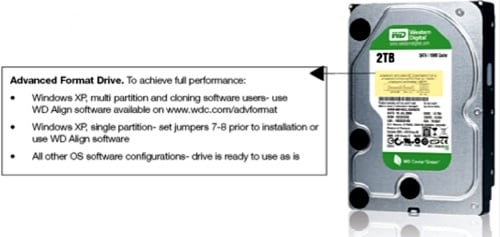
Perkins said WD is offering a software utility, WDAlign, that XP owners should run on new internal and external drives to partition and format them in a way that will ensure XP's 512B sector writes are aligned with the drive's 4KB sector structure.
The software can also be used to ensure a smooth transition when Windows Vista or 7 users clone their old 512B drives during an upgrade process that involves swapping in a new, 4KB drive. According to Perkins, not all Windows disk cloning tools are 4KB savvy, and misalignments - impacting write performance - could arise.
WD will put a guide right on the drive label to ensure users upgrading their hard drives are given adequate warning in case they need to run the software.
Hardware hackers unsure about software solutions can place a jumper on the drive's configuration pins instead, Perkins said, but only on drives that will contain a single partition and a clean OS install.
WD Caviar Green desktop and Scorpio Blue mobile drives are already shipping with 4KB sectors. It expects the rest to follow rapidly as new, more capacious models are introduced. ®
 Biting the hand that feeds IT

