Dell flogs its 'zero client'
PC-over-IP rolls into FX100 boxes
Cloud storage: Lower cost and increase uptime
Dell has unveiled its first "zero client" device for enterprise customers who think traditional thin clients are fatty, fatty 2x4s.
The FX100 Zero Client has no x86 CPU, no hard disk drive, and no image to manage. Instead, it simply acts as a terminal to a virtual environment running on a remote server.
The system was previously paired only with a Dell Precision R5400 Rack Workstation as a one-to-one link, but it now ships with firmware supporting VMware View 4.0. The VMware software sports a new communications protocol called PC-over-IP that enables real-time screen rendering and can purportedly scale to tens of thousands of virtualized desktops.
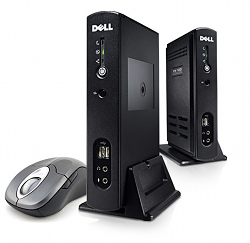
That means multiple FX100 devices can now connect to a single server. The fan-less, driver-less box itself handles only base input and output, like audio, USB, DVI, display, mouse, and keyboard connections. According to Dell, the FX100 consumes just 30 watts.
Despite the minimal hardware involved, Dell's zero client price tag doesn't exactly go easy on the zeros. The device starts at $500 a pop. The remote access host card is $300. The question, of course, is whether plugging bare-bones zero client hardware into a centralized server will save money in the long haul versus buying a fleet of cheapo desktops for the workforce.
Dell enters the zero client fray against a host of smaller firms and startups such as Pano Logic, ClearCube Technology, and Wyse Technology.
Concurrent with the FX100 announcement, Dell announced a new high-performance desktop PC line, the Optiplex 980.
The Optiplex 980 adds Intel's new Core i5 and i7 processors into the Dell biz computer market. In addition to offering a solid state drive option, it also promises to please the Earth Mother with a "90 per cent energy efficient power supply" and containing more post-consumer recycled content than previous generations.
Optiplex 980 boxes are available in mini-tower, desktop, and small form factor chassis variants. They will become available worldwide "in the coming weeks," starting at $807, according to Dell. ®
COMMENTS
Term Server, Citrix, LTSP
Well...
a) Traditionally, this is what a thin client is. Some PC running a full set of apps, but without a hard disk, is not a thin client even though many people call it one. X Terminals, the old Wyse things you could get to access Windows Terminal Server or Citrix servers, those were thin clients.
b) This is what kills thin clients. When a thin client costs more than a cheap desktop, people are going to buy cheap desk tops. Even if they are just running them as a thin client. I mean a $500 thin client? F that.
------------------------------------------------------------------
If done right, there's BIG BIG savings to be had here. Engineers, developers, etc., if they are taxing the resources of a desktop, it's not sensible at all to give them thin clients, they will just all be KILLING a shared server instead and hating every minute of it. Most users? They don't run the desktop all that hard, and the administrative savings of centralizing are HUGE. HOWEVER, if thin clients cost way more than just some desktop, it makes more sense to find low power desktops (there's some Atom desktops, 1ghz Cyrixes, etc. that are like 5-10W desktops.)
Windows Terminal Server or Citrix? Licensing costs eat into the savings A LOT. And inefficiencies in Windows' design increase the RAM and CPU power needed on the server somewhat. But still something to look into.
LTSP (Linux Terminal Server Project?) Very slick, no costs for the server environment; if the user is given permissions for USB, etc., it's just like they have a local desktop except the home directory is centralized, and apps can either run centrally or on the desktop as the admin desires. Since executables are only in RAM once, RAM requirements are much lower than you'd suspect. Setup is SO easy, I installed LTSP on an Ubuntu box, and it was like "install this package, and wait about 10 minutes while it sets up." You have one ethernet device for outside world, and one where it hands out the dhcp addresses and arranges netbooting of LTSP software to PCs. Set PCs to PXE boot, set X terminals to point to the LTSP server. There is no step 4, it just goes to a ubuntu desktop style login prompt. Probably it could be set so given machines auto-logged in to given desktops too.
PCoIP: not as good as I'd hoped
Looks like a rebadged/OEM'd Teradici device. Which given the PCoIP support would hardly be a suprise. The IBM PCoIP device is very similar again in form factor and specification. They're very likely all based off the same Teradici reference design.
We studied VMware View as a wide-area VDI solution.
A pity that PCoIP seems so bandwidth hungry, because I was greatly looking forward to VMware View supplying a better protocol than RDP. In lab tests, PCoIP was only slicker than RDP or ICA over high latency links where bandwidth was not an issue, but borderline unusable even for web browsing over commonly encountered lower-bandwidth connections e.g. 512/512 DSL. Visible tearing, painfully slow scrolling & updates etc.
Even after tuning in conjunction with a VMware consultant it required at least a megabit to provide satisfactory performance for just one remote Windows XP desktop doing browsing & word processing on a typical business DSL circuit.
Trying to stuff a call center or entire retail site's traffic down affordable business-grade connectivity looked infeasible as a result. Especially since we then have to pay for new thin clients, virtual desktop backend servers & licensing, and of course a DR site for same. It worked out cheaper to stay with the conventional desktop model.
It was suggested that we could/would be able to deploy accelerators, but I'm primarily interested in protocol innovations that eliminate this additional cost and significant complexity - otherwise what's the point? I could just deploy RDP with WAN acceleration.
Our conclusion was that the much lower-impact ICA is still the leading national-scale desktop protocol for those who can't justify the cost of reliable very-high-bandwidth connectivity. I think most enterprises will fall into that category.
PCoIP only starts to look interesting for high latency global-scale remote access e.g. offshore developers, remote trading desks.
So it's a Sun Ray
Only it consumes 3-6 times the power and requires expensive software to run?

IT infrastructure monitoring strategies
What you need to know about cloud backup
Enabling efficient data center monitoring
Agentless Backup is Not a Myth
Top 10 SIEM implementer’s checklist