


This article is more than 1 year old
Freecom Network Media Centre
The acme of one-drive media streamers?

Review Sleek aluminium housings are all the rage with hard disk manufacturers, and Freecom’s Network Media Centre is no exception. Available in capacities from 1TB to 2TB, this single-disk Nas box promises to be your ultimate home media server thanks to the inclusion of UPNP/DLNA streaming support, an FTP server, a BitTorrent client and customisable multi-user work areas.
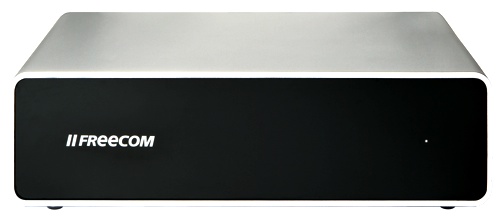
Freecom's Network Media Centre: aesthetically unexciting
Aesthetically, the Network Media Centre isn't overly exciting. Instead, it's pleasantly simple with a smooth brushed-aluminium finish and glossy black faceplate framing a single status LED. Designed to sit horizontally, it's inherently stable, with a reasonable footprint of 155 x 148mm and a height of only 43mm.
Rubber feet are included so you can mount it vertically, but don't try it. The feet are moulded from soft rubber and offer virtually no support at all. If you choose to use them, your investment will soon become a paperweight, as toppling is guaranteed by the slightest of bumps.
Despite being simple, the aluminium housing actually plays an important role: it acts as a heatsink to aid cooling of the internal drive with the help of a temperature controlled fan. Freecom doesn't disclose which drives are used in these devices, simply quoting them as being “3.5in Sata, low noise”. While we found the drive to only be marginally noticeable over the hum of other PCs, in a quiet home environment it could easily become annoying or distracting when other ambient IT sounds are absent.
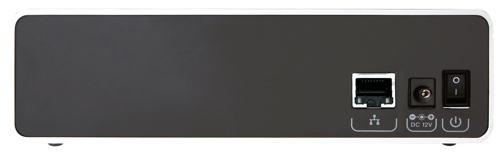
Spartan port array
Freecom has also launched what it calls the Network Storage Centre, which, oddly enough, appears to be identical to the Network Media Centre. It transpires that they are exactly the same product, with the former lacking only the registration key needed to enable the “Media Functions” of the Network Media Centre. This allows those who purchased the “Storage” edition to upgrade to the “Media” edition by purchasing a license for an inflated £18. The cost difference between the “Storage” and “Media” editions range from £15 for the 1TB drive to just £5 for the 2TB version.
 Biting the hand that feeds IT

