
Amazon Kindle DX
What a difference extra inches make
Review It took Amazon's Kindle 2 a good while to escape from Uncle Sam's backyard but less than three months more for the international version of the Kindle DX to arrive. Before we even laid hands on the DX we knew it was both bigger and more expensive, but is it any better?
The most obvious difference between the DX and Amazon's lesser Kindles is the larger screen. Like the standard Kindle, the DX uses an E Ink display, but it's a 9.7in unit with a resolution of 1200 x 824 rather than the basic Kindle's 6in, 600 x 800 panel.
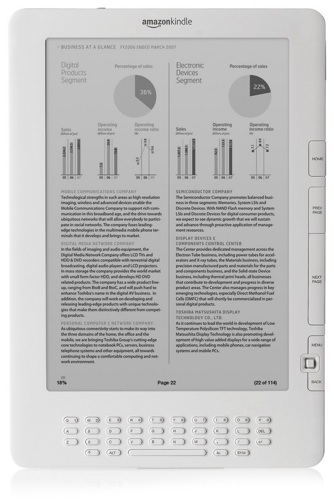
Amazon's Kindle DX: the size e-book readers should be?
Though larger, the DX's screen actually has a lower pixels per inch figure - 150 vs 167 - but the difference is indiscernible to the eye. In every way, the DX's larger screen makes for a much better reading experience than that provided by any other e-book reader we have tested.
Because the DX has followed so hard on the heels of the Kindle 2, Register Hardware found itself with both devices in its clammy grip at the same time, allowing for a direct comparison. While the screens look the same in terms of contrast and shade, there's no doubt that the DX changes pages with a far less obvious grey-to-black-and-back-again flash.
To appreciate just how much more acreage those extra 3.7 inches actually create, you have to put the DX side by side with a 6in e-book reader. It then becomes obvious that the DX's screen has more than two-and-a-half times the surface area. The main advantage of the increased space is that you can crank up the text size but still experience the same structured page layout that you see when reading a traditional book.
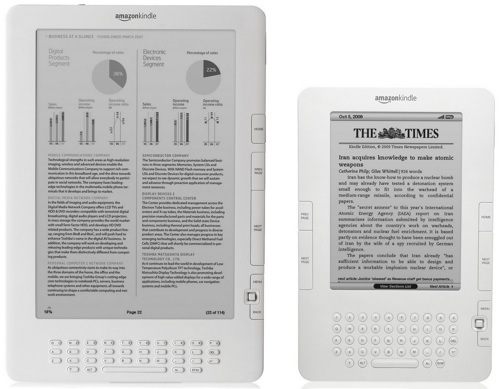
The bigger screen makes a world of difference
Another advantage of the larger screen page became clear when we downloaded the copy of The Lord of the Rings that we purchased as part of our test of the 6in Kindle: the maps were now legible, even the fiddly one giving details of the topography of Gondor.
COMMENTS
Degrees
Nope, the reviewer does mean 360 degrees. Keep turning the DX by 90 degrees to the left or right and the screen keeps re-orientating itself. OK, when you have it upside down it has only turned though 180 degrees but the point is you can keep on turning it through 270 and 360 until you are back where you started.
$450+?
Look, it's a black n white e-reader+ with a non standard keyboard layout, no touch screen, no color, no application support, no bluetooth, no TV connectivity, no camera support, no file system to speak of, no document editing capabilities, and it's still smaller than the iPad.
I hear a LOT of people, who have not actually bought either an IPS screen nor an e-reader, speaking to the point that e-Ink is superior to LCD in terms of eye strain. Let me tell you, as someone who works under florescents for 9-10 hours a day staring at a cheap ass Dell LCD, then goes home to a dark room and stares at a far superior Acer LCD panel for several more hours on my PC, and when I'm feeling like something other than gaming, i sit on the bed in complete darkness reading ebooks of my wife's MacBook pro, often in 3-4 hour sessions.
I borrowed a kindle from a friend, and a Nook from another, for a week each, to see if I felt investing in a formal ebook reader was worth the $300-400 in cash plus the cost of non-portable proprietary DRM books. I spent just shy of 16 reading the kindle, and although i found the e-Ink to be quite nice in normal light, it was somewhat tough to read in bright sunlight, and the backlight quality with e-ink in a dark room made my eyes hurt after only an hour or so trying to read it. The Nook was superior in almost every way to the Kindle, and did better in daylight, but equally poor in a dark room. On one night, I managed to read the kindle in the dark for just about 4 hours, i don't think I could do that again...
Apparently, the majority of people complaining about LCD in dimply lit rooms complain about not being able to dim the screen far enough, and complain about the harsh light. First off, who told you to read black text off a white screen as an e-reader!?!? Change the background color to a deep set near-black, and the text to a soft contrast color. With a computer, or software based e-reader on an iPhone or iPad, that is completely under your control! There are also a number of very cheap screen protectors that filter excess backlight that leaks through parts of the screens and that greatly reduces "wash" in the display if your LCD is particularly susceptible to that (most LED IPS panels are not), but cheap LCDs can be.
I'm glad I had the chance to try both competing e-readers for extended periods. It absolutely confirmed I will never own an e-Ink device, at least not until there's one that fully supports open, unenctypted books, or provides a book sharing mechanism for DRM books from multiple outlets, and at the same time, costs less than $150. Also, it really needs a screen larger than 6". That's fine for text-only content if you have good vision, but for anything including graphics of any kind, or layouts of text (periodicals), anything less than 9" is too small.
I'm not jumping on an iPad immediately. I have 6 other things in front of it in my budget plan, including a new iMac 27" to replace an aging gaming PC, a new washing machine, furniture for my 2 year olds room, shelving in my garrage, and new couches in the living room... However, by Christmas at the latest, I'm sure I'll get around to getting an iPad.
Hang on a minute
...you claim the TFT LCD isn't easy on he eye, but neglect the fact that millions of people spend pretty much all day every day gawking at them. Care to square that one? Frankly the iPad is so far beyond the capabilities of this Kindle that I feel slightly sorry for Amazon. They had a good crack at it, but the game's up, I'm afraid.
International my A*se
Amazon seem to use the word "International" to refer to US owners who happen to travel internationally, rather than those of us who actually live outside the USA (gasp!).
I just wished Amazon would sell a truly International Kindle, e.g. one I can buy from amazon.co.uk that comes with a UK plug and a data plan unlike the current "free" one where either everything that uses it is disabled, or paid for with a premium on the download price.
Price is all
When these things are down to $99 ask me again. And I think ebooks also won't really take off as long as they cost as much as paper books.
I currently use an iPod touch for reading and while I think the screen could be a bit larger I have no problems with the screen being no e-ink. And the thing is (relatively) dirt-cheap AND it can do so much more. I have no doubt that the iPad will hit the ebook-market like nothing before.
