


This article is more than 1 year old
Conceptronic Grab'n'Go
Retro rocket-styled streamer, anyone?

Review We’re always worried when we receive products from companies with names such as ‘Conceptronic’ as it suggests a very hardware-oriented frame of mind. And, like so many of the media player devices that we’ve reviewed in recent months, the Grab'n'Go FullHD Media Player turned out to be a neatly designed piece of hardware that is let down by rather less neatly designed software.
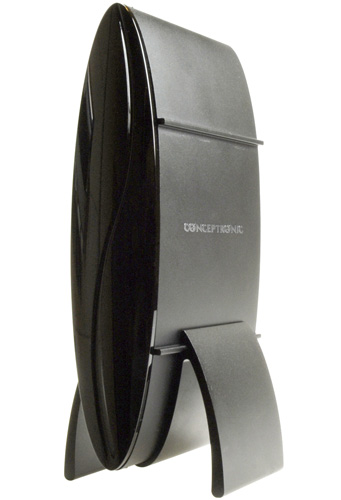
Product launch? Conceptronic's Grab'n'Go FullHD
The FullHD Media Player catches the eye straight away. Its streamlined ovoid design makes a pleasant change from the rectangular lump of plastic favoured by most of its rivals, and if you turn the device on its side – using the sturdy metal stand that’s included in the box – it looks a bit like a 1950’s retro rocket ship.
A quick look around the back of the unit reveals a good collection of connectivity options. There’s an HDMI interface for connecting to an HD TV, along with composite, component and S-Video outputs for analogue gear. Stereo audio is complemented by a coaxial S/PDIF interface, and there’s gigabit Ethernet port for connecting to your home network and streaming those big fat video files. Finally, there’s a single USB port for plugging in an external hard disk or memory stick.
However, the FullHD Media Player does not have an internal hard disk. You play content by simply plugging in a USB hard disk or flash drive that has your files stored on it. Alternatively, you can stream files across your network from a PC that is running Conceptronic’s Media Server software. Your preferred UPnP server software can also be used, as the Media Player itself supports this protocol.
We were pleased to see that Conceptronic also includes suitable cables for its various connectors, even including a Scart adaptor and a gold-plated HDMI cable to boot. Once you’ve plugged it in and turned it on the FullHD Media Player takes a leisurely 28 seconds to warm up, but works smoothly from then onwards and responds promptly to commands from the hand-held remote control. When it starts up it displays a very simple graphical menu on your TV screen that consists of just three icons.
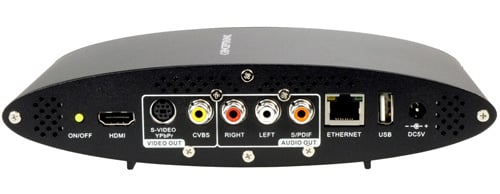
Plenty of ports and a gold-plated HDMI cable included too
The Setup icon allows you to adjust settings such as the video output format – anything from 480p right up to (as the name implies) full 1080p – stereo or digital audio output, and even hue and saturation controls. The second icon, ‘iMedia’, allows you to use a variety of online media services, such as YouTube videos and ShoutCast Internet radio. Using these online services was very easy, as the FullHD Media Player automatically connected to our network with no need for us to adjust any network settings at all.
 Biting the hand that feeds IT

