


This article is more than 1 year old
Nokia E72 smartphone
BlackBerry liquidiser?

Review The E72 is the latest in Nokia’s line of Qwerty handsets, beefing up the popular E71 with a slightly sleeker look, improved software and some interface tweaks. It’s very slim – only just over 1cm thick, 58.3mm wide, and 114 tall, weighing 128g. The 2.36in screen is only QVGA, though arguably on a unit this size, a higher resolution wouldn’t make much difference.
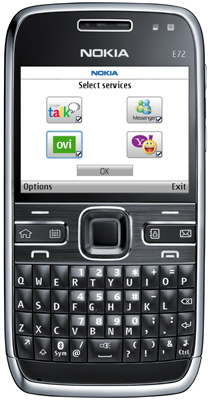
Fast talker: Nokia's E72
Below the screen are two soft keys, call and end buttons, plus four dedicated buttons. The home/menu key can’t be reassigned, but the others can, with one function for a short push, and one for a long one. By default, for example, pressing the calendar button briefly shows the calendar, while a long press creates a new entry.
Between these is the Navikey, a standard looking four-way navpad. However, it’s not entirely standard, as it has an optical sensor as well. So, you can scroll through menus and lists by wiping a finger or thumb over it, which makes for much faster navigation – although some third party apps did seem to be a little confused by it at times. On the whole, it works well, and is a good improvement.
In applications like the web browser – which supports Flash, and had no problems with our various test pages – it makes navigating much simpler; a small mouse pointer appears and you can scoot round quite quickly. On the home screen, missed call, email or text notifications appear at the bottom; hover over the icon, and you see a pop-up with more information, and you can go directly to a specific SMS, for example.
The main keypad itself is quite small, but the keys are domed and feel responsive. It’s simple to get up to a reasonable speed, and key punctuation can be entered without having to mess around using modifier keys. One of those doubles up with a long press to toggle Bluetooth on and off, and another for silent mode.

Besides Nokia’s mains adapter, USB charging is an option
Call quality is clear, and we had no problems with signal, nor with setting up VoIP – though as with other recent Nokia phones, you need to download the SIP Settings application. Once that’s done, you can select ‘Internet call’ from an address book entry, or just dial a number and press the right soft key. It works well, and it’s good to see it integrated with contacts, though configuring SIP can be a bit tricky for novices.
 Biting the hand that feeds IT

