The Register® — Biting the hand that feeds IT

Feeds

Intel P55-based motherboards

The best boards for 'Lynnfield' Core i5s and i7s

Group Test If you’re planning to build a new PC around an Intel 'Lynnfield' Core i5 or Core i7-800 processor then you are guaranteed to get stacks of performance at a reasonable price. In addition to a new CPU, you'll also need a motherboard that's based on Intel's P55 chipset and supports the LGA1156 interconnect spec.

To help you choose the one that's right for you, we’ve rounded up five of the best motherboards to see what you get for your cash. We tested each motherboard with a Core i7-870, 4GB of dual-channel Kingston KHX2133 memory, an AMD ATI Radeon HD 4890 graphics card and an Intel X25-M solid-state drive running Windows Vista Ultimate Edition.

Asus P7P55D Deluxe
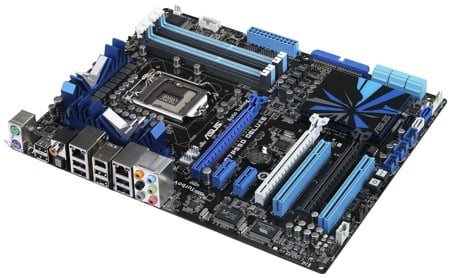
Asus P7P55D Deluxe

There are three eye-catching aspects to the Asus P7P55D Deluxe. The chipset is cooled by a large low-profile aluminium heatsink which is covered by a plastic plate that carries an illuminated Asus logo. It’s not pretty but it leaves plenty of room for your graphics cards. This brings us to feature number two: there are two PCI Express 2.0 graphics slots that support both CrossFireX and SLI as well as a third, long PCIe x4 slot which seems tailor-made for PhysX duties.
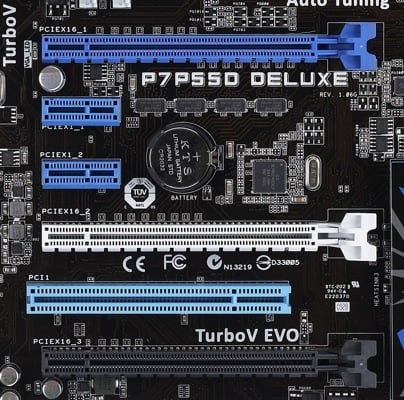
Asus P7P55D Deluxe

Two PCIe x16 slots and a long x4 connector for a PhysX card

The third thing that should catch the eye of any self-respecting geek is the 16+3 power regulation hardware that surrounds the CPU socket. The chokes and capacitors are absolutely tiny and the overall effect suggests some excellent engineering.
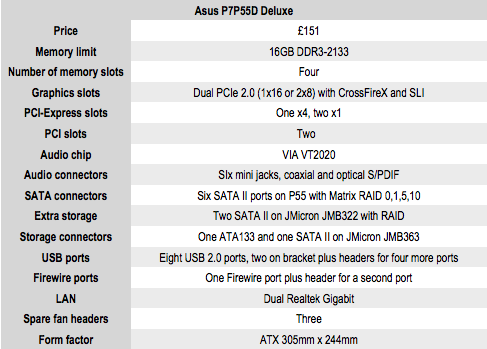
Asus P7P55D Deluxe
Latest Comments

Foxconn sockets

Something to bear in mind if you're planning on serious overclocking is that all of these mobos use Foxconn sockets - dodgy pin contact and risk of burning up your shiny new i7.

On the plus side, all of the new Gigabyte P55A boards use Lotes sockets. DFI are also going Lotes exclusively, and EVGA have said they'll replace anything that burns up. On the other hand, Asus have said socket burn is excluded under their warranty (and deny condoning overclocking). MSI boards are actually built by Foxconn, so no luck their either.

0
0

Bone to pick

What is it with every tech review site and their failure to include warranty data? Before I purchase anything, I want to see what faith the manufacturer places in its product. On that note, perhaps you would include a review of an EVGA board next time? (10 year warranty: putting their money where their mouths are)

0
0

ASUS seems to limp on chipset cooling

That Asus chipset cooler seems pretty marginal, which fits in with my experience. The last couple MBs had huge northbridge heatsinks and tiny southbridge ones, so the southbridge was like grabbing a lit lightbulb, where the northbridge & CPU were fine. I had to buy my own southbridge cooler.

I'll take the huge ugly heatpipe setups for 100, Bob!

0
0

RE: Cooling

Hi Leo

As if watercooling ever had anything to do with merit over expense/complication :-) Generally speaking it's put on there for bragging rights, a strive for absolute silence, overclocking beyond sane levels and a case of more money than sense!

When you're doing it properly, there can be no fans involved at all - external radiators (Zalman Reserator series), full heatsinks for CPU & GPU, so no residual airflow from graphics cards either.

Just waiting for this nutter's idea to become standardised - watercooled PSUs:

http://www.overclock.net/other-hardware-mods/59036-water-cooled-psu.html

Insurance claim just waiting to happen!

0
0

Intel DP55KG Bluetooth

I didn't mention Bluetooth on the Intel board for a nmber of reasons.

1) The word count on each review is very tight so I stuck to what I considered to be the highlights and I am baffled by the appeal of a wireless technology on a desktop PC. For the record the DP55KG also has infra-red.

2) The antenna for the Bluetooth radio is a horrid fiddly thing that clips into place and then attaches inside your PC case using double sided tape.

3) There are no dedicated Intel drivers for the Bluetooth and you rely on Microsoft for the installation. In my opinion this is never ideal.

4) The Bluetooth doesn't appear to work. Or at least my phone cannot see it which boils down to the same thing. as there is no software on the PC and no way to configure the device. The drivers simply say 'Bluetooth' so I have no idea whether it is working but not broadcasting publicly or broken or what. As the drivers are Microsoft I shall wait for Rev. 3 and see if it bursts into life.

0
0

More from The Register

New Lumia 925: This, loyalists, is the BIG ONE you've waited for
Nokia veep drills high-end master plan for El Reg
US boffin builds 32-way Raspberry Pi cluster
Beowulf cluster built for the price of a single PC
Review: HP Pavilion 14 Chromebook
All roads lead to Chrome?
Borked your iDevice? Pay EVEN MORE to have it fixed by Applecare
Or scream at their hapless techies on their forums
Euro PC shipments plummet into bottomless pit of DOOOOM
11th quarter of decline, 20pc drop on last year - Gartner
Report: AT&T dropping Facebook phone after dismal sales
Turns out folks won't buy that for a dollar
Nintendo throws flaming legal barrel at YouTubing fans
All your walk-through vid revenue are belong to us
Which petite model likes a fondle and GETTING WET? Sony's Xperia ZR
Take this new mobe swimming. Just not deep, or for long, OK?
Google adds Atari Easter Egg for Breakout's birthday
Cute game born in Jobsian heart of darkness