
Western Digital My Passport Essential portable HDD
Connector fail
Review We approve of the ongoing miniaturisation of external hard drives, but the process has its limits. Western Digital's latest My Passport Essential is among the smallest drives of its class, but WD's choice of a tiny connector could be the product's downfall.
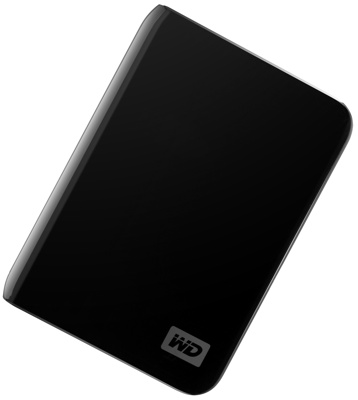
WD's My Passport Essential: quirky, asymmetrical notebook design
Available in capacities ranging from 250GB to 640GB - we tested the 500GB model - the new MPE is comes in a glossy 110 x 83 x 15mm casing offered in five different colours. It's just smaller than Samsung's wee S2 Portable and similarly bus powered.
The casing is curiously asymmetric, WD having applied the broad characteristics of its desktop My Book drive range to the smaller, portable offering. Three edges are flat, the fourth convex, giving it the look of a Moleskine notebook, though the WD is smaller. You can seen people carrying it cupped between fingers and palm.
The activity LED is located on the spine of the 'book'. But this volume isn't designed to be kept upright. The flat edges aren't sufficiently level to allow the MPE to stand on its end. Knowing this, WD has equipped the drive's base with four tiny rubber feet.
So if the MPE is supposed to lie flat, why not design it that way from the start, as LG did with its XD2? Essentially, it's taken the previous, more book-like My Passport design, whittled it down and added curves as if it's transforming the line from mini My Book to its own look. It should have gone the whole hog.
The MPE's single port is a micro USB slot. Now, we have our doubts about the mini USB ports when it comes to external hard drives because the connectors generally - there are exceptions - fit too loosely within the socket. However, they have the advantage of standardisation: the mini USB cable supplied with one product can be used with another.
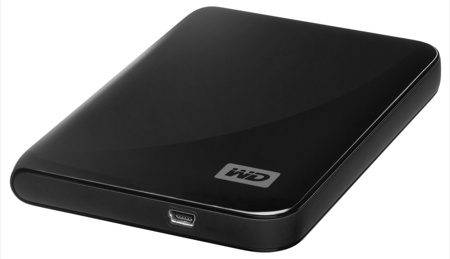
If only the connector was a mini USB port...
The WD drive has no such benefit and, worse, its socket and bundled cable conjoin even less snuggly than their mini USB siblings do. We'll go further: the two parts fit together so loosely that it doesn't take much of a tap to dislodge them far enough to disconnect the drive from a host computer.
COMMENTS
This is such a shame
I own one and it would be a great drive - but I have annoyingly bad, intermittant connections issues with the MicroUSB.
The really annoying thing is the original version I saw, and the reason I bought it was the cable was bult into the drive - not any more.
Now I have a full back with a dodgy unreliable connection - Grrrrr!
Just had a look at the software
Am looking for a simple to use backup device for a friend, so I decided to install WD Smartware. At first glance it looked like it was exactly what I was looking for, keeps multiple versions of files, continuous backup, etc. However I did notice the following issues:
Can't close the software once it's running. I had to kill WS*.exe from the Task Manager
Uses 100MB+ before I even plugged in a drive. I've written a .Net CRM system that uses far less than that.
Doesn't appear to let you choose which files to backup (I could be wrong, but I could find the option)
All new WD devices appear to have the software embedded in the firmware, so my previous comment about simply partitioning the disk may not hold. Be worth a try to use a linux box use fdisk, dd & mkfs to flatten the drive.
I think I'll stick with an older version, and find some kind of rsync app for Windows.
No micro here.
"Interestingly, WD's promo shots for the MPE show a mini USB port, suggesting a last-minute change"
I bought a 500 GB (Blue) drive last week (In Canada) and it has a mini USB port. I have not even used the cable that came in the box as I have a mini USB cable sitting on my desk both at home and work. The connector holds fine, I can't see it coming unplugged by mistake.
microusb
i have the 160gb previous essential model for 2 years.Never had a problem with the microusb port.are you exaggerating?
power draw, anyone?
I *do* wish that reviews for bus-powered devices such as these would include mention of the power draw. I don't want to buy one just to check - that's what reviews are for. And all the manufacturers omit this from their packaging and website info.
Some hosts (usually laptops) limit available power to the 500ma specified by the USB standard (I understand that's where the restriction is, but don't have a copy myself to check). So a drive needing, say, 600ma just doesn't work. The blurb on one vendor's package condescendingly mentions that a special cable is available (extra cost) for "those few machines that limit bus power"
Cobblers !!
So, Reg reviewers, when you get one of these to test, please PLEASE ask the supplier what the power demand is, and tell us. If they won't tell you then please PLEASE just try to start the thing using a 500ma-limited power supply. If it starts and comes ready just bare on that then it should be OK on an actual computer with power limits.
Thank you, and keep up the reviews.
