The Register® — Biting the hand that feeds IT

Feeds
65%
HTC Touch 2

HTC Touch 2 Windows Mobile 6.5 smartphone

Going too far back to basics?

  • print
  • alert

Review Windows Mobile 6.5 is now with us but its reception has been far from ecstatic. The general view is that Microsoft is playing catch-up and will have to do something spectacular with Windows Mobile 7, due to debut next year, if it's to really challenge its rivals.
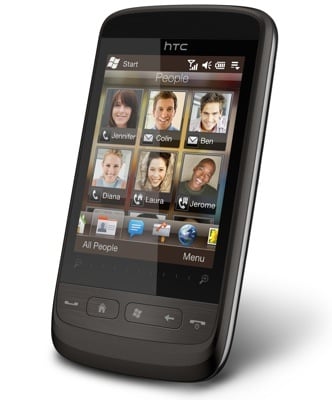
HTC Touch 2

HTC's Touch 2: aspiring to touchphone greatness

However, that hasn't stopped a flurry of new smartphones from gaining the updated OS. HTC has two handsets in the fray: the large screened HD 2 and the more svelte Touch 2. It's the latter we're looking at today, two-and-a-half years on from the launch of the original Touch.

The HD 2 marries Microsoft’s revamped OS with an updated version of HTC’s own TouchFlo user interface. It isn't always easy to tell where one begins and the other ends, though the new colour icons on the vibrant main screen’s horizontal shortcuts scrollbar are HTC’s, as is the six-person favourite contacts display. The main slide-to-unlock screen is Microsoft’s, as is the so-called ‘honeycomb’ applications menu.

From a user's perspective, though, who has implemented what is irrelevant. Ease of use is paramount, and the news here is mixed. For one thing, some functions are still duplicated: application shortcuts, for example.
HTC Touch 2 HTC Touch 2

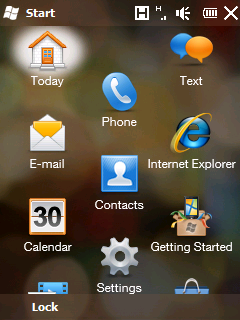
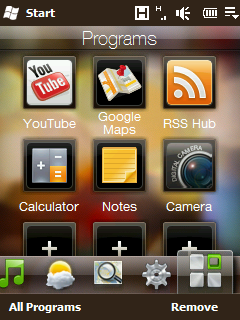
WM 6.5 provides one application list (left) and HTC's TouchFlo has another

HTC’s shortcuts bar on the main screen includes an applications icon. This displays a grid of apps that you can add programs to and arrange how you like, giving you easy access to the apps you use the most. Microsoft’s applications menu, which you’ll get when you press the Windows button or the Start button, is a single, vertically scrolling screen. The apps are in a different, non-customisable order, and we found four or five vertical swipes are necessary to get from top to bottom.

Latest Comments

and as I said before...

I have used WinMo from version 5 and it never unrecoverably crashed on me - and I am a tech user, I use pretty much everything on any phone.

I have never ever heard of a winmo phone doing a passable impression of a 130mm HEAT round and attempting to take a tweens leg off... nor have I run into one that wont let me change a battery, wont let me put on what I want or have the phone how I like.... enter the (jesus)phone... I have not touched the thing even in a shop and I wouldnt have one in the house.... I am as likely to date a police officer as I am likely to date anyone owning an iphone - even if they look like doutzen kroes .... cop or iNerk - is a deal killer.

I have flashed the 8500 I own from 5 to 6 to 6.1 - installed a totally new UI on it and it still is as solid as a rock. Same for the S710.

The Diamond I have is running Touch UI over a 6.5.1 rom and having recently looked into the calendar on there its miles ahead of what even 6.5 managed. I have one gripe alone and thats that you have to use the stylus to get to the numberpad, but since thats only one gripe and something I dont often use I dont really care...

WinMo still has eminantly more software available for it than the jesus-why phone. Not to mention that you can find something that does pretty much anything you want for free ... yeah ... you know, the part where you paid £50 for a handset (BNIB) as against £900, and then got lots of nice new snuggly software for it for nothing... zero... you know, the figure thats the same as the chances of Claudia Black and Nick Griffin getting down and dirty...

I said it before and I will say it again. If you cant do a fair and decent analysis of a device and actually give us a decent idea of what it can and cant do - and give us information on how it will do things with want with a little tweaking (after all, this is a tech-savvy readership one would hope) then stick to americans doing interesting things with stick shift F150's (its amazing what will fit...) and waaaay to much moonshine..

0
0

@ Jack Garnham

Thanks for the advice on the fingerkeyboard. Works a treat. Cheers :-)

0
0

@ Jack Garnham

Er, whut? I was the AC (not sure why i clicked the box though)

i can only assume that you were attacked by the most abrupt case of tl;dr ever as my comment was aimed at Zish who seemed to think this phone was 450 quid - obviously the rebuttal from Reg featured a link to the phone at the suggested price, it wouldn't be a very good rebuttal otherwise.

This is what I believe the original complainant was looking at:

http://www.dabs.com/products/htc-touch-pro-2-wi-fi-gps-674D.html

0
0

@Jemma

The age-old stylus type interface parts of WinMo (Calendar screen etc) are justifiably criticised. It shouldn't be that crap out of the box. That screen is the same as the one on my old HP ipaq circa 2002 - that's shite!

"Firstly its alot more powerful and most of the time stable than that horrible piece of junk known as the jesusphone... it sells because it works"

Surely you're mixing up the two systems no? It's taken MS a bloody long time to get WinMo to this state and it's still requiring a stylus?

The reason MS will be left behind in this market is because of their attitude that shows through here - take the turd and slightly polish it for the next version and hope your fanboys continue to laud it. There's a damn good reason the iphone (much as I hate it's tap-slide wielding drones) sells so well - the interface is a comparative dream.

0
0

Various...

@AC, 22:14, 21/10/09:

"Any tips on a better onscreen keyboard?"

Try FingerKeyboard 2.1 over at [shamelessplug] www.xda-developers.com [/shamelessplug]

@AC, 20:53, 21/10/09:

"I assume that you are, in fact, looking at a Touch PRO 2, you dingbat."

No... the link clearly shows a Touch2 at the stated price, dingbat.

@JeeBee

"That also means that they can port TouchFlo to Android when it becomes viable to do so."

TouchFlo, or Sense as it is also known, is already on HTC's Android devices. Notably the Hero and Tattoo.

@ Jerome 0

"...it's worth noting that we used to manage to change orientation on our devices using a clever invention known as a "button".

AFAIK, the screen orientation option hasn't been removed from WM6.5. In the Cooked 6.5 ROM I'm using on the Touch HD, Rotate Screen is selectable from the button mappings settings page. It's not available in the "Screen" settings page, but that can be changed with a registry tweak.

With that done, I'll still stick with Android for the Touch HD - which is well on the way to being day-to-day usaeable now!

0
0

More from The Register

New Lumia 925: This, loyalists, is the BIG ONE you've waited for
Nokia veep drills high-end master plan for El Reg
US boffin builds 32-way Raspberry Pi cluster
Beowulf cluster built for the price of a single PC
Review: HP Pavilion 14 Chromebook
All roads lead to Chrome?
Borked your iDevice? Pay EVEN MORE to have it fixed by Applecare
Or scream at their hapless techies on their forums
Euro PC shipments plummet into bottomless pit of DOOOOM
11th quarter of decline, 20pc drop on last year - Gartner
Report: AT&T dropping Facebook phone after dismal sales
Turns out folks won't buy that for a dollar
Nintendo throws flaming legal barrel at YouTubing fans
All your walk-through vid revenue are belong to us
Which petite model likes a fondle and GETTING WET? Sony's Xperia ZR
Take this new mobe swimming. Just not deep, or for long, OK?
Google adds Atari Easter Egg for Breakout's birthday
Cute game born in Jobsian heart of darkness