


This article is more than 1 year old
Oki MB290
Versatile all-in-one for the cost conscious

Review First a confession: we have always been troubled by the concept of black-and-white multifunctional devices (MFDs). Being able to scan in colour but print only in mono seems rather like being given a punnet of strawberries that you are only allowed to smell. However, Oki clearly feels there continues to be demand for this level of product and, given the company’s long history in the MFD market, we were willing to be won over by its new MB290.
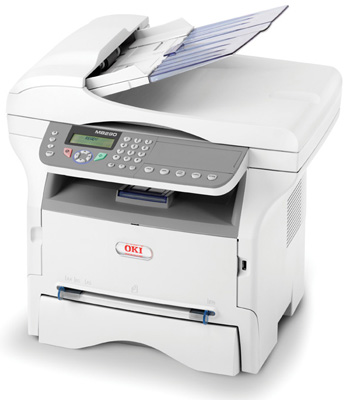
Oki’s MB290: mono printing keeps it compact compared to colour equivalents
It is, after all, a proper MFD that provides extensive multi-user fax features in addition to scanning, 20ppm LED printing and copying. It also has a network port for workgroup use, a built-in web-based management utility and an automatic document feeder (ADF) as standard. Even without the luxury of colour printing, that’s not bad for £210. Despite the large overall dimensions of 412x447x386mm, the MB290 is a compact device with a relatively small footprint and weighing just 13kg.
A single 250-sheet paper cassette is loaded into the front at the base of the unit. Although the front of the cassette sits flush with the front of the machine, the rear end of the cassette sticks out a few centimetres at the back – uncovered and steadily collecting dust. There is no paper level indicator. Above the paper cassette is a single-sheet manual feeder slot with smooth-sliding width guides. Envelopes pass through unfettered and without wrinkling.
The large hinged opening at the front of the MB290 is a door to the internal workings of the printer. The toner and drum are designed as a single unit, and this is quick and easy to remove and replace, with absolutely no clips or locks to worry about. A high-capacity print cartridge for the MB290, costing £126, is good for 5,500 pages. This works out at about 2.3p per page, not including the cost of the paper.
A 50-sheet output tray sits on the top of the main body of the unit, with the scanning apparatus above it. The latter provides a full A4 glass flatbed, while its lid incorporates an ADF that can be loaded with up to 50 single-sided sheets.
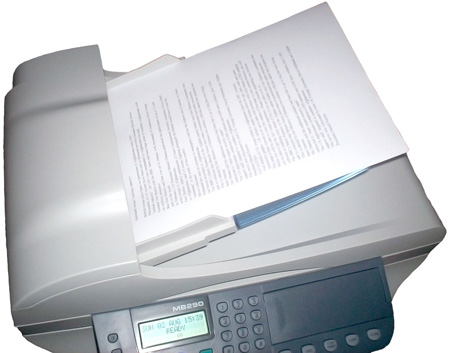
Solid sender: The ADF feels robust and has an impressive 50 sheet maximum capacity
USB 2.0 and 10/100 Ethernet ports are provided as standard for connecting to your computer or network, along with a socket for your fax line and a ‘thru’ socket to connect an optional phone handset of your own. You can upgrade the device for Wi-Fi connectivity by buying an optional LAN USB key for £30.
 Biting the hand that feeds IT

