


This article is more than 1 year old
Samsung R720 17.3in notebook
Keenly priced Pentium powered desktop replacement, anyone?

Review If you caught our review of the Samsung R522, the R720 will look more than a little similar. As the name implies, though, it has a larger 17.3in display, with a glossy coating and native resolution of 1600 x 900. Naturally, this makes the chassis a fair bit bigger at 441mm wide, 273mm deep and, at its thickest point, 40mm tall. Nevertheless, it's one of the lighter 17in laptops on the market, weighing in at 2.9kg.
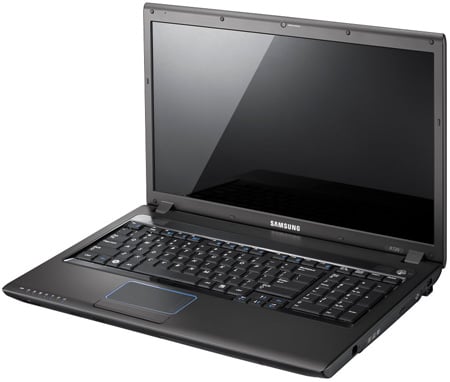
Samsung R720: the R522's bigger brother
The keyboard houses exactly the same style of keys as the R522 but, thanks to the larger chassis, Samsung has also found room for a numeric keypad. The trackpad, with its fancy blue-lit rim, has also been stretched to match the widescreen display. Unlike on the R522, though, Samsung has shrunk the arrow keys to half-height, which makes them a little fiddly.
One area of concern is the keys. When we first received our review sample they all had a very slight, but noticeable texture. However, it didn't take long for the more frequently used keys (such as E, S and A) to lose their texture and develop shiny spots. This isn't exactly uncommon when it comes to laptop keyboards, but the rate at which certain keys started showing bald patches was worrying. We're also left wondering what state they would be in after a year, or even just a few months of heavy typing.
An upside of a larger chassis is more room for the components to breathe. We noted that the R522 got a fairly warm during use, but thankfully the R720 suffers no such problem and only very rarely required the fan to ramp up to an audible level.
As far as ports go, everything is laid out exactly as on the R522. Gigabit Lan, two USB, eSATA, audio, ExpressCard and both HDMI- and VGA-out on the left, while the DVD writer and a further two USB ports sit on the right.
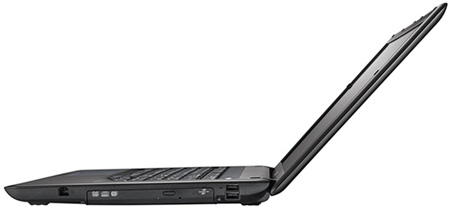
No change from the R522 in terms of ports
Things have changed on the inside, though. It still has 4GB of DDR2 memory, but whereas the R522 was powered by an Intel Core 2 Duo T6400, this R720 has to make do with a Pentium Dual Core T4300. Considered a budget CPU, the T4300 runs at 2.1GHz and features just 1MB of L2 cache – Core 2 Duos have at least 2MB, while higher-end versions get 6MB of L2 cache to call on. We’ll show you what impact this Pentium Dual Core has on performance in a moment.
 Biting the hand that feeds IT

