


This article is more than 1 year old
LG GD910 Watch Phone
Worth the wrist?

Review Smartphones we are familiar with. Watches too. But combining the two is quite rare. Sure, there are sports watches that can collect information about training sessions and share it with a computer. Those with longer memories will recall things like Casio’s data bank watches with their weeny keyboards, and there was the Palm OS watch from US timepiece specialist Fossil. Yet, LG’s GD910 Watch Phone is certainly the most sophisticated offering we've seen in the wristwear department.
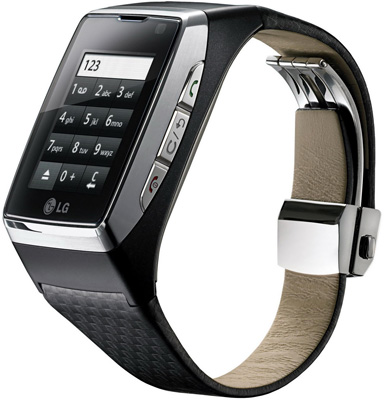
Off the cuff: LG's GD910 Watch Phone
Indeed, this is definitely more phone than watch. With its touchscreen, Bluetooth, HSDPA, 80MB of internal memory and a camera for two way video calls, it certainly gives a good initial impression. The real questions are: is it usable, and would anyone really want to spend £500 on one?
Before we get to the detail of features, it is worth taking a look at the design. First thing of note: this is one big watch with a 1.4in screen. There’s a fair amount of unused space around its edges, so that the front fascia of the watch measures 39mm wide and 49mm tall. It’s also 13.8mm thick – quite a chunk to have on a wrist. Moreover, our GD910 weighed in at 90g. If you are used to wearing something svelte, you’re certainly going to notice it bulk and weight.
The general look is impressive. Build quality is good, the strap is robust faux leather with a sliding adjuster, so you can ensure a snug fit. The right, side-mounted Call, Back/Clear and End/main power buttons are well made and solid. Sure, you might scratch the screen, but in general the watch, er, phone, er, watch phone feels like it will take some knocks.
The Sim card fits into a slot under a cover on the back of the phone – just use a coin to twist the plate off. The battery is more internal, and is charged by putting the GD910 into a large side-hinged clamp that plugs into the mains. The charging mechanism is ungainly and bulky to carry about. Also, you get a Bluetooth headset and a splitter for the charger letting you charge both it and the GD910 at the same time. Alas, more cables to carry, more ungainly wires, but useful nonetheless.
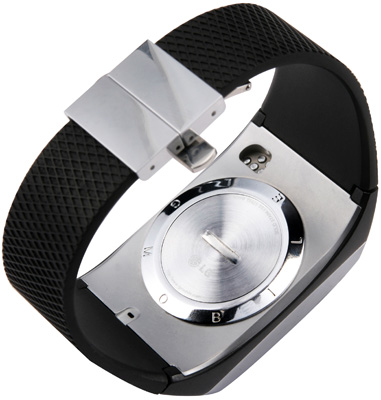
Back plate conceals Sim card slot
You connect the GD910 to a PC using a USB cable and, again, you need to bring that charging clamp into operation. There are no connectors on the GD910 itself, and the clamp provides a cabled link. LG’s PC Suite software allows you to backup and restore the GD910, synchronise contacts, synchronise messages, and use USB mass storage mode to copy files across to the 80MB of memory.
 Biting the hand that feeds IT

